
Avid Subscription Renewal Software Activation Instructions
Renew your plan
Registering Avid product(s) is an easy, one step process. Open the Software Activation Instructions email from your Sweetwater Sales Engineer and find the Activation/Download Code (e.g. FE 260-999E9001L-5BE47R9N). Once you have your code handy, follow these steps to submit it to Avid. Student and Teacher versions must also verify their academic eligibility.
- Go to the My Products and Subscriptions page of your Avid Master Account.
- Locate the expired Avid product license you wish to renew.
- Student and Teacher versions must also verify their academic eligibility.
- Click Have a product code from a reseller? copy and paste the product code you received from your Sweetwater Sales Engineer, then click Redeem product code to renew.
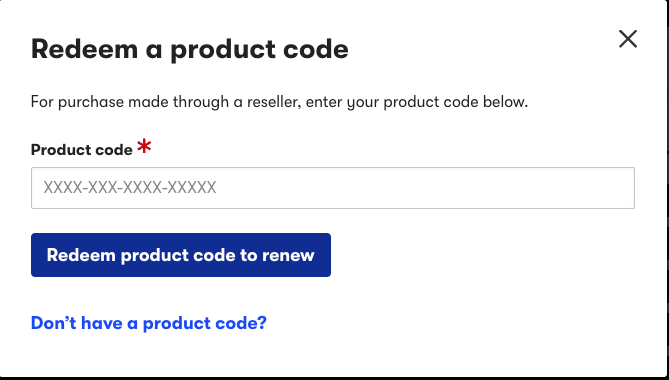
Enter the upgrade code into the blank Upgrade Code field.
Academic Eligibility
Student and teacher versions of Pro Tools must be verified by Proxi.id before you can use your Pro Tools software. Once you’ve activated your software on Avid’s website, you will be prompted to enter your school credentials.
When Proxi. id has verified your eligibility, you will gain automatic access to your Pro Tools software. Follow the renewal instructions if you purchased a student/teacher subscription renewal. Learn more about this topic on Avid’s eligibility page and eligibility FAQs. Once you’ve registered the new code, continue to authorize the iLok license.
- Register your Activation Code with Avid (above).
- When you have registered your Activation Code, you will be redirected to Proxi.id for eligibility verification.
- When prompted, click Start to begin the verification process.
- Enter the institution’s name and click on it once it appears.
- You will then be redirected to your institution’s SSO and prompted to enter your academic credentials. Once logged in, your educational license will then be validated.
- If you cannot find your institution as outlined in step four, if you have forgotten your institution-issued email address, or if you do not yet have an institution-issued email, please follow the instructions below.
If your institution doesn’t appear
IMPORTANT: You must enter the Proxi.id code within seven days! If you do not, you must repeat the following process again. You must submit proof of identification if the email domain does not exist.
If your institution doesn’t appear in the search, Proxi.id will send you a verification you must enter to proceed.
- When you’ve been redirected to Proxi.id (as outlined in step two above), click Can’t find your institution?, enter your academic email address, and then click Submit. You will then receive an email from Proxi.id with a verification code.
- Copy and paste the code you received, click Submit, then follow step five above to complete the validation process.
If your institution-issued email domain doesn’t exist or if you do not have an institution-issued email address
IMPORTANT: The verification will be processed in 24–48 hours (about two days).
If you are a new student/teacher and do not currently have institution-issued email credentials, or if the email domain does not exist, you must submit proof of eligibility.
- When you’ve been redirected to Proxi.id (as outlined in step two above), click Can’t find your institution?, then click click here to submit proof.
- Complete the eligibility form and make sure to enter your academic email address. If required, upload clear copies of any additional documentation (JPEG and PDF only!).
- Once the verification has been processed, you will receive an email from Proxy.id containing a verification code, along with a link to the verification page.
- After entering the verification code, you will be redirected to your institution’s SSO and prompted to enter your academic credentials. Once logged in, your educational license will be validated.
When you need help, Sweetwater has the answers!
Our knowledge base contains over 28,000 expertly written tech articles that will give you answers and help you get the most out of your gear. Our pro musicians and gear experts update content daily to keep you informed and on your way. Best of all, it’s totally FREE, and it’s just another reason that you get more at Sweetwater.com.

