

Adding a third-party KONTAKT instrument with Native Kontrol Standard support to your Native Instruments Komplete Kontrol library.
Important note: for the procedure described below to work, the third-party KONTAKT Instrument you wish to add to KOMPLETE KONTROL’s Library must be NKS-ready. Please check this page to see which third-party content is already NKS-ready among our main industry partners. For smaller third-party KONTAKT Instruments developers, please visit directly their website to obtain more information.KOMPLETE KONTROL 1.5 introduces the support of third-party content via the Native Kontrol Standard (NKS) software instrument format.
NKS instruments are automatically added to your Library when you start KOMPLETE KONTROL for the first time after installing the instrument. Third-party KONTAKT Instruments with NKS support are an exception to this rule: you must add these KONTAKT instruments to your Browser manually.
To add a KONTAKT instrument with NKS support to your KOMPLETE KONTROL Library, you must simply drag the instrument folder onto the KOMPLETE KONTROL Browser. In the example below, we are adding the KONTAKT instrument Archetype to KOMPLETE KONTROL’s Browser. After dragging it to the Browser, the KONTAKT instrument will be available in the Library pane of the Browser.
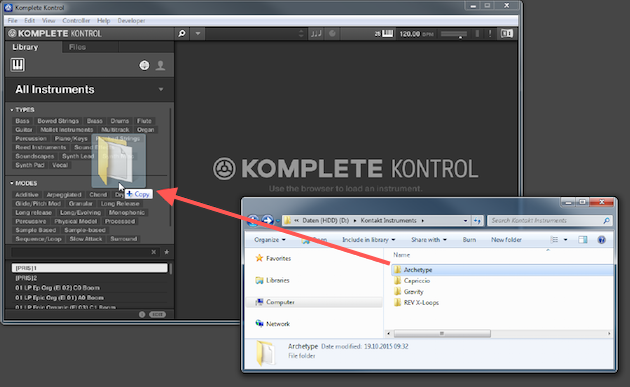
Note: this procedure does not move the KONTAKT instrument’s folder on your hard drive. After having added the KONTAKT instrument to KOMPLETE KONTROL, please do not move the instrument’s folder, or else you will not be able to load the instrument in KOMPLETE KONTROL.
When you need help, Sweetwater has the answers!
Our knowledge base contains over 28,000 expertly written tech articles that will give you answers and help you get the most out of your gear. Our pro musicians and gear experts update content daily to keep you informed and on your way. Best of all, it’s totally FREE, and it’s just another reason that you get more at Sweetwater.com.

