You’ve been woodshedding for what seems like forever. You’ve written a multitude of songs. You’re feeling inspired and you want to create and produce your own music. So, where do you start? After all, audio production is a complicated process. There is a myriad of tiny steps involved that can seem intimidating to the uninitiated. That said, it can be broken down into three primary phases: tracking, mixing, and mastering.
- Tracking (the technical term for recording) involves capturing sound into your DAW.
- Mixing involves adjusting and combining individual tracks into a stereo or multichannel format, a.k.a. the mix.
- Mastering involves processing your mix into its final form so that it’s ready for distribution, which may include transitioning and sequencing the songs.
Tracking is pretty straightforward, but the line between mixing and mastering frequently becomes blurred. In this article, we’re going to clarify that line.
What Is Mixing?
After you’ve finished recording your individual tracks, your project is ready to be mixed. While every mix engineer’s workflow is different, a smart first step is to organize your tracks. Start by giving each track an informative name. “Ld Vox” makes a lot more sense than something like “audio_track_14.wav.” Instantiate gain plug-ins on each track to ensure that they’re not too loud, not too soft, and about the same volume. Use your DAW’s faders to roughly approximate levels for each track. Then, pan each track to create a balanced soundstage, while also giving each element its own spatial location. Done? Congratulations! You’ve now created what is known as a rough mix.
Next, apply highpass filters, lowpass filters, and EQ to the tracks to carve out space for each element and to establish a tonally balanced mix. This game of sonic Tetris ensures that every track can be heard and that there’s an appropriate distribution of energy across the audio spectrum when the tracks are played together. Compressors are employed to manipulate and contain each track’s dynamic range. Additional EQ and compression, as well as reverb, delay, modulation, saturation, and other creative effects are also applied to each track (and can also be applied to the entire mix, depending on your taste and preferences).
Throughout the mixing process, you’ll be editing, adjusting pitch and time, manipulating fades, tweaking track levels, and applying automation when you want your adjustments to occur in real time during playback. It’s important that your mix sounds equally great on a wide range of playback systems, otherwise it’ll sound like gold in your studio but like nails on a chalkboard everywhere else. That’s why it’s important to audition your mix on headphones, earbuds, and alternate speakers (your car works great for this).
When you’ve got everything sounding the way you want, you’re officially finished with your mix.
Recommended Mixing Software:

FabFilter Pro-Q 3 EQ and filter plug-in

Waves Renaissance Maxx plug-in bundle
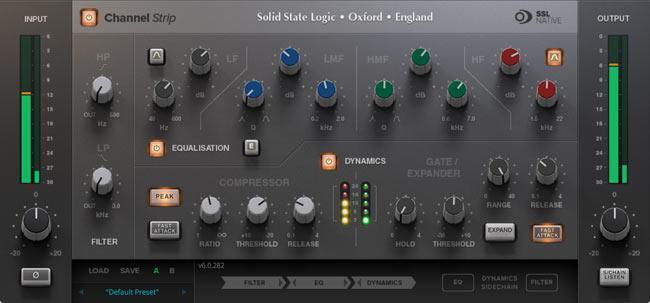
Solid State Logic SSL Native Essentials plug-in bundle

iZotope Neutron 3 Standard mixing suite
What Is Mastering?
When your mix is finished, that’s the time to shift gears into mastering — the final process that your music undergoes before distribution. Its primary aim is to polish your mix to its finest presentation and prepare it for distribution on CD, vinyl, or the internet. During mastering, you use linear-phase EQs, compressors, brickwall limiters, and vibe-enhancing effects like character EQs, stereo wideners, and tape saturation to give your mix a radio-friendly sound. Sufficient metering is also vital. Mastering is all about subtlety. If your mix needs to be drastically transformed to make it sound right, you should probably go back to the mixing stage and figure out what went wrong. Mastering shouldn’t be about fixing a bad mix — rather, it should enhance a good mix!
Many engineers like to put mastering effects or processing on their 2-bus while they’re mixing. This is a legitimate way to work, but it’s not mastering. Mastering is a separate process with a completely different end goal from mixing. When you use 2-bus processing while mixing, it’s not a separate process; rather, it’s simply mixing with extra plug-ins on your 2-bus.
Aside from providing sonic sweetening, mastering is the stage where an album is assembled — putting the songs in the desired order. Adjust the volume of each individual song to achieve a cohesive flow. Add spacing and fades to the beginnings and endings of the songs — two seconds is the standard (but not mandatory). Finally, label song names, add UPC/EAN codes, CD Text, and ISRCs.
We usually recommend that you wait for a while after your mix is finished before starting the mastering process — as long as possible. This helps you to regain the perspective and objectivity you’ve undoubtedly lost while you were slaving over your mix. Having somebody else master your mix is an even better idea. Even if the person mastering your mix is at the same skill level as you, having that second set of ears is invaluable. That said, we’d never tell you not to master your own music!
Want to learn more about mastering? The topic is explored in more detail here.
Recommended Mastering Software:

Steinberg WaveLab Elements 10 mastering software

FabFilter Pro-L 2 brickwall limiter plug-in

iZotope Ozone 9 Standard mastering suite

iZotope Insight 2 Essential metering suite
6 Important Differences Between Mixing and Mastering
- Mixing creates a balance between individual elements. It transforms them into a cohesive whole. Mastering takes that whole and gives it a final polish. Consequently, you can create a mix without mastering it, but you can’t master a recording without mixing it first.
- Mixing gives you access to every instrument in a song. Need more lead vocal? No problem. While mastering, you only have access to the final mix. This makes altering the balance between individual elements much more difficult.
- At both the mixing and mastering stages, you’re striving to achieve balance. The difference is that during mixing you’re balancing individual instruments. During mastering, you’re balancing complete songs and spectral content. Simply put, mixing makes instruments sound good together; mastering makes songs sound good together.
- Mixing sessions can be huge. A simple rock or pop arrangement can easily contain 32+ tracks, while complex projects can have track counts in the hundreds. Mastering sessions, on the other hand, typically consist of one stereo or multitrack file per song, or possibly multiple stems.
- While mixing, you make lots of adjustments — some quite heavy-handed — to each track. After all, your tweaks only affect that particular element. Mastering is the complete opposite — it uses subtle broad strokes that affect the entire song.
- The mixing process is about enhancing the artist’s vision, making sure that the original emotional intent is conveyed. Mastering, on the other hand, is focused on sound quality. It ensures that the song sounds just as good (or better) than everybody else’s.
In Conclusion
Both mixing and mastering are complex subjects — in fact, there are entire books devoted to each one! This article is intended as a primer for beginners. If you want to learn more about how to mix or master your music, give your Sales Engineer a call at (800) 222-4700. They will be happy to share their knowledge with you, offer informed gear recommendations, and get you on the road to success!