Multiband compression originated for radio back in the early 1970s, by splitting the audio into two bands that fed two compressors so each compressor was optimized for its specific band. These days we have plug-ins that offer even more bands of compression, such as Waves 6-band C6. Multiband compression is frequently used for stereo mix and master processing, but it’s less common in live applications. It can be a real lifesaver for live sound mixers though in ways you may not have tried.
As a Pop Filter
If you have a singer who is notorious for popping the mic with plosives (big blasts of air from “B” and “P” sounds), set a compression band that affects only frequencies below the vocal range. Set the low-frequency crossover between 90Hz and 250Hz, with a 1–5ms attack and 50–80ms release, and adjust the threshold to only catch plosives.


As a Way to Smooth Out Edgy Singers
If you’ve ever worked with a singer who has an edgy, midrange-focused voice that gets harsher as they sing louder, you know how hard that is to mix. You can pull back the upper midrange, but that makes their voice sound muffled when they are in their lower range. The fix for this is compressing in the 1–4.5kHz range and adjusting it to start working when the singer really starts pushing. The compressor can pull 4–10dB out of just that band, without losing the lower mids that help round out their tone.
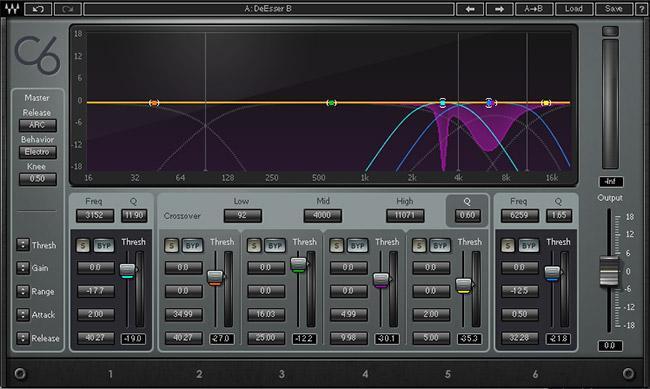
As a De-esser
A de-esser is a frequency-specific limiter designed to focus on the band of spectral energy where “S” frequencies reside, usually in the 4–10kHz range. By setting a mid-frequency compression band and adjusting the threshold, you can duck the sibilance. Set the attack time as fast as possible and the release time to 20–30ms to duck only the sibilant consonant.
As a Way to Enhance a Bass Singer
By tapering the low end — selecting the bass frequency range below 160Hz, and tastefully compressing it to keep it under control — you can turn the gain up in that range and boost their resonance while keeping their presence and fullness in the mix.