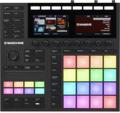
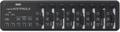
Back in the days of analog synths, tweaking was simple: for every parameter, there was a physical control. With the advent of digital synthesizers, matters became more complex, because they could have so many more parameters. Since hardware is the most expensive part of a synthesizer, we ended up with menu-driven user interfaces that, while flexible, were rarely user-friendly.
Virtual synthesizers were an improvement, because now the entire synthesizer lived in software, and its controls could take up an entire computer screen — or even multiple pages of computer screens. Once again, it was possible to have a control (albeit a virtual one) for every parameter. However, the tradeoff compared to hardware synthesizers was a lack of tactile control.
Of course, we’re musicians and we like tactile control! Controller keyboards started appearing with faders, sliders, and switches you could dedicate to controlling on-screen parameters. Features like “MIDI learn,” where you could link a controller to a parameter on the fly, were incredibly useful. But aside from a few semi-standardized parameters — like sustain pedal, footpedal, (arguably) filter cutoff, modulation, and some others — hardware control was somewhat chaotic. You couldn’t always remember what “fader 12” controlled in different instruments, and with rare exceptions, there wasn’t any visual feedback on the control surface itself. The bottom line was if you wanted to control a specific synthesizer or effects parameter, a lot of times it was easier just to give up on tactile control and click on the screen with a mouse to make the desired changes.
Komplete Kontrol Keyboards
Native Instruments saw a unique opportunity, because they had branched out from being a software-only company specializing in virtual instruments and effects to producing hardware, like Maschine and their Komplete Kontrol keyboards (fig. 1).

Figure 1: Among other features, Light Guide is extremely helpful with any instruments that use keyswitching or keymapping.
So they started linking their keyboards and instruments. For example, the Kontakt sampler provides keyswitching on some sounds. The Komplete Kontrol keyboard’s Light Guide feature can light different-colored lights above the keys, so the keys dedicated to keyswitching are easy to find — no more “counting the octaves” to find which keys controlled which parameters. (You can turn off the lights if you find them distracting, but I find them very helpful.)
Before getting further into NKS (Native Kontrol System), let’s review the Komplete Kontrol line of keyboard controllers, which have evolved to second-generation versions. The S series keyboards (S49, S61, and S88, with the number indicating the number of keys) are controller-rich, with of course the usual mod/pitch wheels, but also eight touch-sensitive rotary controls, eight buttons, navigation buttons and dials, and even a ribbon controller. They also include two large, helpful hi-res color displays (fig. 2) that go way beyond those 2-line, 16-character LCDs that got us through the ’80s.

Figure 2: The displays in the Komplete Kontrol S series keyboards are crisp and informative.
The semi-weighted Fatar keybed has a responsive action as well as aftertouch, and overall, whether you are interested in NKS or not, these are excellent controllers.
The new A series keyboards (A25, A49, A61) forego the dual displays, Light Guide, and some other features to cut costs but still support the NKS features set, including
- Eight touch-sensitive, pre-mapped knobs to control NKS plug-ins, browsing, and support for Maschine and selected DAWs
- Smart Play features (one-finger chords, arpeggiation, etc.)
- Bus power
Enter the Native Kontrol System (NKS)
Introduced in 2015, NKS was originally all about Native Instruments’ virtual instruments. Now with NKS 2.0, effects are part of the spec, along with significant third-party effects support. Taking full advantage of NKS requires suitable hardware (Komplete Kontrol keyboards or Maschine hardware) and the Komplete Kontrol virtual instrument, which can work either as a plug-in or standalone. Komplete Kontrol doesn’t make sound itself but is a sort of “user interface wrapper” for all your NKS-compatible instruments and effects, whether made by NI or not. Once you open Komplete Kontrol (fig. 3), you can browse a database of sounds, audition them with audio previews, and call up presets in virtual instruments and effects. After selecting what you want to edit, you can then use the keyboard’s control elements to tweak the sounds. The goal is faster, more hands-on virtual instrument control.
However, NI hardware is not absolutely essential to gain some of the benefits of NKS if you own Komplete 9 through 12 — the software alone provides the NKS browsing features, as well as Smart Play features (one-finger chords, arpeggiation, constrain to scales, and the like).
This may sound a bit like NI’s earlier Kore system, but there are some significant differences. Kore lacked the kind of display that could make tweaking more user-friendly. It was also an audio interface, and user requirements for audio interfaces are too diverse to be accommodated in a single, desktop box. Furthermore, Native Instruments has become a music software powerhouse, with far more resources than were available for Kore. Finally, heavy hitters like Waves, Arturia, Eventide, and others support the NKS standard; it’s not just a protocol that lives in the world of Native Instruments. So far, around 75 manufacturers have tweaked their virtual instruments and effects for NKS (fig. 3).

Figure 3: Komplete Kontrol is being hosted in PreSonus Studio One 4 and loading Waves plug-ins. Note this is the same roster of plug-ins shown on the keyboard displays in figure 2.
NKS is most useful when you want to dial up different instrument sounds quickly in the studio (or live), add effects, and do some tweaks. You’re not constantly loading and unloading instrument and effects plug-ins — just scrolling through them and calling up presets. There are also multiple ways to browse — start with an instrument like Kontakt and see what’s available, or start with an instrument category like bass, and see what bass presets are available in what instruments. Or narrow your search based on the Mode, like whether a preset is long and evolving, sample-based, and the like. You can combine search criteria to narrow your choices down even further.
The ability to preview sounds is also helpful (although it requires about 8GB of hard disk space, via a download from Native Access). Note that the plug-in developer chooses which parameters are editable; it could be a handful for an effect, or over a hundred for a virtual instrument. If you need detailed editing over more parameters than the manufacturer exposes to the controller, the instrument’s UI opens up on your computer screen within the Komplete Kontrol plug-in (fig. 4).
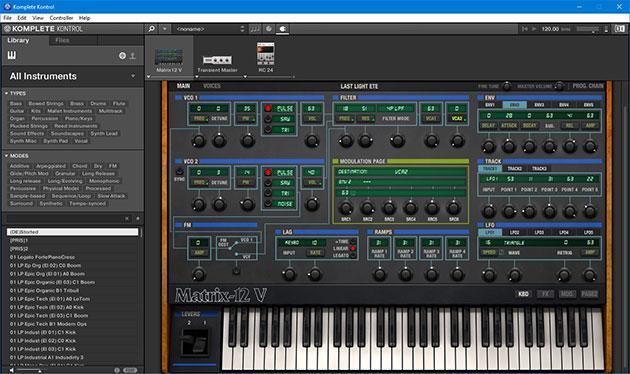
Figure 4: Komplete Kontrol in standalone mode, running Arturia’s Matrix 12 V, along with NI’s Transient Master and RC 24 effects. Note the browser on the left side of the screen.
As to controlling effects, so far this is only for effects that follow a virtual synthesizer — for example, you can’t load Komplete Kontrol on an audio-only track’s insert and call up that track’s effects. However, in addition to being able to edit parameters, you can move effects around in a series chain and bypass individual effects. Given that it’s common to add effects after instruments to further tailor the sound, being able to edit these greatly extends what NKS can do. (Note that currently, you can record automation for virtual instruments, but not for effects. NI is looking into this for a future update.)
More Than Instruments and Effects

NKS also provides deeper integration with selected virtual studio software, like control over transport buttons, track navigation, mixer controls, enable/disable functionality, etc. For now, NKS supports recent versions of Cubase, Nuendo, Maschine, GarageBand, Logic, and Live (which requires a somewhat more complex setup compared to the others). There’s no Mackie Control functionality for non-supported DAWs, which at the moment include Pro Tools, Studio One, Samplitude, and Reason. Personally, I see features like transport control as a helpful addition more than something essential; the virtual instrument and effects control are the most important aspect of NKS. If needed, you can always pick up something like a Korg nanoKONTROL2 to handle transport, faders, pan, and solo/mute buttons.
Regardless, for those who live within the Native Instruments ecosystem or use NKS-compatible plug-ins from other companies, NKS represents a major advancement in terms of making editing faster, more accessible, and frankly, more fun. Just being able to scroll through instruments and effects (as well as preview sounds) speeds up workflow, but add in the controller options presented by the Komplete Kontrol keyboards, and your setup becomes far more friendly to hands-on kontrol. I mean, control.
In the past, it took work to get controllers working more or less seamlessly — and you had to remember what mapped to what, how the assignments and mappings varied for different synthesizers, and so on. This often diluted the efficiency of using a controller, but Komplete Kontrol is all about removing those kinds of barriers.
Perhaps what’s most encouraging is that NKS has been available for virtual instruments since 2015, but it continues to evolve. Opening up NKS to competing plug-in manufacturers is significant, and I can’t help but wonder if that’s a precursor to opening up the spec to other controller manufacturers. At that point, it would become unstoppable as an industry standard. In any event, the continued evolution shows that NI is committed to the concept of NKS — as well as the goal of not letting a mouse get between you and your creativity.