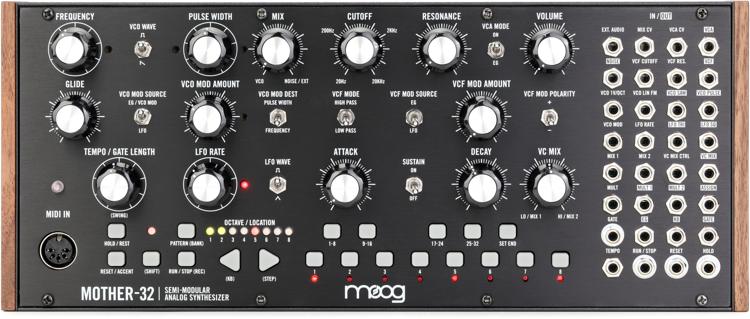
Although I’ve been playing with modular synthesizers since 1980 (my first was a Moog System 55 at Northern Illinois University) and have owned many varieties of analog and digital synthesizers in the past 40 years, I had never personally owned a modular or Eurorack synthesizer until I got a Moog Mother-32. I simply couldn’t resist the classic Moog sound and patching possibilities offered in a compact box with a compact price. (I now own three of them!)
But even with my years of experience, there is something new to discover about the Mother-32 every time I power it on. So we thought it would be incredibly useful to offer our customers a series of patching examples that would take them from the simplest ideas all the way to complex patches that use up all the cables. We even shot videos for each of the patch charts so you can watch the patching and hear the results.
The first four of the patch charts were drawn up by Moog. To show some expanded possibilities, I created a variation or two for each of those patch charts and then came up with four more original patches that each show interesting aspects of the Mother-32.
After reproducing each patch (and their variations), feel free to turn every knob and throw every switch to create your own variations.
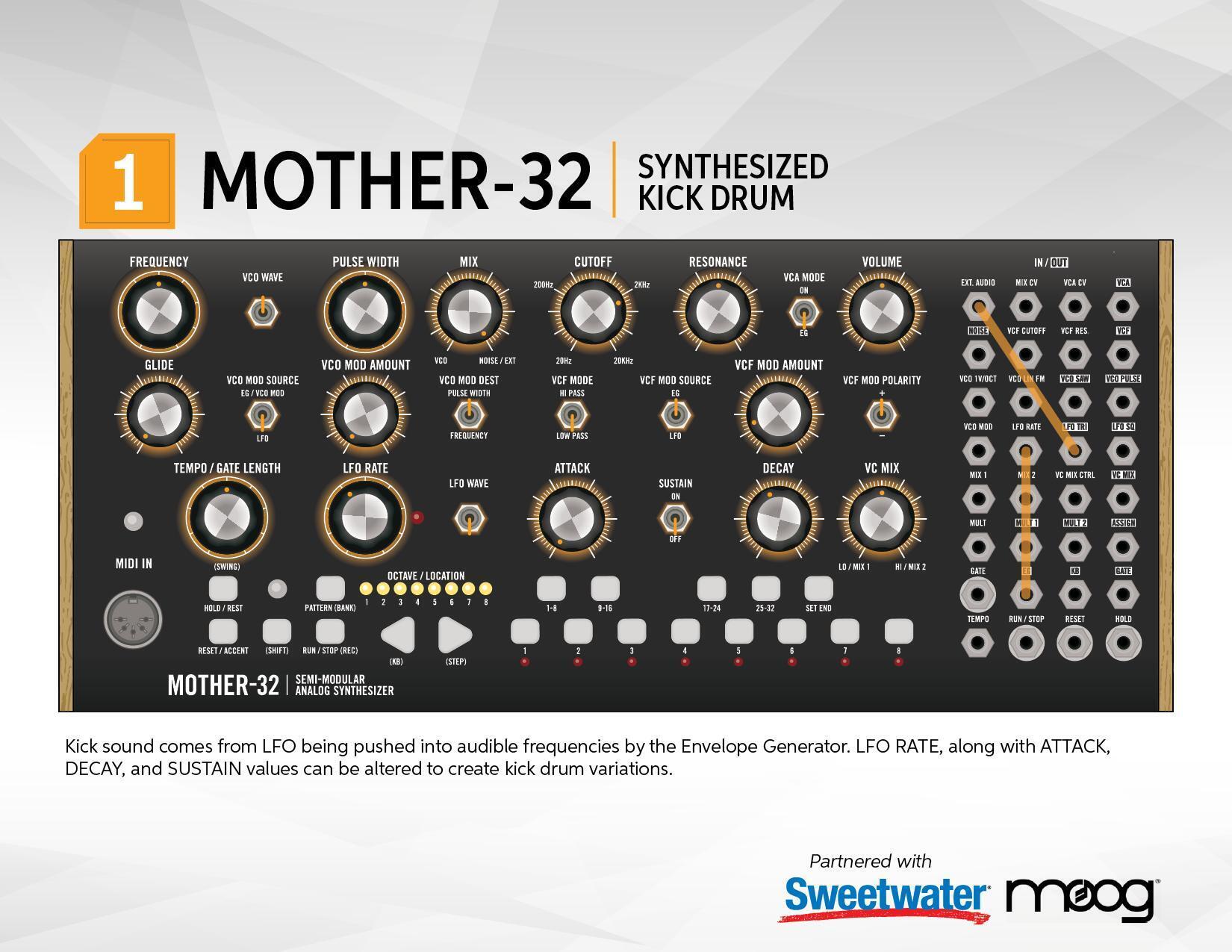
1. Synthesized Kick Drum Patch
This kick drum is created by the Triangle LFO (which is usually not in the audio path), which is patched into the EXT. AUDIO jack. Its frequency is rapidly pushed upward by the EG (Envelope Generator), which is patched to the LFO RATE jack. Lots of variations can be found by changing the LFO RATE, FILTER CUTOFF, and ATTACK and DECAY values.
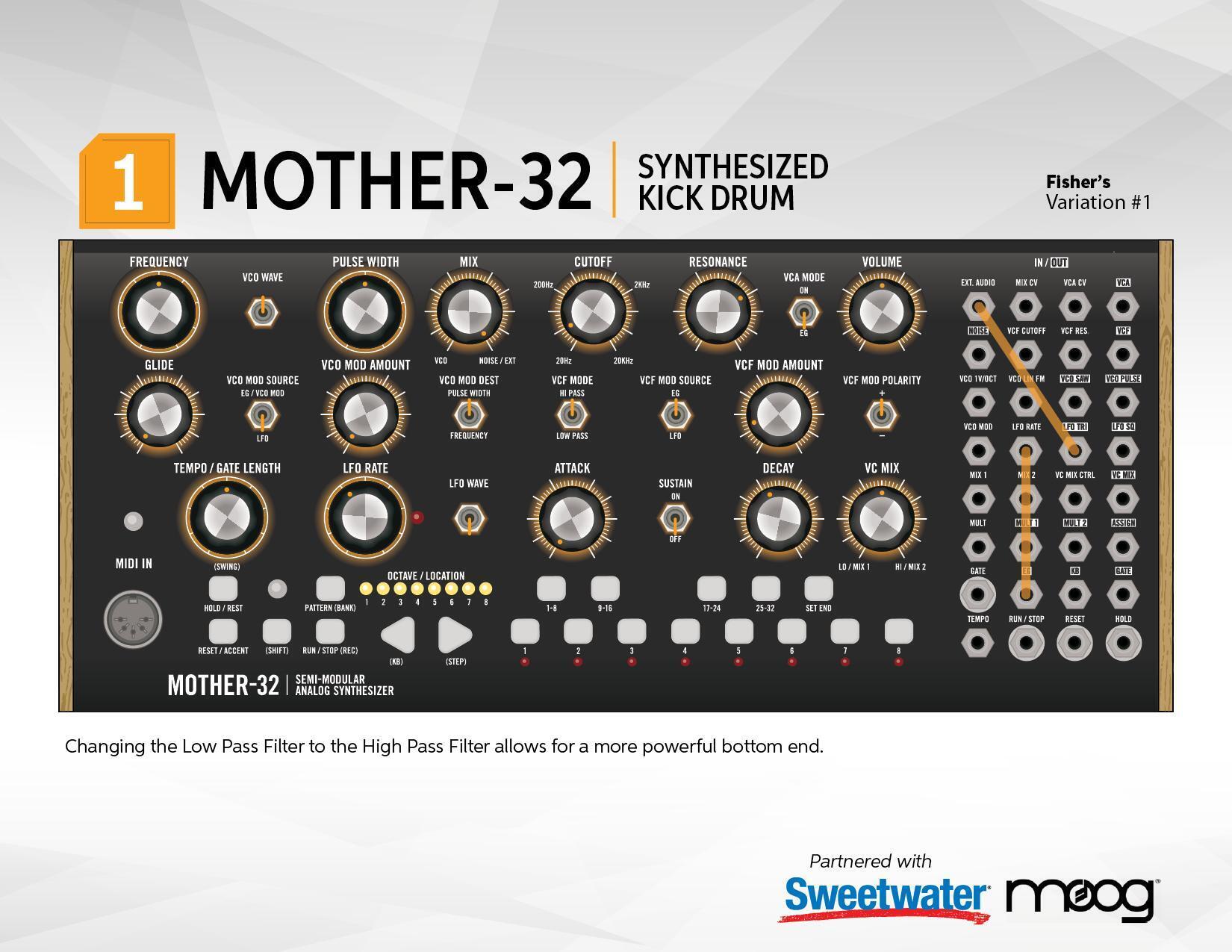
Synthesized Kick Drum — Fisher’s Variation 1
By changing the Low Pass filter to a High Pass filter and changing the CUTOFF and RESONANCE knobs, you can get an even more powerful bottom end.
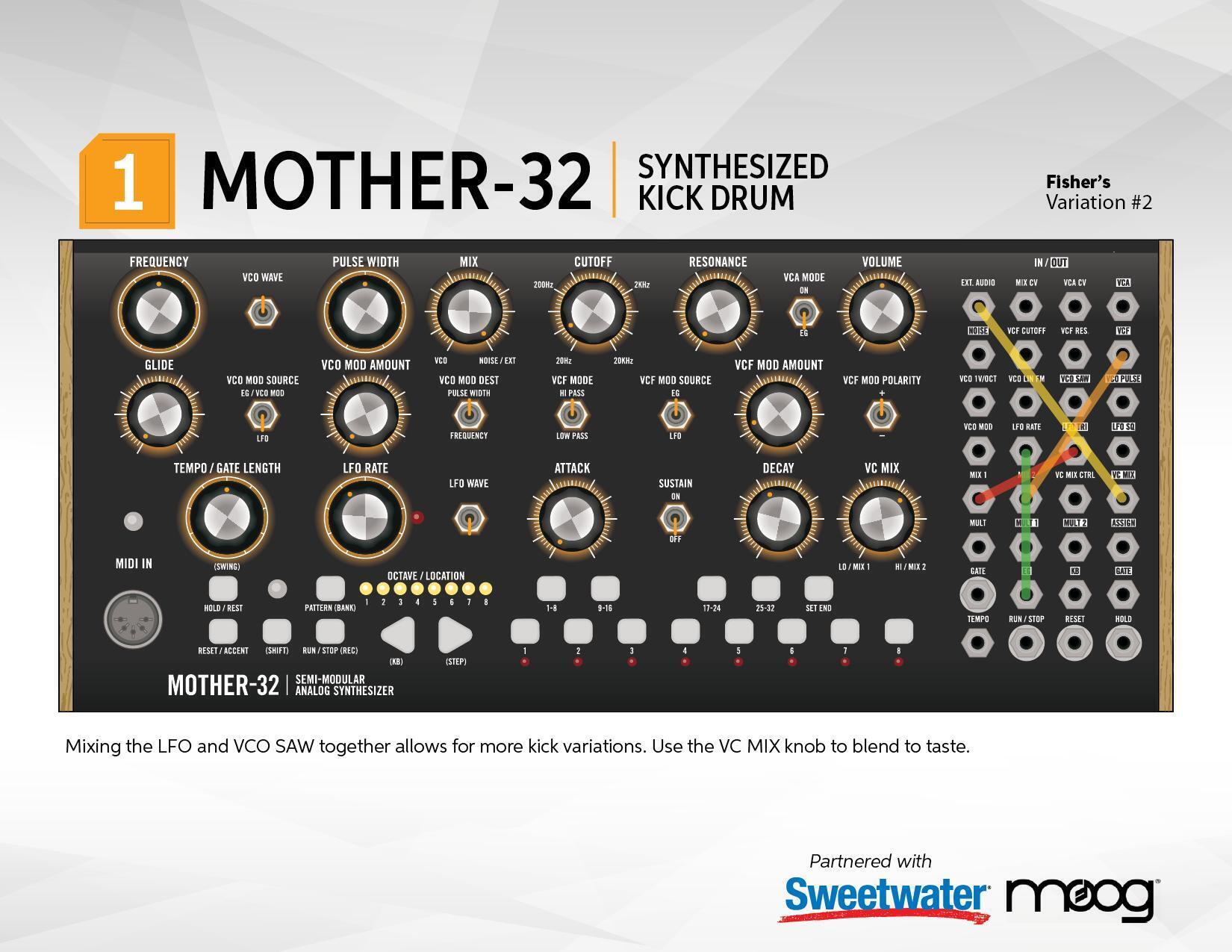
Synthesized Kick Drum — Fisher’s Variation 2
Mixing the LFO and VCO SAW together allows even more kick drum variations. Use the VC MIX knob to blend to taste.
Synthesized Kick Drum Patch Sheets:


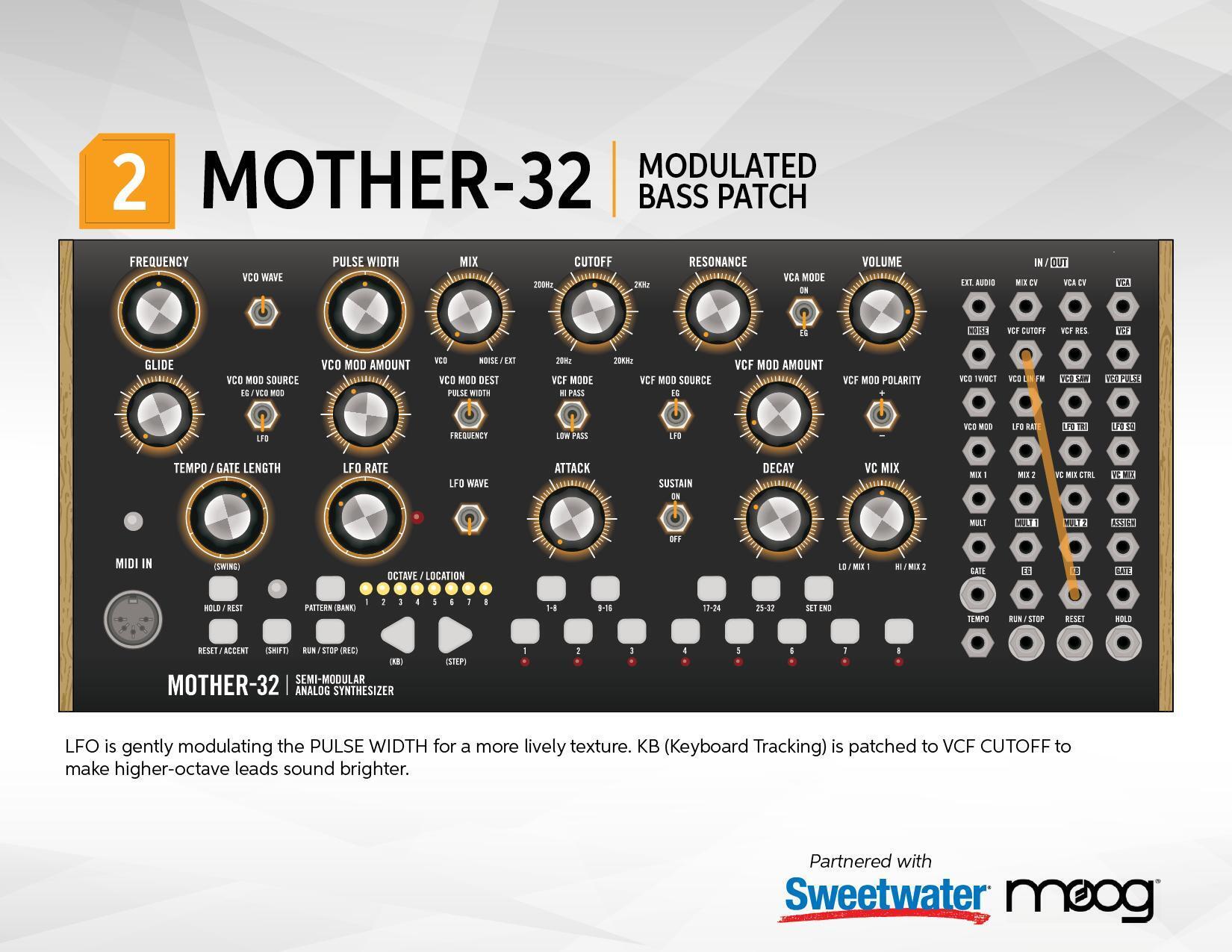
2. Modulated Bass Patch
By connecting the KB (Keyboard) voltage to the VCF CUTOFF of the Low Pass filter, higher notes will automatically open the filter to create a lead sound while lower notes close the filter for a bass sound. The VCO AMOUNT knob is controlling how much of the LFO is modulating the Pulse Width of the VCO, which creates a pleasant modulation.
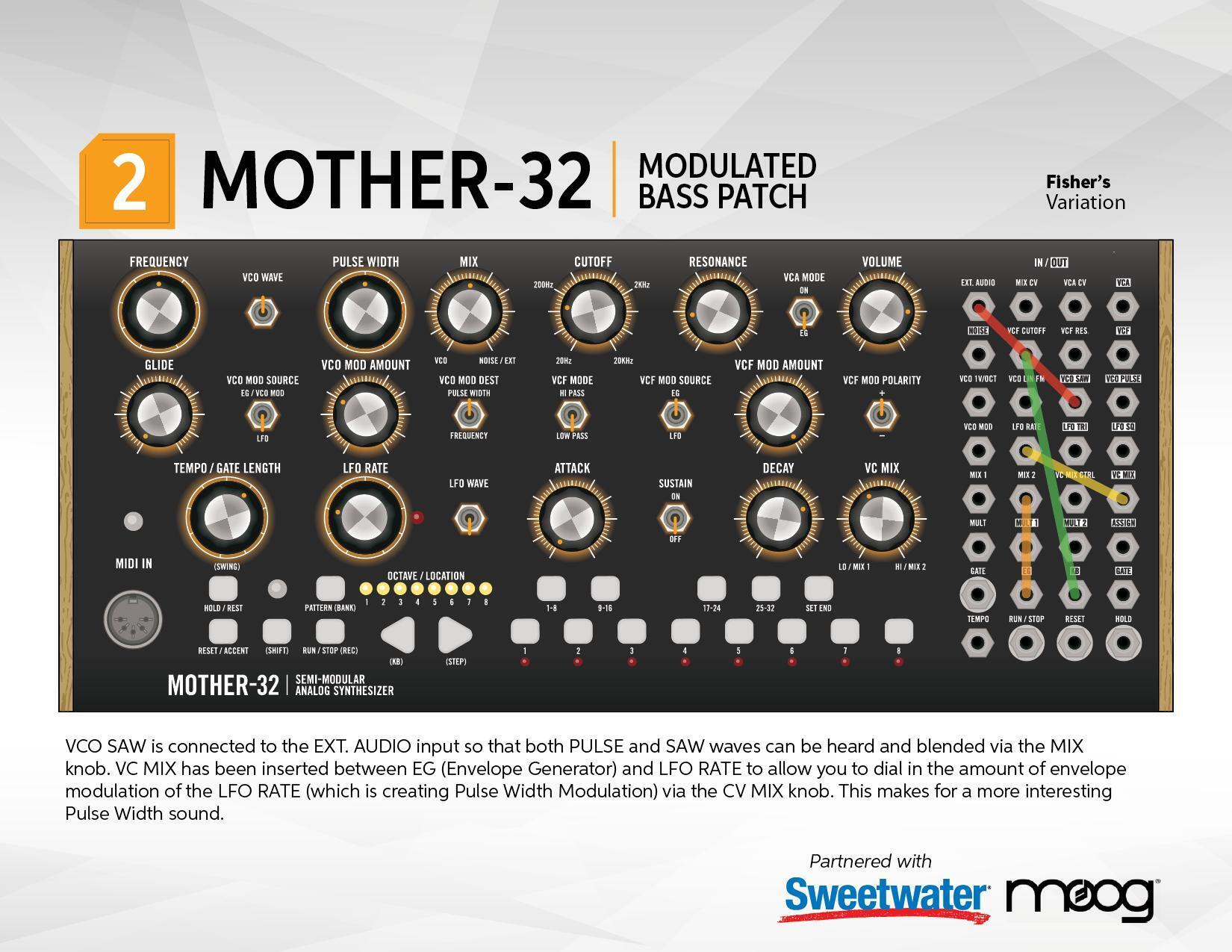
Modulated Bass Patch — Fisher’s Variation
Connecting the output of the VCO SAW to the EXT. AUDIO input allows you to blend both the PULSE wave and the SAW wave together (via the MIX knob). The EG is now controlling the speed of the LFO (via the VC MIX knob) to make the Pulse Width Modulation even more interesting.
Modulated Bass Patch Sheets:


3. Sequenced Filter Patch
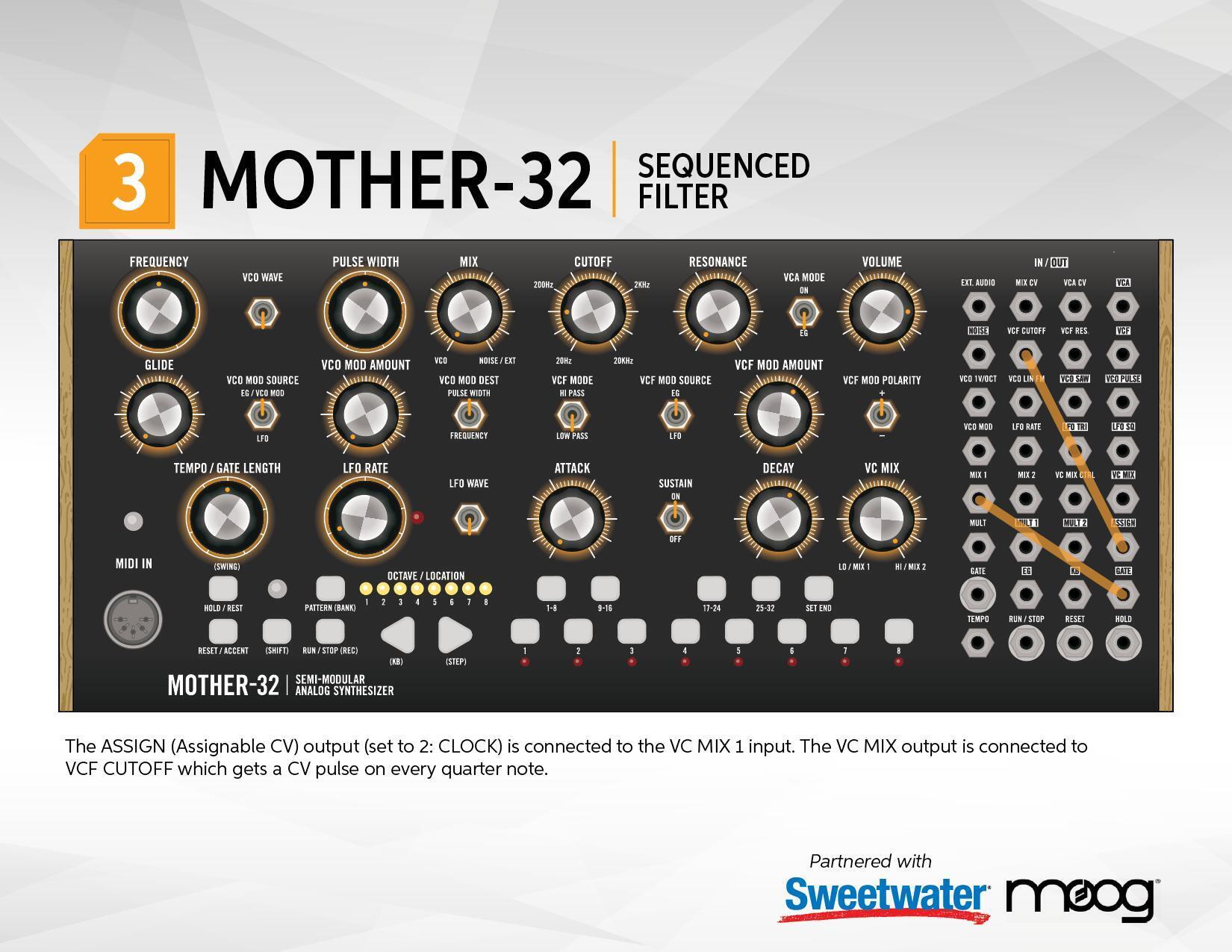
This patch shows the flexibility of the ASSIGN jack, which can be assigned to one of the sixteen different flavors of CV (Control Voltage). The ASSIGN jack is connected to MIX 1, and the VC MIX jack is connected to the VCF CUTOFF jack, letting you choose how much of the ASSIGN CV gets to the filter via the VC MIX knob.
Choosing one of the eight ASSIGN CV types is done by pressing and holding these four buttons (in this order): SHIFT + RESET + SET END + STEP 8.
Now use the Left Cursor button to make sure that the #1 LED is lit green. This means you’re in the Assignable Output Mode. You can press any number key (1–8) to select the first eight types of Assignable Output. For this patch, we’ll be using type 2 CLOCK. Press the #2 to see the #2 LED light up. Finally, get out of the Assignable Output Mode by again pressing: SHIFT + RESET + SET END + STEP 8.
Now, every step of the sequencer will play notes you have recorded and send a high CV to open the filter.
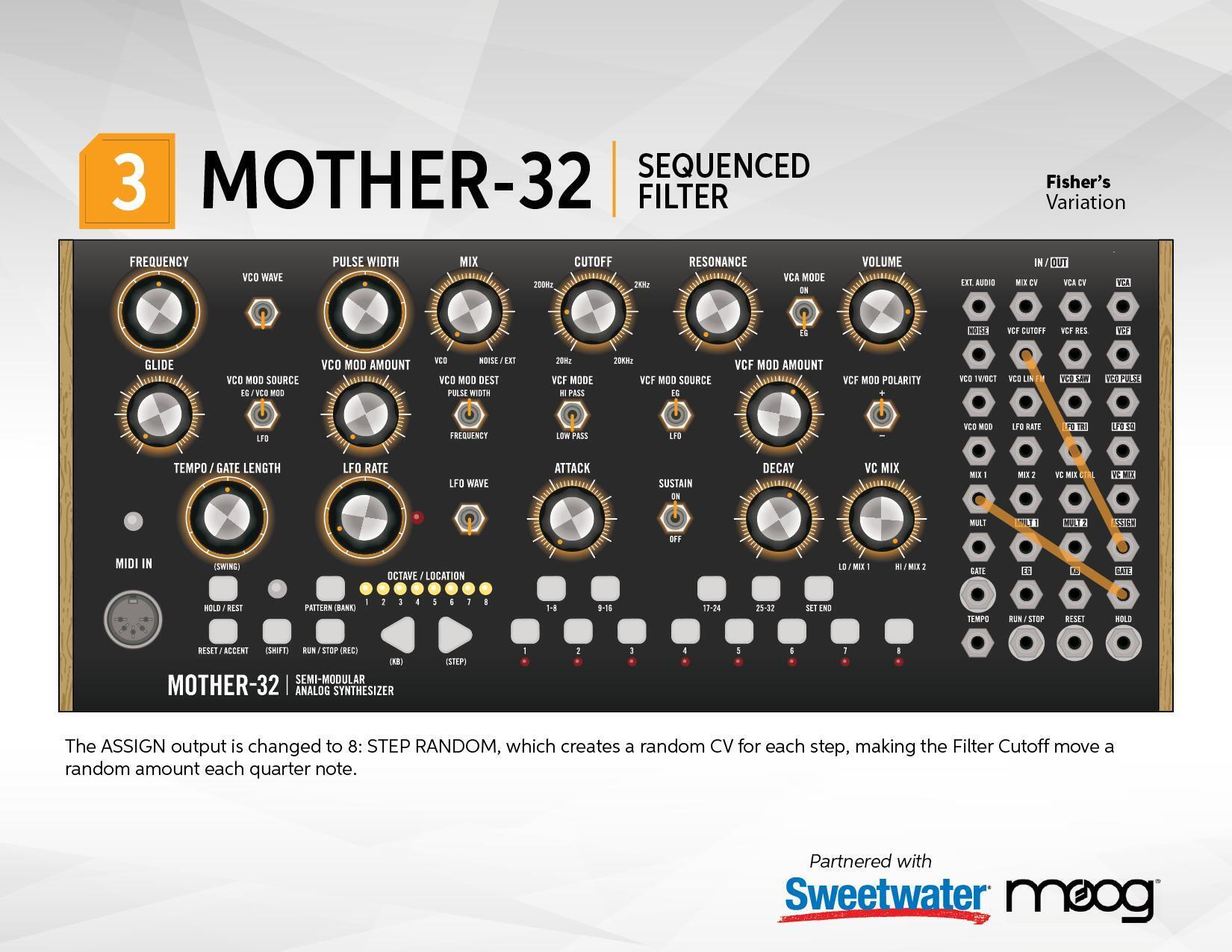
Sequenced Filter Patch — Fisher’s Variation
The ASSIGN type has been changed to 8: RANDOM, which sends a random CV on every step of the sequence, making for interesting Filter variations for every note.
Press: SHIFT + RESET + SET END + STEP 8 to get into the Assignable Output Mode, but this time choose the #8 button for 8: RANDOM. Finally, get out of the Assignable Output Mode by again pressing: SHIFT + RESET + SET END + STEP 8.
Sequenced Filter Patch Sheets:


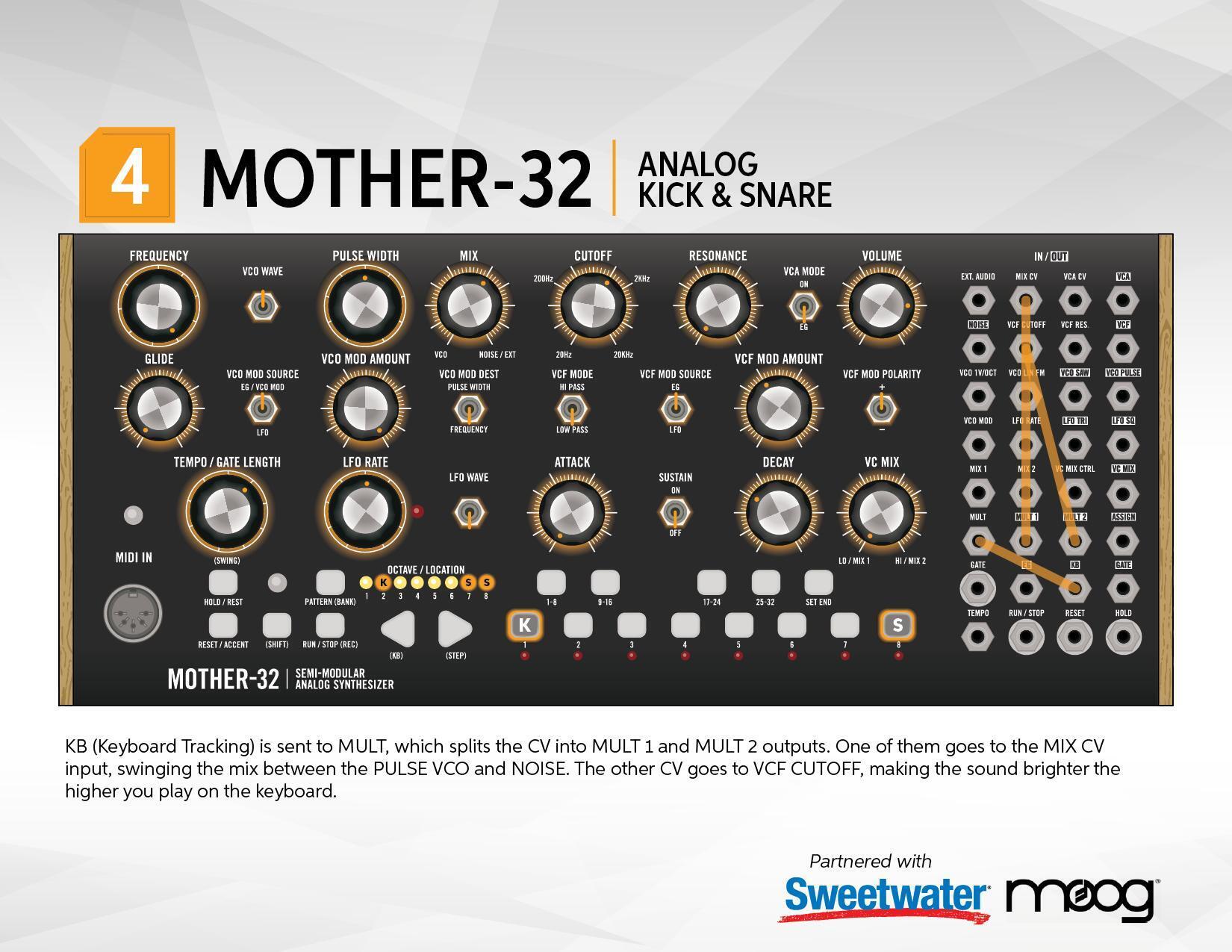
4. Analog Kick & Snare Patch
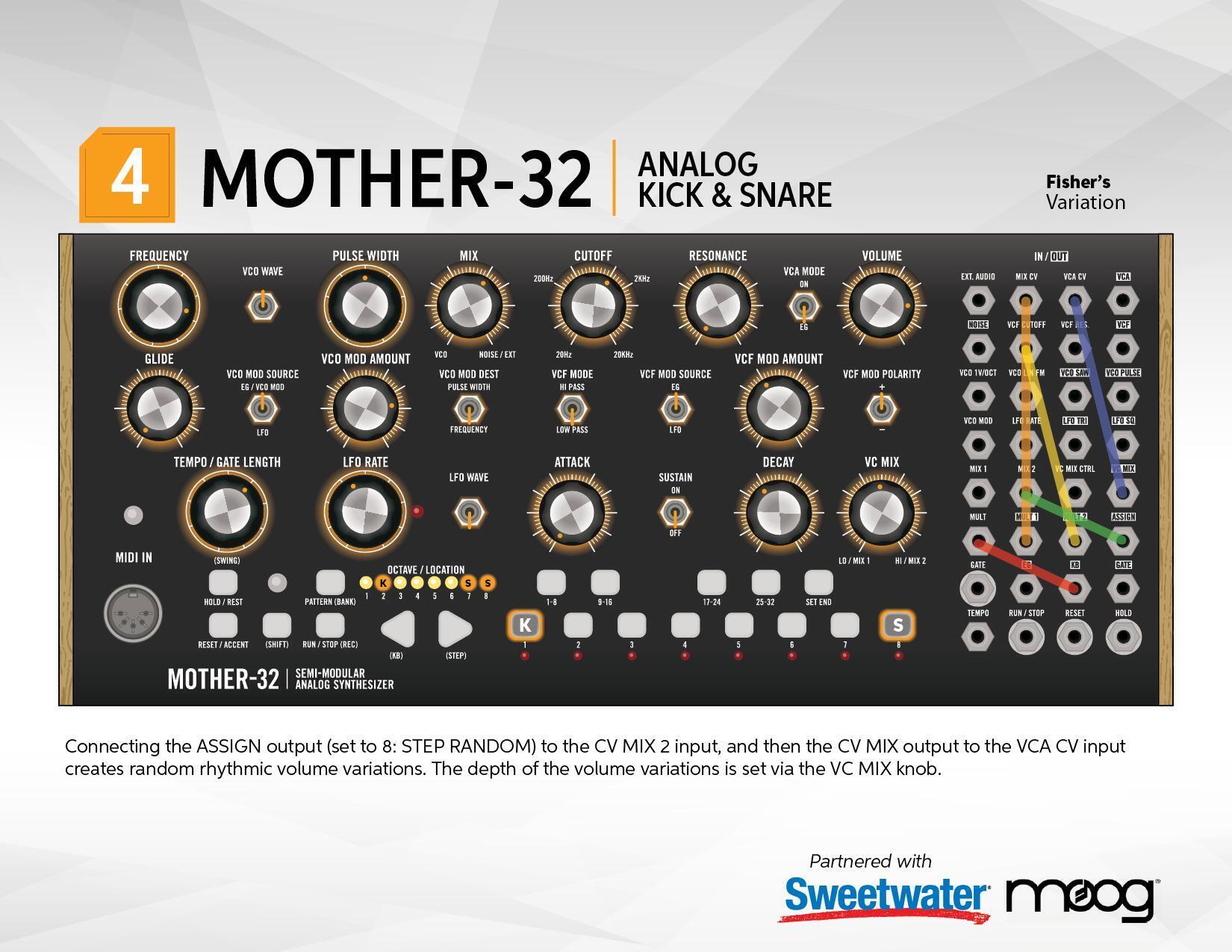
This tricky patch creates two different sounds (Kick & Snare) depending on whether you’re playing very low notes or very high notes. By splitting the KB (Keyboard) voltage with a MULT, you can send one to MIX CV, which switches between the VCO and NOISE, and the other to VCF CUTOFF, which makes the low notes dark (Kick) and the high notes bright (Snare).
Use the Left and Right buttons to go between Octave 2 and Octave 8 while you’re sequencing, and you can create your own analog drum track.
Analog Kick & Snare Patch — Fisher’s Variation
This variation uses the ASSIGN jack set to 8: RANDOM, which is randomly changing the volume of the VCA on every beat for a more modern electronic drum style.
Press: SHIFT + RESET + SET END + STEP 8 to get into the Assignable Output Mode, then choose the #8 button for 8: RANDOM. Finally, get out of the Assignable Output Mode by again pressing: SHIFT + RESET + SET END + STEP 8.
Analog Kick & Snare Patch Sheets:


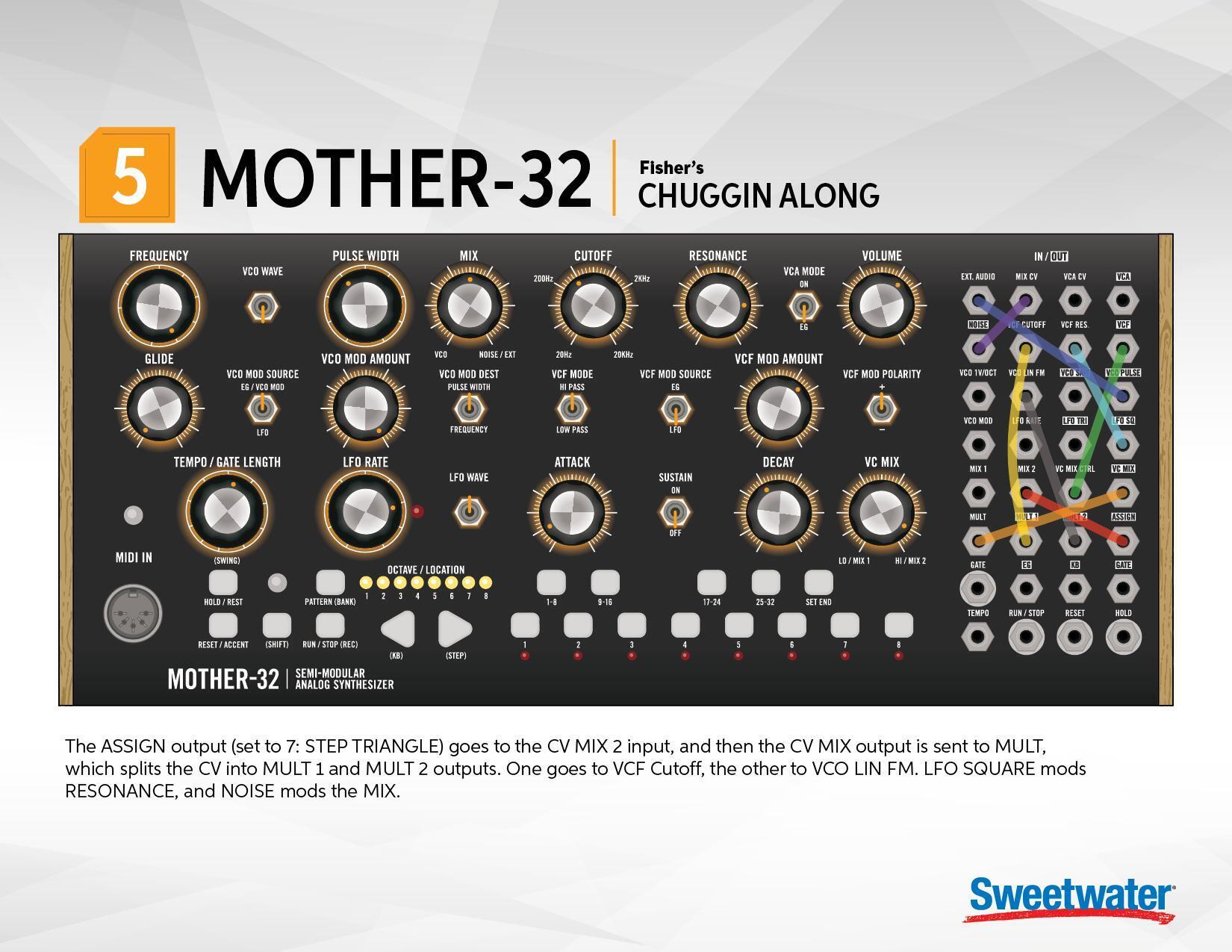
5. Chugging Along Patch
I created this patch to show how you can use the ASSIGN jack (set to 7: TRIANGLE) to create complex modulations that move over time.
Press: SHIFT + RESET + SET END + STEP 8 to get into the Assignable Output Mode, but this time choose the #7 button for 8: TRIANGLE. Finally, get out of the Assignable Output Mode by again pressing: SHIFT + RESET + SET END + STEP 8.
Chugging Along Patch Sheets:

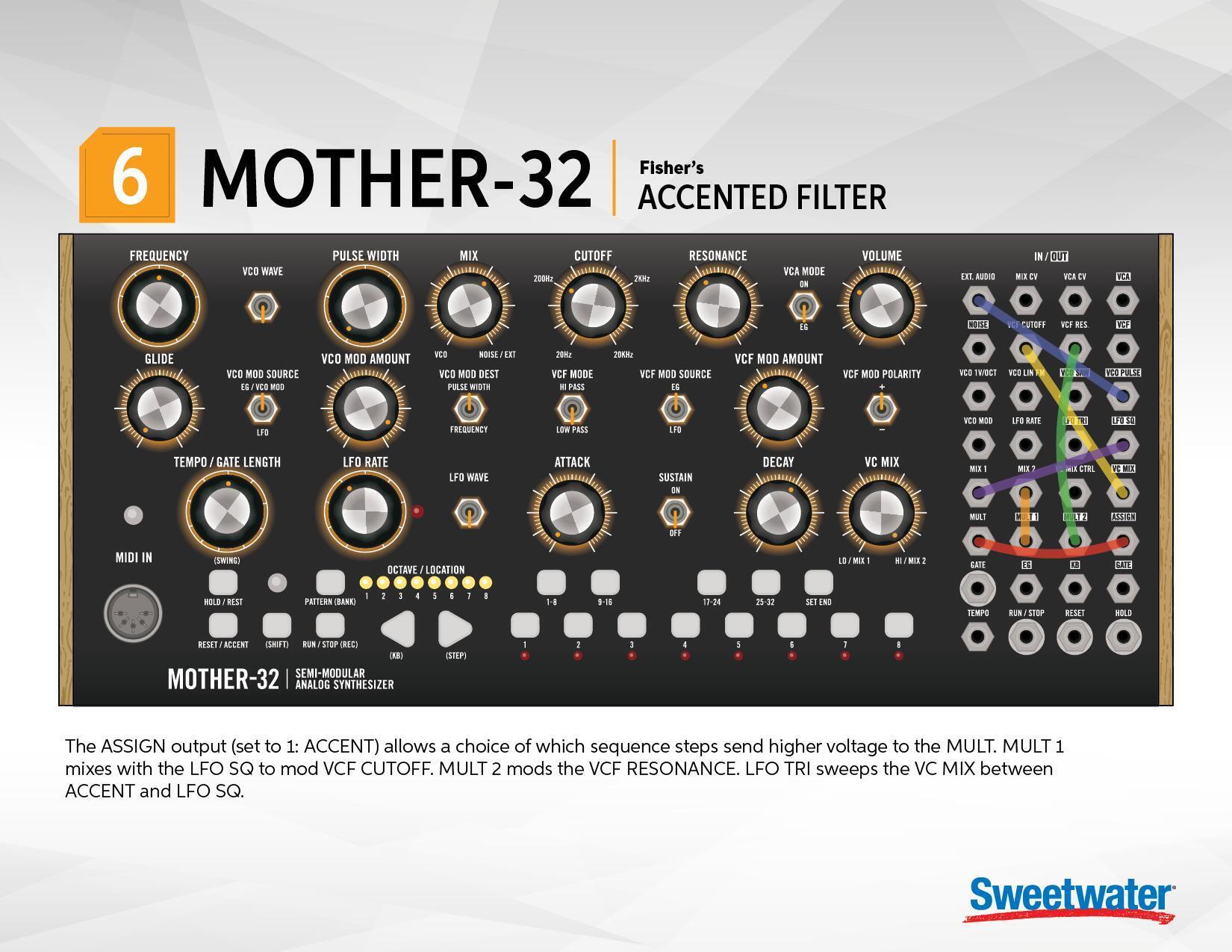
6. Accented Filter Patch
This patch demonstrates the ACCENT feature of the sequencer. By setting the ASSIGN to 1: ACCENT, you can get a high voltage from the ACCENT jack on every sequence step that has an Accent. Accents are added to a step by pressing the RESET/ACCENT button while step recording. In this example, the Accents are split with the MULT and sent to the VCF CUTOFF and are also mixed with LFO SQ to modulate the RESONANCE amount.
Press: SHIFT + RESET + SET END + STEP 8 to get into the Assignable Output Mode, but this time choose the #1 button for 1: ACCENT. Finally, get out of the Assignable Output Mode by again pressing: SHIFT + RESET + SET END + STEP 8.
Accented Filter Patch Sheets:

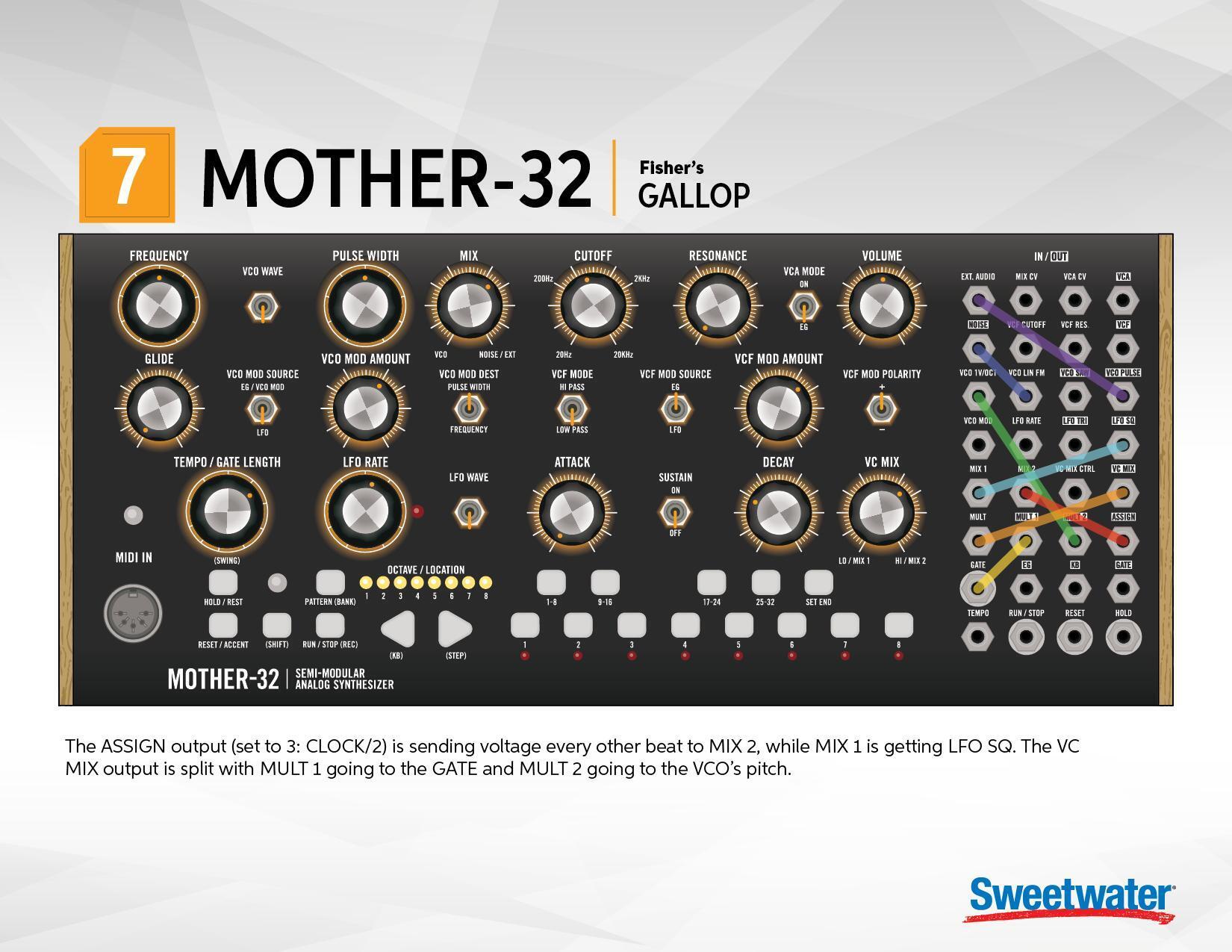
7. Gallop Patch
This patch demonstrates the CLOCK/2 feature of the ASSIGN jack. By setting the ASSIGN to 3: CLOCK/2, you can get a high voltage from alternating sequence steps. The ASSIGN is mixed with the LFO SQ and then split, with MULT 1 going to GATE and MULT 2 going to the VCO 1v/OCT input. This allows the VC MIX knob to create all kinds of galloping rhythms.
Press: SHIFT + RESET + SET END + STEP 8 to get into the Assignable Output Mode, but this time choose the #3 button for 3: CLOCK/2. Finally, get out of the Assignable Output Mode by again pressing: SHIFT + RESET + SET END + STEP 8.
Gallop Patch Sheets:

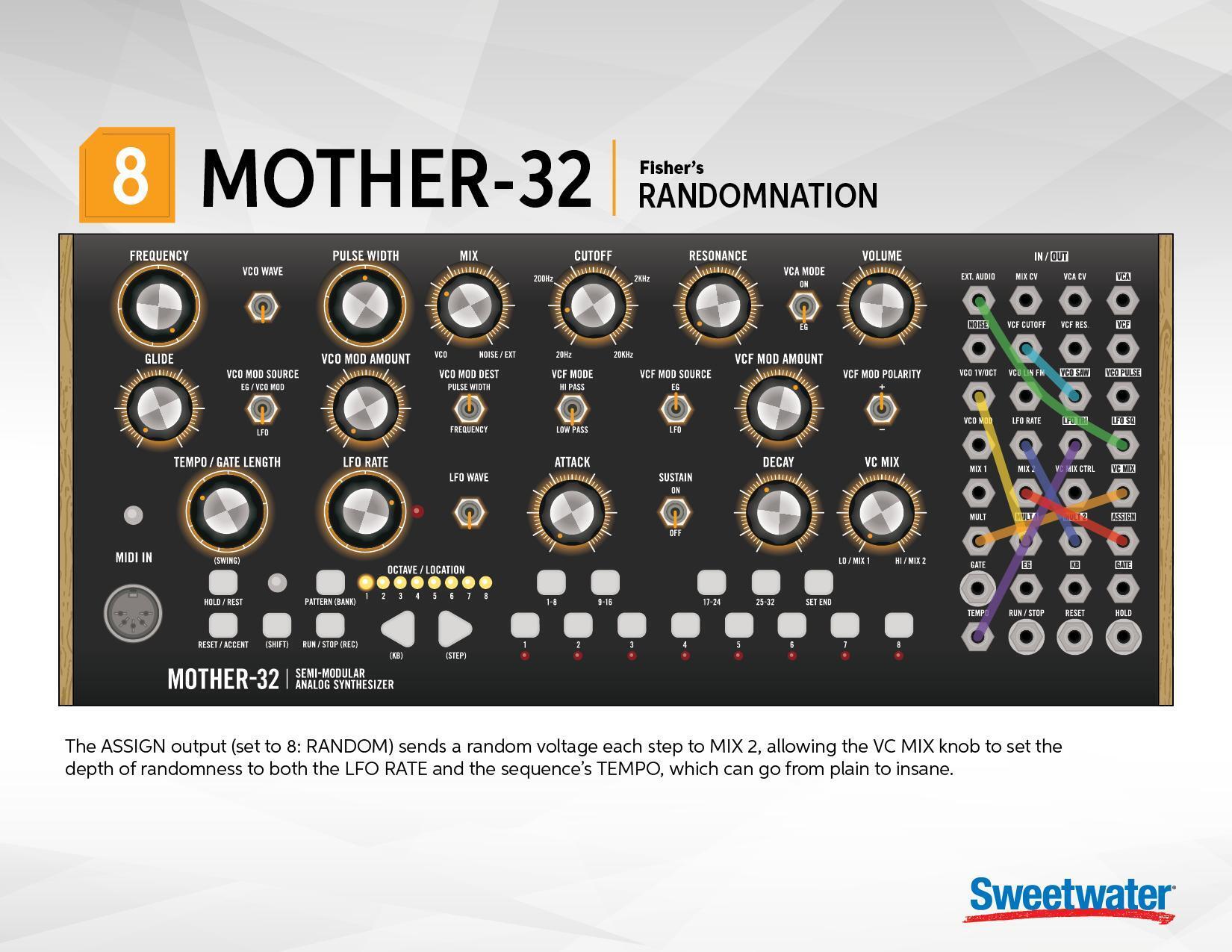
8. Randomnation Patch
This patch makes insane use of ASSIGN (set to 8: RANDOM) to modulate the OSC pitch, Filter, and Tempo. The VC MIX knob allows you to control how much of the random insanity occurs.
Press: SHIFT + RESET + SET END + STEP 8 to get into the Assignable Output Mode, then choose the #8 button for 8: RANDOM. Finally, get out of the Assignable Output Mode by again pressing: SHIFT + RESET + SET END + STEP 8.
Randomnation Patch Sheets:

I hope these Mother-32 video and patch chart examples encourage you to further explore this powerfully flexible instrument. If you have any questions about this or other Eurorack gear, please contact your Sweetwater Sales Engineer at (800) 222-4700.
Download our Mother-32 Patch Sheets for FREE:
Bonus:
Photo Gallery