

Any seasoned sound tech knows that getting the drum balance just right is one of the hardest parts of putting the mix together. While there are a lot of tricks you can use to make adjustments on the fly, the most important part (or at least the one that will save you the most time and trouble) is nailing the soundcheck. Here are a series of tips and tricks we’ve found that make running a great drum soundcheck as painless as possible.
What to Mic
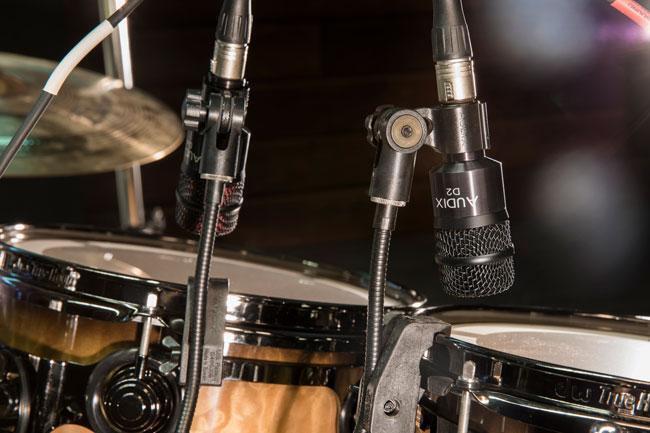
Whether in the studio or live onstage, one of the worst mistakes engineers make is over-miking the kit. How do you avoid this? First, you have to trust your ears. That may be intimidating, but when you mic up drums and assume you need to use every channel, you’ve become the proverbial carpenter with a hammer who sees everything as a nail.
Pro Tip: You can always mic up the whole kit and then use only the channels you need. That’s a particularly good option if you have more mics than experience – then you can choose just what contributes to the effect you want.
Assuming you have to mic the kit at all (there are plenty of times you don’t), kick and snare are a given. Cymbals, toms, and percussion are up for debate. With that in mind, there are a few things that will determine what you do and don’t have to mic.
First, there’s the size of the venue. Obviously, the bigger the venue, the more volume you’ll need to fill it. The same goes for acoustics. If the venue isn’t set up for modern live sound (e.g., many churches), then you don’t want to contribute to the cacophony with unnecessary sound reinforcement. On that note, the volume of the rest of the band is another major contributor. If you can’t cut through the mix, then it doesn’t matter how good the kit sounds.
In most cases, you can skip miking the cymbals. For starters, unless you’re playing an arena, you rarely need to worry about miking individual cymbals. It’s far more common to set up a pair of overheads to catch all the cymbals at once. While this is great in the studio, since it lets you also capture room ambience, the same effect can make these mics muddle up the mix.
Toms are a bit trickier. It’s tempting to mic them up – they are important drums, after all – but sometimes the additional open microphones invite too much bleed from the stage, which can wreak havoc on the mix. If you’re using overheads, then it’s likely that your toms are already covered well enough, as are any percussion instruments you’ve attached to your rig.
One final note about miking in general is that it varies dramatically from the studio to the stage. In the studio, we tend to toss mics on everything, including the bottom heads of the snare and toms and the beater in the bass drum. For sound reinforcement, you can probably skip all of these, since many of the subtleties and nuances you could capture this way won’t register in the live mix.
Order Matters

Now that you’ve sorted out what you might and might not need to mic, let’s talk about the order of running the soundcheck. Many engineers feel that next to the vocals, the most important instrument in the mix is the kick drum, followed closely by the snare. These form the backbone of the rhythm section, driving the music and providing the beat.
Most people initially think of the kick drum as being purely a bass instrument, but between its beater attack and harmonic overtones, the bass drum can take up a lot of frequency bandwidth. That’s why we recommend starting there. Then, as you mix in the snare drum, you can EQ out any conflicting frequencies to let both the kick and the snare breathe.
Next, you’ll want to bring in whatever overhead sound reinforcement you need over the cymbals. It’s important to realize that the cymbals are, by far, the loudest instruments in the kit and often don’t need to be miked at all. In fact, there are many products, such as drum shields and specialty cymbals, that are particularly popular in house of worship environments and are designed to turn down the volume of your cymbals to balance out your miked-up drums.
Once you have the overheads set, you can begin to bring up the toms. Be cautious – tom mics can bring with them a lot of unwanted ambience via mic bleed. You want to amplify your toms, but you probably don’t want to turn up the volume on everything else as well.
Loud, Louder, Loudest – Real

It’s time to get down to business – the soundcheck itself. There are two key goals of the soundcheck. First, you want to get the loudest level possible at the preamp, without overloading the input. That means setting the channel fader at ±0dB and turning up the gain at the preamp until you reach the level you want (just like dialing in any channel). Second, you need to get the balance right between each channel via the faders. The biggest difference between soundchecking drums and anything else is leaving more headroom in the preamp.
Before you start, prepare yourself for some degree of frustration. Soundchecking even the most seasoned drummer can be hard on experienced engineers. The reason for this is simple: no drummer ever plays as hard during a soundcheck as they do when the lights are on and the crowd is feeling it. So what do you do?
First, make peace with the fact that you won’t get an entirely trustworthy soundcheck. You’re going to have to make adjustments on the fly. The most effective thing you can do is leave some headroom in the preamp – usually about 3dB-6dB will do. What you don’t want to do is risk overloading the preamp and distorting the channel.
Single strikes of the drum at increasing volumes can be a good place to start. Cycle through each drum (kick, snare, and toms if individually miked), and then cymbals and other percussion. In each case, you’re going to want the drummer to strike each drum at a variety of levels. This is really useful if you’re using in-line compression, but it’s still a good habit if you aren’t, since it will provide the drummer with a reference point and get them to hit harder.
Pro Tip: Don’t just increase in volume; switch it up. One good technique is to have the drummer strike the drum four or five times at increasing volumes, then back it off for a couple of strikes, and then bring it back up. They’ll almost always hit much harder the second time they ramp it up.
Don’t put too much stock in the levels you get from checking each drum in isolation. Even considering the tricks we just described, your typical drummer won’t hit nearly as hard as they will while rocking out for real. To get the best idea of how hard the drummer is going to hit, you need to hear them play at a variety of volumes. The emphasis here is that they have to play, not just hit the drum repeatedly. That means getting the levels right is going to happen when the whole band plays, whether that’s during soundcheck or their opening song.
Pro Tip: If you can, assign all the drum channels to a group, or submix, and err on the side of caution while dialing in the preamps. This will allow you to dial in the drum balance and then adjust the whole submix volume when the band starts to play.
Taking It Live
Still a bit intimidated about soundchecking drums? Don’t worry about it. Especially if you’re new to this, the important thing is to take your time and really listen. No article can tell you exactly what to do, but it won’t be long before you get a natural feel for dialing in drums and starting off the show with a really great drum mix.