
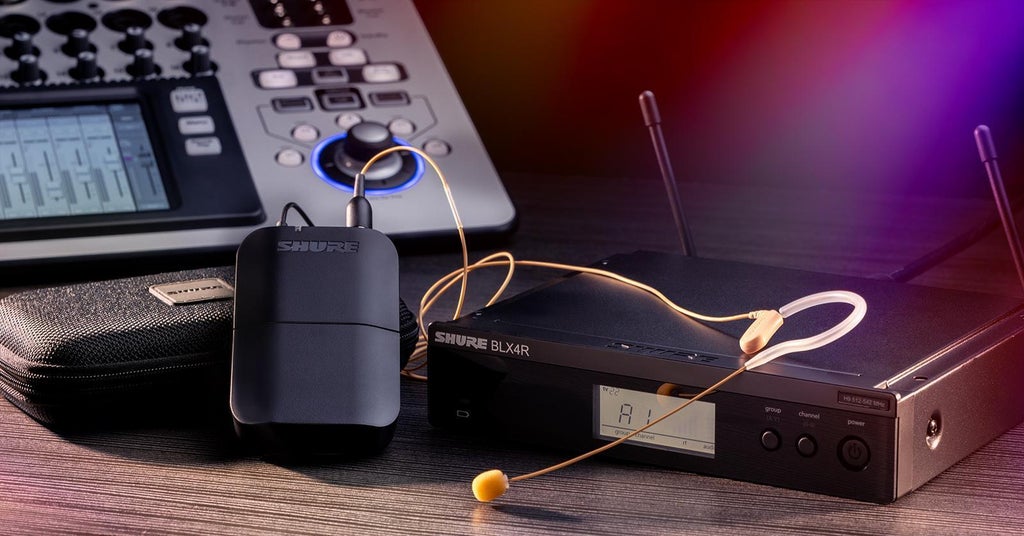
So, you’re thinking about cutting the cord and untethering yourself. In other words, you’re ready to invest in a wireless microphone system. There are countless reasons to do so. That said, there are a lot of factors to consider. In this guide, we’ll walk you through the nuts and bolts of wireless microphone systems, and we’ll point you in the right direction for which type of system is best for your needs, budget, and application.
- Benefits of Going Wireless
- Anatomy of a Wireless System
- Compact Wireless Systems for Streamers
- Which Wireless Configuration Is Right for You?
- Wireless Frequency Bands
- More About Wireless Frequencies
- Using Multiple Wireless Microphones Simultaneously
- The Great Debate: Analog vs. Digital
- More Helpful Tidbits
Benefits of Going Wireless
Why go wireless? Is it worth the investment? For many artists, presenters, and performers, the answer is an emphatic “yes” for the same reason that our consumer devices, such as laptops, computer peripherals, and smartphones, operate via Wi-Fi and Bluetooth: it’s simply more convenient. What’s more, wireless microphones offer numerous advantages over their wired counterparts.
They Allow for Greater Freedom of Movement
With a wireless microphone, you’ll be completely untethered, enabling you to move unimpeded during a performance. You can wander around your entire performance area, mingle with your audience, and even perform backflips if the feeling hits you.
They Create a Clean Look for Your Performance Space
Wireless microphones ensure that your audience won’t be distracted by the presence of wires, providing you with a clean look both on camera and onstage in front of a live audience.
They Avoid Cable-related Issues
Microphone cables are notorious for going bad and needing to be replaced. Cables can also become damaged or disconnected during a performance, leading to embarrassing, show-halting outcomes.
They Reduce the Likelihood of Trip hazards in Your Performance Space
Not only do wireless microphones allow you to move about with impunity, but you can also do so without fear of tripping over any of the cables that occupy performance stages where wired microphones are being used.
They Safeguard Against Ground Loops
The galvanic isolation provided by wireless microphones avoids creating ground loops between your microphone and other electrical instruments and devices onstage.
Anatomy of a Wireless System
A typical wireless microphone system consists of three components: a microphone, a transmitter, and a receiver.
Microphone
The microphone component of a wireless system serves the same purpose as a wired microphone: to capture sound. There are five types of wireless microphones designed for various applications:
- Handheld wireless microphones serve the same purpose as a conventional wired handheld mic, allowing a vocalist to hold the microphone.
- Lavalier microphones boast a low-visibility, clip-on design and yield high-quality sound in speech applications.
- Headworn microphones are rugged, comfortable, easy-to-position headsets designed for full, clear vocal reproduction, making them a great choice for active performers or presenters.
- Clip-on instrument microphones feature a sturdy clamp-on design with an easy-to-position gooseneck and are built to withstand the high sound pressure levels from woodwind, brass, and percussion instruments.
- Electric guitar and bass wireless systems don’t use a microphone; rather, they employ a cable to connect your instrument directly to the rest of the system.
Transmitter
The transmitter converts the audio signal from the microphone to a radio signal. There are two types of transmitters:
- Handheld microphone transmitters combine a handheld microphone and a transmitter in a single housing, so both functions are contained in one convenient unit.
- Bodypack transmitters are belt- or guitar-strap-worn units with a connector that accommodates lavalier, headworn, and clip-on instrument microphones, as well as electric guitar and bass cables.
Receiver
The receiver receives the radio signals sent by the transmitter and converts them back to audio.
- Modular receivers are either freestanding or rackmounted, and they’re typically powered by AC.
- Portable receivers physically resemble bodypack transmitters, but they perform the opposite function. They’re typically battery powered.
- Guitar pedal receivers are intended specifically for electric guitar and bass players and are designed to integrate seamlessly into a pedalboard.
Compact Wireless Systems for Streamers
There are self-contained wireless solutions available that are tailor-made for content creators and mobile professionals. They generally contain multifunction microphones, transmitters, and receivers in a single, easy-to-deploy package.
Which Wireless Configuration Is Right for You?
Wireless systems, along with microphone and transmitter options, give performers and presenters outstanding flexibility in matching an application to a wireless configuration.
Vocalists
A handheld microphone transmitter, used together with a modular receiver, is the most common choice for stage vocalists. This type of configuration allows the vocalist not only to hold the microphone in their hand but also to physically control the distance between their mouth and the mic for maximum artistic expression.
Active Vocalists & Fitness Instructors
A headworn microphone, used in tandem with a bodypack transmitter and a modular receiver, allows for unlimited hands-free movement, making this combination ideal for dancing vocalists, singing keyboardists and drummers, and fitness and dance instructors.
Presenters, Worship Leaders & Stage Actors
A lavalier microphone or a headworn microphone, used alongside a bodypack transmitter and a modular receiver, is a great choice for presenters, worship leaders, and stage actors who need a discreet mic as well as hands-free operation.
Video & ENG
A handheld microphone transmitter or a lavalier microphone and a bodypack transmitter, used in tandem with a portable receiver, are excellent solutions for video and ENG applications, as the portable receiver can be mounted directly to a camera.
Horn & Percussion Players
A clip-on instrument microphone, used in conjunction with a bodypack transmitter and a modular receiver, is the right combination for horn and percussion players.
Electric Guitar & Bass Players
Plugging into a bodypack transmitter, combined with a guitar pedal receiver, offers the perfect cable-free solution for electric guitar and bass players.
Content Creators & Mobile Pros
A compact, all-in-one wireless system is the best choice for streamers, gamers, content creators, and other on-the-go professionals.
Wireless Frequency Bands
Wireless microphone systems, like most wireless devices, transmit and receive audio on a specific frequency or on specific bands of frequencies. The most common frequency bands used by wireless mics are the UHF TV band, the 900MHz band, and the 2.4GHz band.
The UHF TV Band
The UHF TV band, which is situated between 470MHz and 608MHz, is frequently used by wireless microphone systems. You don’t need a license to operate in this band, but in order to utilize the frequencies contained in it, they must not be claimed by any local television channels. Most cities, especially larger municipalities, have a significant number of television stations, but there are typically at least some unused frequencies available for wireless users. Because different cities utilize different frequencies for their local television channels, the available frequencies will differ from city to city.
The 900MHz Band
The 900MHz band, specifically 902MHz to 928MHz, is another band of frequencies that is often used by wireless microphone systems. These frequencies fall outside of the television channel range, and you don’t need a license to operate within them. The 900MHz band is legal to use in the United States, but that’s not the case in all parts of the world. So, if you’re on a worldwide tour, then you’d best check with the local regulatory entity to ensure compliance with their laws.
The 2.4GHz Band
The 2.4GHz band is also employed by some wireless microphone systems. It can be used, license-free, anywhere in the world. The biggest hurdle with the 2.4GHz band, however, is that Wi-Fi devices use the same frequency band, which means there’s a significant potential for interference.
More About Wireless Frequencies
When it comes to frequency selection, some wireless microphones are fixed-frequency systems, meaning that their operating frequency is preset and can’t be changed. You might be able to get away with this if you’re using your wireless mic in a single area, provided your local television stations don’t change their broadcasting frequencies. That said, fixed-frequency systems are generally relegated to less expensive units due to their limited operating capabilities.
Most modern wireless microphone systems are frequency-agile systems, meaning that you’re able to quickly and easily change their operating frequency to avoid interference from television channels and other wireless signals. Many frequency-agile systems include scan and sync features, which enable you to locate a clear channel automatically and synchronize your transmitter and receiver to it.
Higher-end wireless microphone systems boast a true diversity design. This means that the system’s receiver includes two independent receiver sections, each with its own antenna, to receive transmissions from your wireless microphone transmitter. The unit only uses one of its receiver sections at a time, employing a comparison circuit in real time to ensure that the antenna with the strongest signal is always the one that’s being used. True diversity systems give you an incredibly stable signal with fewer instances of dropouts and interference.
Using Multiple Wireless Microphones Simultaneously
If you’re using more than one wireless microphone simultaneously, then it’s important to note that each mic will need to be assigned its own individual frequency for proper operation and transmission. Since each wireless microphone’s frequency takes up space within a particular frequency band, when you employ multiple microphones at the same time, their individual frequencies must be spaced apart to avoid interference. If the frequencies are set too close together, then the mics will compete with each other, and you’ll experience wireless interference and dropouts.
The more transmitters and receivers you deploy simultaneously, the more difficulty you’ll have separating frequencies, as there is only so much frequency bandwidth available. Higher-end systems give you greater frequency selection and flexibility. What’s more, top-level systems are designed with large wireless rigs in mind, so they provide you with features that enable you to better combine multiple receivers and transmitters to accommodate more users.
The Great Debate: Analog vs. Digital
Technically, there is no such thing as “digital wireless” — all wireless microphones rely on an analog carrier wave. The difference is in the way the unit modulates the carrier signal. Analog wireless systems modulate the carrier frequency with the actual microphone signal. Digital systems, on the other hand, encode a digital signal onto the analog carrier.
Both analog and digital systems are capable of excellent sound quality. That said, digital systems often boast a better dynamic range and frequency response, as analog systems employ a form of dynamic compressing and expanding (a.k.a. companding) that can affect their overall sound quality.
Latency is another consideration. While even inexpensive analog systems have negligible latency by design, most digital systems exhibit at least some latency. It’s important to note, however, that latency specifications vary from system to system, and you’ll enjoy negligible latency with high-end digital systems. So, if you’re searching for a low-latency digital wireless system, then pay super-close attention to the unit’s latency specification.
RF interference can occur in both analog and digital wireless systems, but it’s easier to filter noise out of a digital system. Digital systems convert your audio to a digital signal at the transmitter, send the digital information to your receiver, and then decode it back to analog. Since the receiver only concerns itself with digital data, analog noise and interference are nonissues; the receiver will simply disregard anything that’s not digital ones and zeros.
If security is a factor, then there’s really only one choice for you: digital. Most higher-end digital wireless systems use AES 256-bit encryption to keep your transmissions safe and secure.
More Helpful Tidbits
When researching wireless systems, it’s important to dive into their specifications to ensure that the system you choose will truly meet your needs. How large are the venues you’ll be using your system in? You’ll want to be sure that your system’s operating range (distance from the stage to the receiver) offers sufficient coverage. How long will you be using your system between charges? Be sure that the system you choose provides you with enough battery life.
One last helpful hint is to upgrade your wireless receiver’s stock antenna with an RF Venue model. These turbocharged antennas and wireless accessories can manage multiple signals better than most stock antennas, and they’ll help you cut through the RF clutter if you’re using multiple transmitters.
Are You Ready to Cut the Cord?
If you’re sick and tired of being tethered to a microphone cable, then give your Sweetwater Sales Engineer a call at (800) 222-4700, and we’ll help you find the perfect wireless microphone system for your needs, application, and budget.