Successfully streaming your worship services can be like walking a tightrope. Balancing quality, authenticity, engagement, and time can stretch your budget and your production team (which may be only you). You want people who have never been in your worship space to feel connected, and your regular attendees to feel at home.
Kent Morris, Sweetwater’s Live Sound Market Manager, describes the dilemma this way. “You provide your viewers with a window into your space — what the room looks like, how big it is, where the people are sitting, and where the stage is. If we tell the story well, they will feel connected.” But how do you do that?
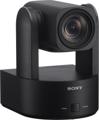
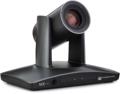
Enter pan/tilt/zoom (PTZ) cameras. These small, remote-controlled cameras allow an operator to pan left and right, tilt up and down, and zoom in and out for a huge range of shots. Their small size allows them to be placed almost anywhere — even if there’s no room for an operator. Their features make them excellent for creating a pleasing, in-the-room experience for streaming viewers — often at a cost that’s less than a single broadcast camera lens.
Because of the wide range of PTZ camera features, picking the right model can be intricate. Consider these essential factors to avoid buyer’s remorse and effectively engage your viewers with the authentic story of your services.
What Will Show How Your House of Worship Is Special?
Your stream doesn’t only communicate information. It reveals culture and nuance. It tells people what it means to share time with your congregation and hopefully encourages them to engage with your house of worship.
Before Thinking About Features
Camera Location
An important factor when selecting the right PTZ camera is where you’ll put it. For example, a camera located on a back wall may not need a wide pan range but may require a strong zoom. Putting a camera on a stage where the stage floor vibrates will require stabilization, especially during close-ups.
Lighting
For any camera to work optimally, you’ll need about 1,000 lux of light on your subjects. Learn more by reading “Improve Stage & Stream with Effective Church Lighting.”
Important Features to Get the Best Shots
Depth of Field
Depth of field describes how much of the background and foreground remains in the same focus as the subject. A shallow depth of field helps the subject stand out because the background and foreground appear blurrier. A greater depth of field helps keep the subject, foreground, and background all in focus, which is better when you have multiple subjects at different distances from the camera or for establishing shots when everything needs to be in focus. The depth of field is primarily determined by the chosen aperture of the lens and the focal length.
Sensor Size
Each sensor size has advantages. Big sensors capture more information, leading to improved image quality, higher contrast, and better detail in dim light as well as post-production advantages. Small sensors can be grainy but are affordable and offer a deep depth of field. Their small crop size results in necessary magnification from your lens. A slight difference in size indicates an improvement (i.e., 1/2.8 vs. 1/2.5), but the benefit may be subtler than other factors such as lens, zoom, and aperture. Sensor size categories range from the smaller 1/2.8 inch to the larger 1 inch to full frame.
Aperture
Your camera’s aperture determines how much light enters the camera. Aperture settings are a bit counterintuitive because the smaller the rating, the larger the opening. Large openings, such as f/1.8, let in more light and allow a shallow depth of field; this is helpful in dim lighting. Small aperture openings, such as f/22, admit less light and have a greater depth of field. To get that artistic bokeh shot of an in-focus singer with a blurred background, you’ll need a camera with a big aperture opening.
Focal Length
Focal length is the distance from the lens to the sensor. It determines the camera’s angle of view — how much of a scene is captured. Short focal lengths are great for capturing a bigger part of the scene, such as a wide-angle lens for establishing room shots. Longer focal lengths capture less of the scene and are better for midsize shots and close-ups.
Zoom Range
One huge advantage of a PTZ camera is its ability to provide you with multiple types of shots from a wide-angle auditorium shot to a close-up of a subject’s face. However, this versatility depends heavily upon your camera’s zoom. Think about the closest shot you’ll need on the farthest subject and the distance of your camera from that subject. That’s the amount of zoom your PTZ camera needs.
Many cameras offer both optical and digital zoom.
- Optical zoom maintains your camera’s resolution and preserves image quality, allowing you to enlarge an image without pixelation. A good rule of thumb is to use at least a 12x zoom for small rooms, 20x for medium rooms, and 30x for large auditoriums. Optical zoom lenses are expensive.
- Digital zoom enlarges the image by expanding (multiplying) the digital data. Pixelation and noise become noticeable if you digitally zoom in more than 10% to 20%. However, you can zoom digitally up to 200% without pixelation by shooting in 4K and downsampling to 1080p.
For example, let’s say that your 1080p PTZ camera is 50 feet from your subject. If its 12x optical zoom gives a waist-to-head shot, then a 20x zoom will give you a chest-to-head shot. A 30x zoom will tighten that further into a close-up.
If we put the same camera in a room about 100 feet from the subject, then the 12x zoom will get a full-body shot, the 20x will get a waist-to-head shot, and the 30x will give a chest-to-head shot.
Here’s how to get even closer. Output a 4K camera with a 2x digital zoom in 1080p. Because of all the information in 4K, a 2x digital zoom doubles the power of your optical zoom without pixelation. Your optical zoom gets twice as close!
Most worship camera productions use a combination of cameras and camera locations to get the right blend of close-up and wide shots. For example, a flexible arrangement may include:
- One large-sensor PTZ camera with a strong zoom positioned in the back of the auditorium for narrow-field close-ups and follow shots of the worship leader
- One smaller-sensor, medium- or low-zoom PTZ camera also in the back for wide-angle shots that give a sense of space and presence in the room
- One or two PTZ cameras close to or on the platform for detailed shots of musicians, special service elements, or congregation shots
Frame Rate
Frame rate, measured in frames per second (fps), counts how many images the camera captures each second. Higher frame rates result in crisp, fluid video. Doubling the frame rate dramatically increases the amount of information the hardware must handle, requiring faster connections, increased processing power, and additional light. For example, shooting a fast-moving subject at a resolution of 1080p 60 fps may look more detailed than at a resolution of 4K 30 fps. Livestreams are commonly shot at 30 fps, and this resolution is often adequate while demanding less of your hardware, especially in low-light situations. You can create a smooth slow-motion effect in post-production by slowing down a 60-fps video to 30 fps, like in sporting events or gaming playback. Because most cinematic films are shot at 24 fps, many streaming platforms including Netflix, Amazon Prime Video, and YouTube support that rate. Higher frame rates tend to look more hyper-realistic and detailed while lower frame rates may appear softer or more flowing. Cameras with high frame rates typically allow you to shoot at lower frame rates.
Auto-tracking
Many smart PTZ cameras can automatically keep a moving target in frame even without someone running the camera. Some cameras can even adjust the frame size to track multiple subjects or follow a specific subject moving in a group of people. While auto-tracking is not as intuitive as a live camera operator who is familiar with the subject’s movement tendencies, the technology has advanced to the point that it can follow a subject walking at a reasonable pace. Tracking and framing quality vary by software.
Smart Features
Some cameras incorporate a shot memory, allowing you to switch or transition between multiple presets. Presets may include baked-in transitions or variable transition speeds — a great help when you only use one or two cameras while livestreaming.
Onboard Storage for Backup & Post-production
Most PTZ cameras do not store footage internally. However, some may offer uncompressed storage and backup options with an SD card, microSD card, or cloud service. These options offer easy data transport and reliable security, which is especially helpful if you’re using Wi-Fi or a less stable network.
Controllers
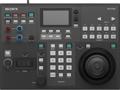
You have a range of options to control your PTZ cameras. Many come with smartphone apps or proprietary control software. Some cameras can be controlled by a dedicated hardware controller with buttons or a joystick connected wirelessly, via a web interface, or over an Ethernet connection (including NDI). Video production software, such as OBS, may offer control capability. Additionally, some cameras may include an IR remote control device. It’s all a matter of what works best for your workflow, budget, and priorities.
The PTZOptics HuddleCamHD HC-JOY-G4 joystick controller packs the controls you need into a small footprint.
Take advantage of NDI control, backlit buttons, and a full-color display with the Marshall Electronics VS-PTC-300.
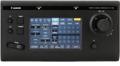
Control up to 100 supported Canon cameras over IP using the onboard joystick, zoom lever, and 7-inch touchscreen of the Canon RC-IP100 remote camera controller.
For a full-featured workflow, step up to the Sony RM-IP500 or the 200-camera Canon RC-IP1000 with multicamera display.
What Connections/Ports Do You Need?
PTZ cameras come with a wide range of input and output connections for video, audio, power, and control. Some connections, such as NDI, combine multiple functions into a single Ethernet cable. Ensure that the PTZ camera you select offers the specific connections your hardware requires.
Camera Video Output
- HDMI: This output sends uncompressed, high-definition video and audio to computers, displays, video mixers, and capture cards. For 4K transmission (especially at 60 fps), an HDMI 2.0 high-speed or premium high-speed cable is recommended. It’s best used for cable runs fewer than 50 feet. Note: an HDMI connection doesn’t lock, which makes it more susceptible to accidental disconnection.
- SDI (HD-SDI/3G-SDI/6G-SGI/12G-SDI):This output sends uncompressed, high-definition video and audio to professional broadcast equipment and recorders. It uses a locking coaxial cable that can cover over 1,000 feet without signal loss. It’s commonly used in multiple-camera setups connected to a switcher and supports video formats including 720p (HD-SDI), 1080p (3G-SDI), 4K 30 fps (6G-SDI), and 4K (12G-SDI).
- NDI: This LAN-based (IP) protocol combines video, audio, power (PoE), and pan/tilt/zoom control in a single Ethernet connection. Cameras with multiple NDI connections can be daisy-chained. The signal is compressed, which may impact color depth unlike SDI or HDMI, but this does not show up when compressed for online streaming. It handles up to 4K 60 fps and features auto-discovery, making it simple to add to production workflows. It handles distances up to 328 feet (more with extenders or network expansion).
- USB (USB 3.0 or USB-C for up to 4K 60 fps): This format makes connecting easy because many computers automatically recognize the camera as a webcam. While USB itself is uncompressed, many webcams compress the signal before sending it on their USB output. It’s used for short cable runs up to 10 feet and handles 4K video. Many PTZ cameras come with software to control the PTZ features through the USB connection.
- Dante: This format sends uncompressed, low-latency A/V over a standard Ethernet cable. It keeps all devices in sync, so it’s handy when managing an entire network from a central location using Dante Controller software. It supports up to 4K 60 fps video.
- RTMP: This legacy internet broadcasting protocol sends low-latency live feeds directly to streaming platforms or services, which reformat them for delivery to a wide range of devices including web browsers, smartphones, and smart TVs. It can handle 4K 60 fps video resolution, but output depends on the specific encoder, streaming platform, and network conditions.
- RTSP: This legacy low-latency protocol is more commonly used for surveillance and closed-circuit television systems. Some cameras using RTSP can handle 4K 60 fps.
- Composite (CVBS): This legacy standard-definition analog video connection is designed for lower resolutions with a maximum resolution of 960H using an RCA or BNC connector for compatibility with older equipment (not 4K or 1080p).
PTZ Control
- VISCA, ONVIF: These control protocols are sometimes used to connect cameras with controllers.
- RS-232/RS-422/RS-485: These connectionsallow compatible software or hardware to control the PTZ aspects of your PTZ camera. A single port allows control of a single PTZ camera, and two ports can be daisy-chained by your software/hardware to control multiple cameras.
Audio
- Audio In: This line-level connection (usually 3.5mm) receives an external audio signal from a switcher, mixer, or audio interface.
- Audio Out: This is a line-level connection for outputting a camera’s audio signal.
Select from Premier Camera Models
Sweetwater carries a wide selection of quality PTZ camera models matching specific feature/use combinations. We’ll start with the smallest sensor category and move up. Consider these standouts.
1/2.8-inch sensor/1080p
A great starting point is the economical Marshall Electronics CV612, featuring a 12x optical zoom, auto-tracking, and 60 fps at 720p or 30 fps at 1080p. Step up with the PTZOptics Move SE 20X — its 1080p 60 fps maximum resolution and automatic-tracking features capture expressive singers and platform roamers.
1/2.5-inch sensor/4K
Enter the high-resolution 4K arena with the Marshall Electronics CV630-NDI. In addition to the convenience of single-cable control, power, video, and audio, you get a maximum frame rate of 30 fps at 4K, a 30x optical zoom, and an extremely versatile depth of field.
The PTZOptics Move 4K sports a 1/2.8-inch sensor, a selectable 12x/20x/30x optical zoom, and smooth, 4K 60 fps clarity. Its Presenter Lock auto-tracking feature can follow a subject at distances up to 300 feet.
The Sony SRG-A40 NDI camera sports a 20x optical zoom backed by a 40x digital zoom plus a remote control, auto-tracking, and Sony’s hands-free AI framing. It sports 60 fps at 720p and 1080p and 30 fps at 4K.
For Dante systems, the PTZOptics Link 4K offers Dante AV-H support with a great 30x optical zoom and shallow depth of field for impressively clear 4K 60 fps cinematic shots. It also has PoE capability and auto-tracking that can lock onto a specific subject even when other people are in frame.
1/1.8-inch sensor/4K/digital PTZ
The Marshall Electronics CV420e combines a 1/1.8-inch sensor, 4K resolution, and wireless remote control, resulting in cost-effective versatility. By processing pan, tilt, and zoom features digitally rather than through hardware, it is both small and silent. It offers simultaneous USB 3.0 and HDMI output and features a maximum frame rate of 60 fps at 4K.
1-inch sensor/4K
With its Canon 4K CMOS sensor, DIGIC DV 6 image processor, and optical image stabilization, the Canon CR-N500 provides professional image quality. Plus, the 15x optical zoom and 8.3mm–124.5mm focal length provide adaptable functionality along with advanced face lock focusing that can track while zooming. It features a max frame rate of 60 fps at 1080p and 30 fps at 4K.
The Sony BRC-AM7 delivers professional, low-noise 4K 60 fps imagery even in low-light situations. (Its actual internal recording frame rate is 120 fps at 4K and 240 fps at 1080p!) Its newly designed motors maintain ultra-precise, near-silent operation. The combination of its 20x optical zoom and 24mm–480mm focal length extends the zoom to 30x in 4K and 40x in full HD to take your viewers to the heart of what’s important. Add that to an extremely fast auto-focus, smooth auto-framing features, and adjustable pan/tilt movement speed for exceptional results.
Specialty Cameras
The cost-effective Marshall Electronics CV605 makes for a great on-the-platform 1/2.8-inch 1080p 60 fps PTZ camera for shallow depth-of-field close-ups and team side shots or wider depth-of-field establishing room shots.
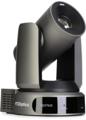
PTZOptics’ dual-sensor HuddleCam HD SimplTrack3 combines a 1/2.8-inch Sony sensor with a 1/2.8-inch Exmore sensor to simultaneously capture a wide-angle full-room shot and a separate subject shot to enable sophisticated video editing options at resolutions up to 1080p 60 fps.
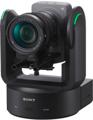
For cinematic quality, the professional-level Sony Cinema Line FR7 delivers in spades with its full-frame sensor, interchangeable lens options, real-time tracking, scalable ISO, up to 4K 120 fps and 1080p 240 with 5x slow motion, and a plethora of advanced pro features whether mounted on a tripod, dolly, or jib.
The Best Choice
Different PTZ cameras focus on unique combinations of features and uses, sometimes making it a challenge to determine which model will work best. We’re glad to help you narrow the choices and find the right PTZ camera for your specific needs. Call your pro Sales Engineer at (800) 222-4700 today for personalized recommendations so you can share your story and powerfully connect with your viewers.
If you’re new to livestreaming your services or are updating your current livestream, then these informative articles can help: