

Say “Auto-Tune,” and most people think “vocals.” But Auto-Tune works with other monophonic instruments, including single-note guitar solos — and you can get some pretty cool effects that can’t be obtained any other way.
Although Auto-Tune Pro 11 doesn’t do polyphony, it’s pretty tolerant if you brush against other strings. Also, you can restrict Auto-Tune’s range to cover the higher notes on which you play solos while ignoring lower notes so you can play chords lower on the neck with total abandon.
Here are examples of what you can do.
Hard Pitch Correction
Quantizing bends produces a novel variation on bending, whammy-bar pitch changes, and slide guitar. And with heavy finger vibrato, you’ll hear super-accurate trills. Although hard quantizing voice can sound unnatural, since guitar strings are fretted, they’re inherently “quantized” into semitones anyway.
1. Open the default preset and then make the following edits.
2. Click the gear icon in the upper right. Check the Use Low Latency box (fig. 1). This makes Auto-Tune suitable for live performance.
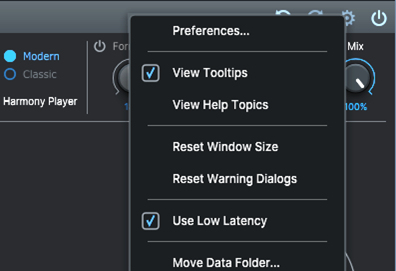
3. Set the Retune Speed, Flex Tune, Natural Vibrato, and Humanize parameters to 0.
4. Set Scale to Chromatic if it isn’t already (the Scale setting persists across presets).
5. For the Input Type, choose Instrument.
Now you’re ready to do some cool effects.
Constrain Slides to Scales
This is an unusual effect with much potential. By choosing a key and scale, you can constrain notes in slides to a particular scale (fig. 2). This applies to slide guitar but also to sliding up and down strings. For example, suppose you set Key to E and Scale to Major. Hit the low E string and slide up an octave. The slide will play only the notes that fall within the E major scale. Note that there isn’t a space between notes when you slide — the pitch change holds onto the previous note until you slide into range of the next note.

This also works with slide guitar, although you’ll want high action. This helps minimize artifacts and sounds from other strings, which complicate the detection process. Quantizing slide guitar can create some wild effects, as you’ll hear in the following audio example.
Pitch-quantized Slide Guitar: This slides up and down a guitar string and incorporates vibrato (see next).
Add Vibrato
Auto-Tune can vary the characteristics of natural vibrato, but it can also create vibrato. The capabilities are like a synth’s auto-vibrato function, including parameters for Waveshape, Rate, Delay, Onset Rate, and Variation to “humanize” the vibrato effect (fig. 3). Separate controls for Pitch, Amplitude, and Formant allow tricks such as having vibrato and tremolo at the same time, but modulating the Formant parameter produces a unique effect that’s unlike vibrato or tremolo.

For the Windows programs I tested for compatibility (Bitwig, Cakewalk, Cubase, FL Studio, Mixcraft, Pro Tools, and Studio One), the transport has to be running for vibrato to work. However, recording isn’t necessary. Playback is sufficient.
Hard Correction for Pitch Bends
Like vocals, you can quantize pitch so that bends are no longer bends but instead move in semitone intervals. Just play and bend naturally. For the best results, play one note at a time and, if possible, mute the other strings. The audio example gives an idea of what this sounds like.
Pitch Bend and Vibrato: All pitch bends are converted to half-step jumps. This example also uses some downward whammy-bar pitch shifts and added vibrato.
The Harmony Player
The Harmony Player is a new Auto-Tune feature that generates harmonies from a single vocal. With guitar, the Harmony Player makes it possible to add harmonies to a solo. However, note that Harmony Player does not work with low latency mode and handles only major, minor, and chromatic scales. It has the same basic strengths and limitations as the harmony generator effects used with guitar, so it’s at its best when mixed at a level below the solo.
Amp Sims, Too!
Vocals are a clean sound source, and so is dry guitar. So, I wasn’t surprised when Auto-Tune responded well to guitar. However, I was surprised that Auto-Tune had no problem handling highly distorted amp sims. The only requirement was that the amp sim should be inserted before Auto-Tune. Using amp sims also seemed like a better match for the Harmony Player within the limitations of trying to generate harmonies from a guitar.
Auto-Tune has been around since 1997. Since then, it’s made a name for itself with vocals — but I haven’t heard of too many guitarists using Auto-Tune. Maybe that will change when people insert Auto-Tune in their guitar tracks and find out what it can do.