Want to create a killer live recording of your band without draining your wallet? If so, then it’s easier than you might think, and you don’t need a remote recording truck to get the job done. This article will explore several cost-effective strategies for capturing your live performances.
- Bribe the Front-of-house Engineer
- Use a Standalone Recorder
- Use a Mixer with Built-in Recording
- Bring Your Laptop & Audio Interface
Bribe the Front-of-house Engineer
It’s common for front-of-house engineers to create recordings of their live mixes by feeding them into a stereo recorder connected directly to their console. These are typically referred to as “board tapes” or soundboard recordings. Indeed, the most coveted concert albums in the bootleg community are those from soundboard recordings.
If all you want is a high-quality stereo recording of your gig, then ask the front-of-house engineer to record the live mix and give you a copy. Soundboard recordings are far from rare. These recordings are so commonplace that many modern digital mixers include built-in SD card recorders, enabling engineers to create stereo recordings (and sometimes capture full multitracks) on the fly, directly on their console.
This is the most cost-effective way of obtaining a high-quality live recording in most situations. It might cost you nothing (or it might cost you the price of a blank SD card). Of course, enticing the front-of-house engineer with a gift (like a Sweetwater Gift Card), cash, or even fresh baked goods never hurts.
Use a Standalone Recorder
If the venue you’re playing in doesn’t have a dedicated front-of-house engineer, or they’re not willing to help you out, then another way to obtain a high-quality stereo recording of your live show is to use a battery-powered portable recorder, such as the Zoom H4n Pro Handy Recorder or the TASCAM DR-40X 4-channel handheld recorder. All you need to do is place the unit strategically in front of the stage. You can then use its built-in XY microphones to create a high-fidelity stereo recording of your performance.
For added depth and realism, you can add a stereo pair of wallet-friendly, large-diaphragm condenser microphones, such as the sE Electronics X1 As, to your recording setup and point them toward the audience. This will enable you to blend crowd noise and room ambience into the primary signal for a cool, live-sounding effect.
Use a Mixer with Built-in Recording
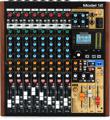
If you mix your own live show, then using a relatively inexpensive, small-format mixer with multitrack recording capabilities, such as the Zoom LiveTrak L-12 12-channel digital mixer / recorder or the TASCAM Model 12 mixer / interface / recorder / controller, is a practical live recording solution.
To deploy these mixers, use mics and DIs on your instruments and run them into the mixer’s inputs (remember to add a stereo pair of mics at the audience to capture the crowd’s interaction). Route the mixer’s main stereo outputs to your PA system. Set up your monitoring onstage, either with wedges or in-ears. The Zoom LiveTrak L-12 really shines in this regard, enabling you to craft up to five independent cue mixes. Both the TASCAM Model 12 and the Zoom LiveTrak L-12 include built-in effects to put the final polish on your live performance. Both units are also self-contained recording devices capable of capturing high-quality digital multitrack files onto an SD card that you can import, edit, and mix in your DAW.
Bring Your Laptop & Audio Interface
If you aim for the highest sound quality, then you can set up your laptop and audio interface and record directly to your DAW, much like you would in your home studio. To do this, you’ll mic and DI your sound sources as per usual, including audience microphones, and then route everything to dedicated inputs on your audio interface. (Pro tip: be sure you have enough hard drive storage for your entire show!)
If you have a front-of-house engineer, then route stems out of your interface and into the front-of-house console. If you don’t have a front-of-house engineer, then you can route the main stereo output of your audio interface to the inputs on your PA system. For monitoring, you can create cue mixes using your interface and software or let the front-of-house engineer create the mixes for you.
Using this method will net you a top-quality multitrack recording of your gig using a familiar DAW session file that’s primed and ready for editing, mixing, and mastering with full access to your plug-ins and other studio processors.
Sweetwater Is Your Live Recording Headquarters
Regardless of your chosen method, Sweetwater is your number one resource for musical instruments, gear, and — most importantly — expert advice. Call your Sweetwater Sales Engineer at (800) 222-4700 today to get started!