Apogee has updated their Symphony Control software for their flagship Symphony I/O Mk II series of audio interfaces. The release offers significant new features for users, including standalone AD/DA functionality, multi-unit support, compatibility with Apogee Control hardware remote, and an all new Symphony Control software for Mac.
Symphony Control Software
Symphony Control has been built from the ground up and replaces Apogee’s Maestro software for Symphony I/O Mk II users. Symphony Control delivers all the functionality of Maestro in a new, customizable user interface along with new features such as talkback functionality, the simplified “Essentials” control window and an FX Send mixer feature, recently introduced as part of the Element Control software.
Standalone Mode
Standalone routing lets you set up and use Symphony I/O Mk II without a computer. From the front-panel touchscreen you can set up Symphony I/O Mk II to use Apogee’s flagship AD/DA conversion with your Windows DAW workstation, digital console or even your hi-fi system. With Symphony I/O Mk II in standalone mode connected digitally to any of these systems, you can choose to bypass the AD/DA converters of your existing gear and utilize Apogee’s instead.
Multi-unit Support for up to 64 Channels of I/O
Symphony I/O Mk II Thunderbolt users can now connect two units simultaneously for up to 64 channels of I/O over a Thunderbolt connection to their Mac.
Apogee Control Hardware Support
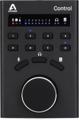
The latest software update provides compatibility between Symphony I/O Mk II audio interfaces and the Apogee Control hardware remote accessory. Apogee Control hardware remote connects directly to your Mac.
The new software is available as a free download for all registered owners.