
¡Obtenga asesoría en español!  Llámenos hoy a (800) 222-4701
(800) 222-4700 Talk to an expert!
Loading Cart
Your Cart Is Empty

See what's new at Sweetwater.

My Cart this.cartQty
Recording Guitar Bass Keyboard Drums Live Sound DJ Band & Orchestra Content Creators Worship

Hands-On Review: Tune-Bot

Hands-On Review: Tune-Bot

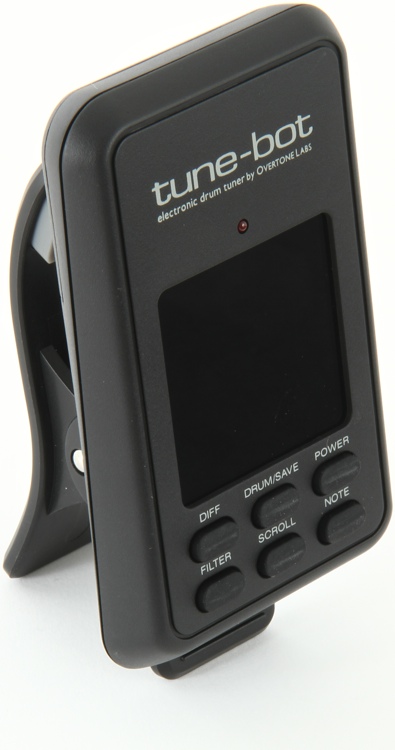
What is a Tune-Bot? A Tune-Bot is an electronic tuning device made specially for drums and the drum set by Overtone Labs. It quickly shows what pitch or note value each lug of the drum is at so you can adjust and get the drum in tune fast — great for beginning players who don’t have a lot of experience tuning drums. The Tune-Bot can not only help you get your drums in tune, but can also be a nice tool to help train your ears to what pitches work for your drumkit.

Simple
The Tune-Bot is compact and easily connects to the rim of the drum using the attached clamp on its back. Put in the included AAA batteries, turn the unit on, and you’re ready to get tuning. The top panel has a clear and easily read LED screen and the six buttons below that are clearly labeled.

Very easy to use
The Tune-Bot’s LED screen looks like a guitar tuner. There are two modes: Absolute mode (ABS) and Difference mode (DIFF). ABS mode tells you the pitch at each lug and DIFF mode lets you know the difference in pitch between each lug. It really is just that simple.

To tune a drum, you connect the Tune-Bot to the rim of the drum with the finger grips on the back of the unit, then you strike the drum about two inches from the rim. Tune-Bot reads the pitch and displays the frequency in Hertz. If you want to see the actual musical note, just press the Note button, and if you press the button again it goes back to Pitch mode. Continue to strike the drum at all of the other lugs and tighten or loosen each lug to get iy as close as you can to the same as the first lug. All the lugs don’t have to be exactly the same. In Pitch mode, it’s really easy to see the small differences and it is fine if they are off by just a little.

That is all you have to do! Repeat the procedure for all of your other drums and you will be rocking in no time with your drums in tune.

Other nice features
The Tune-Bot allows you to save the pitch settings for up to ten drums for easy recall. It also lets you scroll through your settings for the top and bottom heads so you can really zoom in on the perfect pitch for your particular drum.

There is also a Filter mode that lets you tell the Tune-Bot to reject a certain frequency. That way, if you find a pitch that you don’t like, the Tune-Bot will remember it and get you to the better pitches for your drum.

Wrap Up
The Tune-Bot is very easy to use on any drum on the kit. I quickly got around my whole six-piece drum kit in no time and was able to spend more time playing rather then tuning. The Tune-Bot is indeed a very cool product for drummers.
About Nick D'Virgilio

Sweetwater's Nick D'Virgilio is a world-renowned drummer/singer/songwriter who has played for such artists as Genesis, Peter Gabriel, and Tears For Fears, as well as Cirque Du Soleil's touring show, TOTEM. D'Virgilio has carved out a major presence in the progressive rock world with his former band, Spock's Beard, and with his current band, Big Big Train. At Sweetwater, Nick creates how-to content, demonstration videos, and product reviews, teaches music/pro audio classes, and serves as the first-call session drummer for Sweetwater Studios.
Read more articles by Nick »

Offer applies only to single-receipt qualifying purchases. Select manufacturers may require that only the manufacturer’s products qualify towards the minimum purchase amount needed to be eligible for promotional financing. Otherwise, an invoice that meets the minimum purchase amount and contains at least one qualifying manufacturer product is eligible for promotional financing. No interest will be charged on promo purchase balance, and equal monthly payments are required on promo purchase until it is paid in full. The payments equal the amount financed divided by the number of months in the promo period, rounded up to the next whole dollar. These payments may be higher than the payments that would be required if this purchase was a non-promo purchase. During the last month(s) of the promo period the required monthly payment may be reduced due to the prior months’ rounding. Regular account terms apply to non-promo purchases. New Accounts as of 07/31/2025: Purchase APR is 34.99%. Penalty APR is 39.99%. Min Interest Charge is $2. Existing cardholders: See your credit card agreement terms. Subject to credit approval.

Offer applies only to single-receipt qualifying purchases. No interest will be charged on the promo balance if you pay it off, in full, within the promo period. If you do not, interest will be charged on the promo balance from the purchase date. The required minimum monthly payments may or may not pay off the promo balance before the end of the promo period, depending on purchase amount, promo length and payment allocation. Regular account terms apply to non-promo purchases and, after promo period ends, to the promo balance. New Accounts as of 07/31/2025: Purchase APR is 34.99%. Penalty APR is 39.99%. Min Interest Charge is $2. Existing cardholders: See your credit card agreement terms. Subject to credit approval.

The estimated required monthly payment shown which excludes taxes and delivery equals the amount financed divided by the number of months in the promo period, rounded up to the next cent. During the last month(s) of the promo period the required monthly payment may be reduced due to this rounding. These payments apply only with the financing offer shown. If you make these payments by the due date each month, you should pay off this amount financed within the promo period, if it is the only balance you are paying off. If you have other balances on your account, this payment will be added to any other minimum monthly payments.

Applies only to select items from this manufacturer. Ask your Sweetwater Sales Engineer for more details.