

We’ve configured and used large-scale Sennheiser wireless microphone systems here at Sweetwater for years. There are some easy steps you can take to get the maximum channel count, range, and sound quality from your Sennheiser wireless system. We talked with Jeff Barnett, Sweetwater Sales Engineer and wireless expert, and he offered these tips to get the most out of your gear. If you have more questions about Sennheiser wireless microphone systems, just call your Sweetwater Sales Engineer!
#1
Don’t cover the antenna
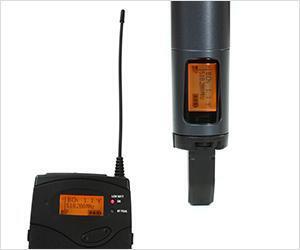
For best performance, the antenna on a transmitter should never be covered. With handheld mics, take care not to cover the antenna with your hand. If you don’t see an antenna on your microphone, it’s probably hidden inside the last couple of inches of the mic’s body. Hold the mic closer to its head/capsule to avoid covering it with your hand as you grab the mic.
If you’re using a beltpack with an external antenna, make sure that the antenna isn’t wadded up or bent when wearing it. Not only is this bad for the antenna (bend a wire enough times, and it’s sure to break), but it also severely impairs its transmission. You’ll end up with limited range and more dropouts with a wadded-up antenna.
#2

Fresh batteries are essential
Signal strength and operating range tend to drop off as the transmitter’s battery dies, so it’s generally best to change the battery at the beginning of every show, event, or service, even if the battery isn’t completely dead.
#3
Frequency selection is important when using multiple systems

The frequencies of multiple wireless systems must be carefully coordinated to avoid interference with each other. Simply having different frequencies is not always enough. Usually, the best way to do this is to use wireless systems from the same manufacturer and series – Sennheiser’s wireless systems automatically use frequencies that are already pre-coordinated not to interfere with each other. If you are combining systems from different manufacturers or different series, consult an expert.
#4
Maintain line of sight between components

The most common cause of signal dropouts is improper antenna placement. Line of sight should always be maintained between the antennas and the transmitters. If that’s not possible in your rack, the antennas should be mounted away from the receivers, possibly up on a wall, on a balcony rail, from the ceiling, or in another location that allows line-of-sight placement.
Remember that human bodies are excellent absorbers of RF energy. Your wireless transmitter probably does not have enough “oomph” to power through an entire audience on their feet. If your antennas are in the back of the room, then the middle of the pastor’s back may not be the best place for the beltpack transmitter, which forces the signal to pass through the pastor’s body on its way to the receiver.
#5
Keep transmitters and receivers as close as possible

If you are having problems with clear reception, try reducing the distance between the transmitters and receivers by moving the receivers closer to the stage. If that’s not practical, consider remote-mounting the antennas to be closer. And if you must run long antenna cables, don’t scrimp to save money – get the lowest-loss cable that’s available. RG-8 is recommended. If the cable run exceeds 25 feet, you may need an antenna booster – and it’s time to call an expert.