

Why does the preamp knob on my Presonus 192 make a fader move in Logic Pro X?
There is a MIDI I/O (internally) for non Studio One DAWs to remotely control the Mic-Pre’s via MIDI.
The encoder on the main display controls the level of each pre-amp, and it will send MIDI data since the preamps can be controlled via MIDI: See Studio 192 Manual, pg 11
We need to remap the Encoder Knob MIDI Output to something that does not affect channels in Logic.
We need to go into the MIDI Environment (which is not enabled by default).
1. Open Preferences
2. Click Advanced Cog Wheel
3. Click “Show Advanced Tools”
4. Click “MIDI”
5. Close Preferences
6. Click “Window” on Logic Menu Bar
7. Click “Show MIDI Environment”
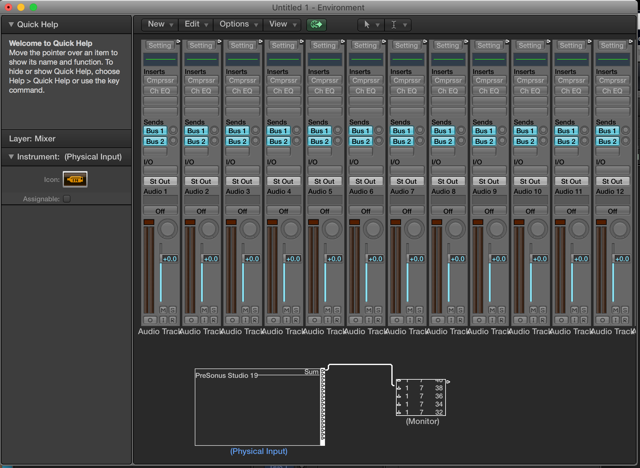
8. Click “New” – Physical Input, drag it down below the Mixer then
9. Click “New” – Monitor, drag it down below mixer next to Physical Input, not right next to it, give it some space. (see pic below)
10. Click and drag the cable from the Physical Input and drop it on the monitor.
The Encoder Knob / Studio 192 MIDI OUT is now remapped to the monitor Window in the Logic Environment. (see pic)
A good way to make sure you don’t have to do this every time you start a new song is to click on File and select Save As Template, that way Logic will open up this way for all new sessions when this Template is used.
When you need help, Sweetwater has the answers!
Our knowledge base contains over 28,000 expertly written tech articles that will give you answers and help you get the most out of your gear. Our pro musicians and gear experts update content daily to keep you informed and on your way. Best of all, it’s totally FREE, and it’s just another reason that you get more at Sweetwater.com.

