

How do I uninstall PreSonus Universal Control?
To uninstall Universal Control, follow the steps below. Make sure any device you have is disconnected from your computer.
Mac
- Download the latest version of Universal Control from your products downloads page.
- Once the download is complete, open the folder and launch the PreSonus Hardware Uninstaller.
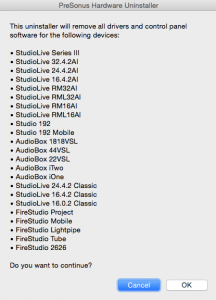
- The dialog box pictured below will appear. Click OK to begin uninstalling or Cancel to quit.
 PC
PC
- Quit all applications.
- Click the START menu and select All Programs.
- Click on the PreSonus folder and open the PreSonus Universal Control folder.
- Choose Uninstall PreSonus Universal Control.
- If you are asked to confirm, select Yes.
- Look in the System Tray in the lower right hand corner of your screen. If you see the red Universal Control icon, right-click it and select Quit.
- When you are prompted that the driver has been removed, click OK.
- Next, open the START menu and search for %appdata% and hit enter.
- Open the PreSonus folder and delete the Universal Control/FireStudio folders and any Universal Control .dmp files you see.
- Restart your computer.
- You have successfully uninstalled Universal Control.
When you need help, Sweetwater has the answers!
Our knowledge base contains over 28,000 expertly written tech articles that will give you answers and help you get the most out of your gear. Our pro musicians and gear experts update content daily to keep you informed and on your way. Best of all, it’s totally FREE, and it’s just another reason that you get more at Sweetwater.com.

