
Apollo Quick Start: Installation, Registration, and Authorization
Follow the steps below to prepare Apollo for use.
- Install the software.
Launch the Software Installer from the included CD-ROM or software download. Restart the computer after installation is complete.

- Connect Apollo to the computer via FireWire and power up the unit.
Turn off any connected speakers before powering Apollo.
- Open the UAD Meter & Control Panel application.
The application can be accessed under the blue UA diamond icon in the OS X Menu Bar at upper right of screen. (The location of the application file is: Startup Disk/Applications/Powered Plug-Ins Tools/UAD Meter & Control Panel.app)

- Open the “Plug-Ins” panel within the UAD Meter & Control Panel application.
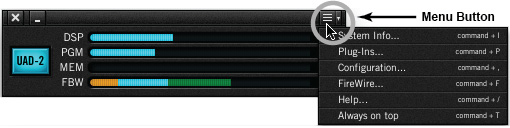
Access the Plug-Ins panel by clicking the menu button in the UAD Meter window and selecting “Plug-Ins…” from the menu (or type Cmd-P as a shortcut).
- Click the “Authorize Plug-Ins…” button.
The web browser will connect to the Internet. Create (or login to) your my.uaudio.com account to register Apollo and activate UAD plug-in licenses.

- Download the Authorization file.
Click the “Download Authorizations»” button at the bottom of registration page to download the auth file.

- Load the Authorization file.
Double-click the downloaded auth file to authorize Apollo (the file is downloaded to the default location specified by the web browser). When the “Authorizations successfully updated” dialog appears, click OK.


- Important! Adjust the FireWire setting to maximize Apollo performance.
See Optimizing FireWire Performance for details.
When you need help, Sweetwater has the answers!
Our knowledge base contains over 28,000 expertly written tech articles that will give you answers and help you get the most out of your gear. Our pro musicians and gear experts update content daily to keep you informed and on your way. Best of all, it’s totally FREE, and it’s just another reason that you get more at Sweetwater.com.

