
Optimizing FireWire Performance for the Apollo (Mac OSX)
About FireWire Bandwidth
FireWire bandwidth is shared between Apollo I/O streams, UAD plug-ins used within the DAW, and external FireWire hard drives. Available bandwidth also depends on the session sample rate; the higher the sample rate, the more bandwidth is consumed. FireWire bandwidth is displayed in the “FBW” meter in the UAD Meter & Control Panel application:

UAD Bandwidth Allocation
The UAD Bandwidth Allocation setting reserves FireWire bandwidth for UAD plug-ins used within a DAW. The default value (45%) allows Apollo to run at higher sample rates (88.2 – 192 kHz).
Important: If using sample rates of 44.1 kHz or 48 kHz, we recommend increasing the UAD Bandwidth Allocation setting to allow more UAD plug-ins to run within the DAW. See the table below for recommended values.
Recommended Maximum UAD Bandwidth Allocation Values
| Sample Rate (kHz): | 44.1, 48 | 88.2, 96 | 176.4, 192 |
| Without external FireWire hard drive: | 80% | 70% | 55% |
| With external FireWire hard drive: | 55% | 40% | 20% |
| I/O buffer setting for best playback results: | 512 | 1024 | 2048 |
To change the UAD Bandwidth Allocation setting:
- Quit all DAW software and the Console application (most UAD hosts must be quit to change this setting).
- Open the UAD Meter & Control Panel application. It can be accessed under the blue UA diamond icon in the OS X Menu Bar at upper right of screen (as shown below).

- Open the “FireWire” panel by clicking the menu button in the UAD Meter window, as shown below (or type Cmd-F as a shortcut).
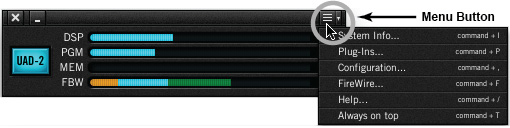
- Change the UAD Bandwidth Allocation setting (shown below) by clicking the up or down arrows.

UAD Bandwidth Allocation Notes:
- To run more UAD plug-ins within a DAW, use USB, eSATA, or internal hard drives for audio session files instead of FireWire drives.
- Mac FireWire performance is better on some systems versus others due to the FireWire controller chips they contain. In general, newer Mac Pro, iMac, and Mac mini systems contain a superior FireWire controller chip and will deliver better FireWire performance than MacBook Pro systems. There is no simple method to determine which controller is used.
- Apollo has intelligent FireWire bus monitoring. If audio playback is compromised, a “FireWire Interrupt Detected” dialog appears. If that occurs, decrease the UAD Bandwidth Allocation setting for reliable playback. Note that even if the dialog appears during playback, audio file integrity is never compromised during recording.
- The UAD Bandwidth Allocation only applies when UAD plug-ins are used within a DAW. UAD plug-ins used within the Console application do not consume FireWire bandwidth.
When you need help, Sweetwater has the answers!
Our knowledge base contains over 28,000 expertly written tech articles that will give you answers and help you get the most out of your gear. Our pro musicians and gear experts update content daily to keep you informed and on your way. Best of all, it’s totally FREE, and it’s just another reason that you get more at Sweetwater.com.

