What is a DiGiGrid SoundGrid DSP system, and how can it benefit my workflow? This buying guide will answer these questions, and give you examples of how it would be used in common applications.
The dedicated DSP processing and network audio that a DiGiGrid SoundGrid DSP system provides are powerful enhancements to any recording studio, live sound system, or broadcast environment. Sweetwater Sales Engineers are experts in DiGiGrid products and systems – if you have further questions after reading this guide, just give us a call!
DSP Processing Plus a Powerful Audio Network
You can base virtually any type of recording studio, live sound system, or broadcast system around a DiGiGrid-based digital audio network, with the benefits of enhanced versatility, simplicity, and epic sound quality. Tap into any recording space in your studio facility, from any control room. Run high channel counts over extremely long distances with ultra-low latency via simple Cat 5e or Cat 6 Ethernet cables. Minimize your analog cable runs while gaining complete routing flexibility. Whether you work with Pro Tools or any native DAW, a DiGiGrid network gives your existing system exciting new potential.
By adding a DiGiGrid SoundGrid DSP server to your audio network, you’ve got impressive processing power to run SoundGrid-compatible Waves and third-party plug-ins in real time with incredibly low latency. You can track, monitor, and mix while running hundreds of plug-ins, without taxing your host system one bit. Create custom chains of plug-in processors in the SoundGrid Studio software interface, and then apply them to any inputs and outputs in the network. The ultra-low latency processing and exceptional sound quality make a DiGiGrid SoundGrid DSP network an amazing solution.
Five Amazing Things You Can Do with a DiGiGrid SoundGrid DSP Network:
- Route high channel counts at high resolution across long distances via simple network cables
- Minimize analog cable runs while providing ultra-low latency and an ultra-low noise floor
- Run hundreds of SoundGrid-compatible plug-ins in real time with dedicated DSP
- Tap into the same audio network from multiple workstations running different DAWs
- Add processing power and routing flexibility whether you work with Pro Tools or any native DAW
What Is SoundGrid?
DiGiGrid has teamed up with plug-in manufacturer Waves to create the SoundGrid platform, which provides DSP power for SoundGrid-compatible plug-ins. DiGiGrid audio interfaces with a built-in DSP server provide processing power for hundreds of plug-ins in real time, allowing you to record, monitor, and mix with your favorite plug-ins as if they were hardware. Use the SoundGrid Studio software interface to add plug-ins to inputs and outputs, and manage signal routing across the entire network right from your workstation.
You can also tap into this processing power for anywhere on the network – for example, all of your control rooms can access the same DSP server located in your machine room for processing power. Because of its ultra-low latency, powerful DSP, and intuitive operation, a DiGiGrid SoundGrid system is just as suited for live sound applications as it is for studio work. Use industry-standard plug-ins on live singers, monitor mixes, and the main FOH mix. Easily set up sends and splits for recording or broadcast. Even large format, multi-room facilities are easy to manage with a DiGiGrid SoundGrid DSP system.
Key Benefits of a SoundGrid System
Manage high channel counts at high resolution over a single cable
Thanks to the power of network audio, every device in your DiGiGrid SoundGrid DSP network is connected via simple Ethernet cable. You’ll be reducing the amount of line noise in your system thanks to shorter analog cable runs. And system maintenance in your facility will be much easier in the long run. Best of all, adding a whole new room to your SoundGrid system is as easy as plugging in a single cable.
Run hundreds of top-notch plug-ins without taxing your host CPU
You can load up hundreds of Waves and third-party SoundGrid-compatible plug-ins with a DiGiGrid SoundGrid DSP server and use them on any DAW connected to the network. Not only does this free your host CPU’s resources for audio performance, but it also allows multiple workstations to all tap into the same powerful plug-in processing. And instead of authorizing dozens of plug-ins on each individual workstation, all of your plug-in processors are centralized in a single SoundGrid DSP server – simple!
Ultra-low latency from tracking to mixdown
Even when you’re applying several complex plug-in processors on multiple inputs, the DiGiGrid SoundGrid DSP system offers amazingly low latency down to just 0.8ms. You can record through plug-ins as if they were hardware processors, without having to wrestle with buffer settings in your DAW. Even when you’re working with high channel counts and sample rates, the DiGiGrid SoundGrid DSP system provides the low latency that professional projects demand.
Route audio between different workstations and DAWs
Using a simple Ethernet switch, you can connect multiple workstations running different DAWs all to the same DiGiGrid SoundGrid DSP server. This means every workstation can tap into the DSP powered plug-ins, but that’s just the start. Because they’re all networked together, you can use SoundGrid to route audio directly from one workstation into another without patching any audio cables. When you need to get audio from one workstation to another, this can be a faster solution than exporting a file, transferring it, and importing it into a different DAW.
Application Examples
Using DiGiGrid SoundGrid DSP with a native DAW
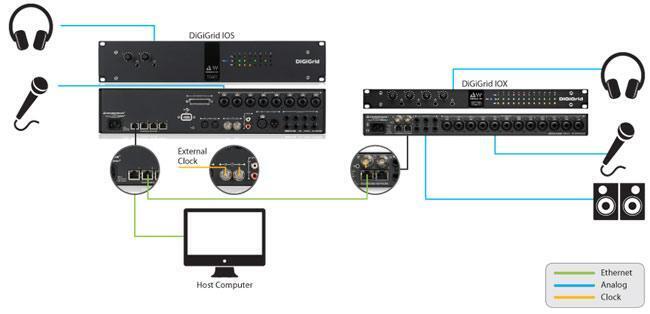
This setup allows you to record, monitor, and mix with a large number of SoundGrid-compatible plug-ins at near-zero latency. The DiGiGrid IOS serves as your main audio interface, connected to your host computer via Ethernet. The IOS provides audio I/O as well as DSP for your plug-ins. The IOS expansion audio interface can be placed remotely and connects to the IOS in your mixing position via Ethernet. All inputs and outputs can be managed directly from your host computer.
Using DiGiGrid SoundGrid DSP with Pro Tools
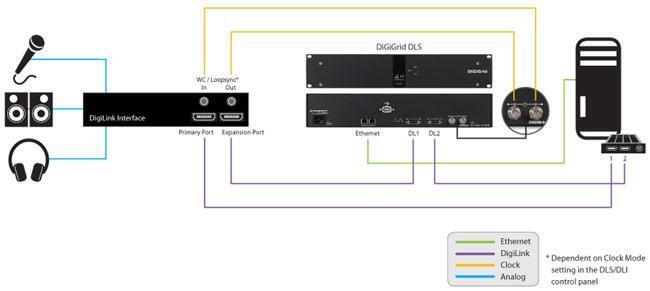
This example combines the production power of a Pro Tools|HDX system with the versatility of the SoundGrid network. You have real-time processing for hundreds of plug-ins, ultra-low latency, and access to multiple I/O devices across the network. Expanding the system is as simple as adding more Pro Tools I/O hardware.
Using DiGiGrid SoundGrid DSP with multiple computers running different DAWs
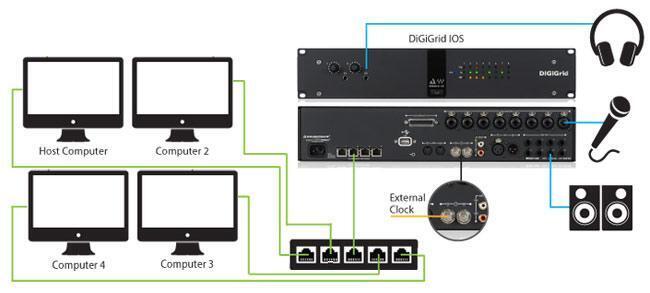
Using a simple network switch, you can connect multiple workstations to a central SoundGrid DSP server. Each workstation can tap into any I/O device on the network, and you can even route audio directly from one workstation to another using the network. From large studios to classrooms and broadcast facilities, a DiGiGrid SoundGrid DSP is one of the best ways you can tie together multiple DAW workstations into a single, coherent audio ecosystem.
DiGiGrid SoundGrid DSP System Components
IOS

The DiGiGrid IOS is an Ethernet audio interface and SoundGrid DSP server for native DAW systems. It provides DSP power for hundreds of SoundGrid-compatible plug-ins while also providing analog and digital I/O. Use it as your main audio interface with any native DAW, or connect expansion audio interfaces for more comprehensive I/O options or for remote accessibility.
IOC

This Ethernet audio interface can be used to add more I/O to your SoundGrid DSP server. It can also serve as a standalone audio interface for any native DAW, just without the added DSP for plug-in processing. The comprehensive I/O selection on the IOC is designed with control room operation in mind.
IOX

Similar to the IOC, the IOX can be used either as a standalone Ethernet audio interface or as an expansion interface for your DiGiGrid SoundGrid DSP system. The I/O selection is designed with tracking rooms in mind, providing generous microphone connectivity and four headphone outputs for artist monitoring.
DLS

The DiGiGrid DLS is an Ethernet audio interface and SoundGrid DSP server for Pro Tools|HD and Pro Tools|HDX systems. It provides DSP power for hundreds of SoundGrid-compatible plug-ins while also supporting 64 channels of audio from your Pro Tools hardware. A built-in network switch makes it easy to connect multiple workstations.
DLI

The DiGiGrid DLI is an expansion interface for the DLS. The DLS supports up to 64 digital inputs and outputs for Pro Tools – if you need more than that, add the DLI expansion interface for another 64 channels of Pro Tools I/O.

M Cube
The M Cube features one mic/line input and one instrument/line input, plus a high-powered headphone amp for monitoring. It can be used to expand a DiGiGrid network, or as a standalone Ethernet audio interface.
Q Cube
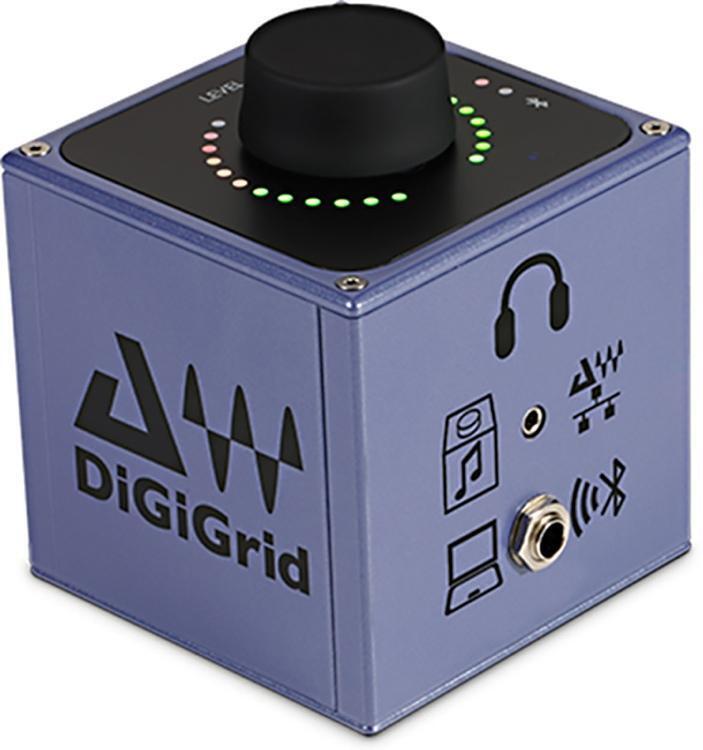
Designed to deliver ample power for clear, loud headphone monitoring applications, the Q Cube can be added to a DiGiGrid network, or used as a standalone Ethernet audio interface.
S Cube
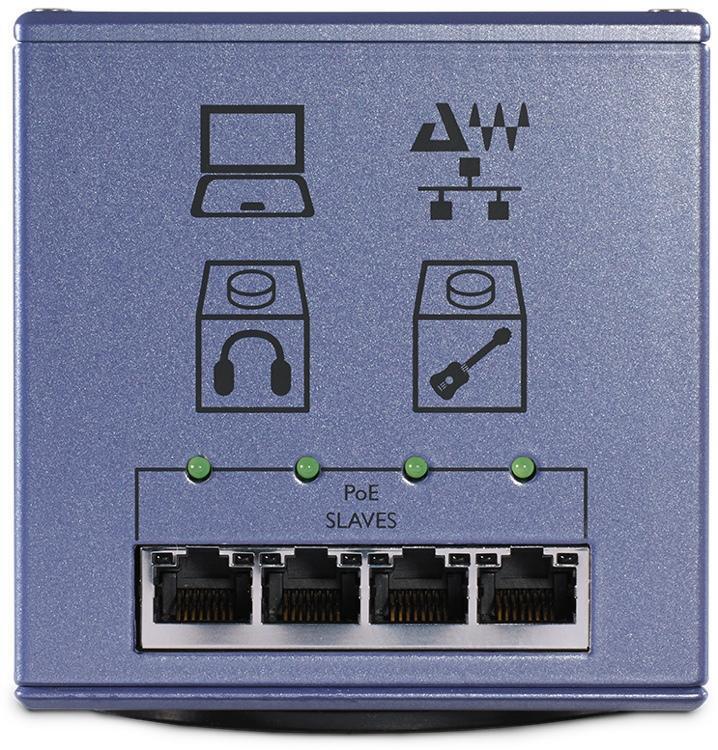
The S Cube is a Power-over-Ethernet (PoE) interface for DiGiGrid and Dante devices, with four downstream ports and one upstream port.
D Cube
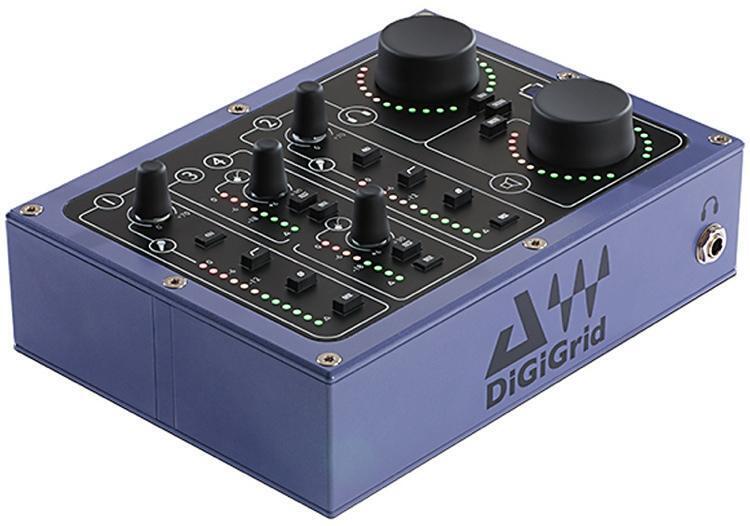
The D Cube is a four-channel audio interface with two mic/line inputs, two instrument/line inputs, four line outputs, and headphone output, perfect for desktop, small-footprint applications. Can be used with a DiGiGrid network, or as a standalone Ethernet audio interface.

MGB (MADI to SoundGrid BNC)
Connect any coaxial MADI device to your SoundGrid network
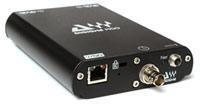
MGO (MADI to SoundGrid Optical)
Connect any optical MADI device to your SoundGrid network
| Component | What it is | Analog I/O | Digital I/O |
|---|---|---|---|
| DLS | SoundGrid DSP server with Pro Tools I/O | No analog I/O | 64-in/64-out via DigiLink |
| DLI | Pro Tools expansion I/O, for use with DLS | No analog I/O | 64-in/64-out via DigiLink |
| IOS | SoundGrid DSP server and Ethernet audio interface for native DAWs | 8 x mic/line in (XLR/TRS combo), 8 x line out (TRS), 8 x alt line out (D-sub), 2 x headphone (TRS) | 2 x S/PDIF (Coax), 2 x AES (XLR) |
| IOC | Expansion I/O for SoundGrid systems, with I/O configuration optimized for control room use. Can also be used as a standalone Ethernet audio interface. | 2 x mic/line in (XLR/TRS combo), 8 x line in (D-sub), 8 x line out (D-sub), 2 x headphone (TRS) | 8-ch ADAT I/O (Optical TOSlink), 16 x AES (2 x D-sub) |
| IOX | Expansion I/O for SoundGrid systems, with I/O configuration optimized for tracking rooms. Can also be used as a standalone Ethernet audio interface. | 1 x mic/line in (XLR), 1 x inst/line (TRS), 1 x headphone (TRS) | No digital I/O |
| M Cube | Expansion for SoundGrid systems. Can also be used as a standalone audio interface. | 12 x mic/line in (XLR/TRS combo), 6 x line out (TRS), 4 x headphone (TRS) | No digital I/O |
| Q Cube | Headphone amp for SoundGrid systems. Can also be used as a standalone Ethernet audio interface. | 2 x line in (RCA), 2 x headphone (TRS) | 2 x AES (XLR), Bluetooth |
| S Cube | PoE interface for DiGiGrid and Dante devices. | No analog I/O | No digital I/O |
| D Cube | Expansion for SoundGrid systems. Can also be used as a standalone Ethernet audio interface. | 2 x mic/line (XLR), 2 x inst/line (TS), 4 x line out (TS), 1 x headphone (TRS) | No digital I/O |
| MGB | Connects any coaxial MADI device to your SoundGrid network | No analog I/O | 128 channels via MADI BNC |
| MGO | Connects any optical MADI device to your SoundGrid network | No analog I/O | 128 channels via MADI optical |
 Waves eMotion LV1
Waves designed the eMotion LV1 for audio networking over SoundGrid, allowing you to mix audio on the network from a flexible software environment. Each of its mixer channels has its own plug-in rack that can run up to eight Waves or 3rd-party plugs-ins. Whether you use Waves eMotion LV1 with an industry-standard hardware controller, a multi-touch screen, a laptop, or a mobile device, you have the same smooth, natural workflow.
Designing a DiGiGrid SoundGrid DSP Network
You can tap into the power and flexibility of a DiGiGrid SoundGrid DSP network even if you’re not building your system from scratch. Any native DAW system or Pro Tools system can benefit from the network flexibility, DSP power, and exceptional sound quality that DiGiGrid and SoundGrid provide. Whether you’re designing a new system or enhancing your existing rig, there’s a DiGiGrid SoundGrid DSP solution for you. Call your Sweetwater Sales Engineer anytime to learn more!