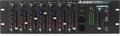
“I recently purchased an Alesis QS8.1, but I find I can only get it to play one sound at a time when I use it with my sequencer. What’s wrong?”
(While the advice below is specific to the Alesis brand of keyboards much of it is applicable to many other brands.)
You need to set it up for multitimbral operation. The Alesis keyboards default to “normal” mode, which is essentially a performance mode optimized for playing all its sounds (including layers and splits) from its own keyboard. This mode does not allow multitimbral operation, and the unit will only respond to one MIDI channel. Follow the steps below to set it up for multitimbral operation so it is playable on all 16 MIDI channels. Remember that while you have it set for multitimbral operation the only way you can do splits and layers is by playing through your sequencer and having it define them for you.
- Hit the EDIT Select button
- Hit the right Bank button, which is the GLOBAL button
- Scroll until you get to PAGE 6, which is the KEYBOARD MODE
- Using your page button – choose the keyboard mode of SOLO
- Now hit your MIX key
- Hit the 00 button
- Scroll back until you see MULTITIMBRAL: Bank USER and you see 16 numbers on the bottom of the LCD – then you are in Multitimberal mode