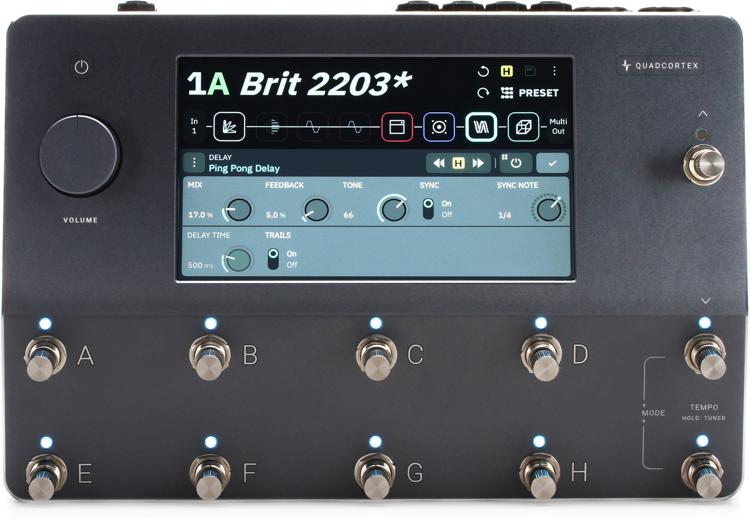
After months and years of hype and rumors, Neural DSP is proud to unveil Quad Cortex’s full-featured desktop editor: Cortex Control, available to all current Quad Cortex owners as of October 9, 2023. This comprehensive editor will transform your Quad Cortex sound-shaping workflow with a remarkably intuitive and inviting user interface, allowing you to tweak, twist, and fine-tune your tones without having to lean down to adjust your touchscreen!
Equally exciting is Neural DSP’s joint announcement that “Cortex Control is the bridge to plug-in compatibility,” as plug-in compatibility has been arguably the most requested Quad Cortex feature since the unit was first launched in 2020. In fact, Neural DSP recently announced that in a few short weeks, Archetype: Plini X will be the first Neural DSP plug-in to make its way to the Quad Cortex. There’s never been a better time to own a Quad Cortex, so if you’re looking to take Neural DSP’s industry-defining modeling unit into your own hands, then make sure to give your Sweetwater Sales Engineer a call at (800) 222-4700!
Latest News from Neural DSP
We are so excited to announce that the open beta of Cortex Control, our Desktop editor, is live! Users can find out more at this link: https://neuraldsp.com/cortex-control
The manual for Cortex Control (Beta) is here: https://neuraldsp.com/downloads
Note: Users must download and install 2.2.0 from their QCs and Cortex Control from the website.
Remember that this “open beta” is a crucial step in refining and enhancing our software. During this phase, you may encounter bugs, issues, or unexpected behavior. We want to emphasize that this is entirely normal and expected. Your feedback and reports are invaluable in helping us identify and address these challenges to make Cortex Control even better.
Cortex Control
Fully Integrated Desktop Controller for Quad Cortex
Cortex Control lets you manage every feature and setting of your Quad Cortex effortlessly in a sleek and intuitive desktop interface.
Boots in Seconds
Cortex Control boots in seconds and instantaneously syncs your Quad Cortex’s current state. Pick up where you left off without any interruptions in your workflow.
Optimized Workflow
Intuitive mouse actions and keyboard shortcuts ensure that tweaking parameters, managing files, carrying out tasks, and navigating through Cortex Control is smooth and efficient.
Bulk Actions
Copy, like, upload, download, or delete multiple Presets with a few clicks. Similarly, you can edit, upload, download, or delete multiple Neural Captures and IRs at once.
Local Backups
Cortex Control lets you create and manage local backups of your Quad Cortex directly on your computer. You can create as many local backups as you need.
Quick actions for renaming, updating, deleting, and recalling backups makes managing them quick and easy.
Internet via USB
Quad Cortex can access the Internet using the USB cable it’s connected to your computer with. This ensures uninterrupted Internet access for your Quad Cortex regardless of Wi-Fi availability. Quad Cortex will prioritize Internet via USB when Cortex Control is open.
Import IRs
Adding IRs to your Quad Cortex or Cortex Cloud profile is streamlined with Cortex Control. Simply open your IR library and drag and drop your IRs into it. The IRs will be immediately available on your Quad Cortex or Cortex Cloud account, depending on which library you upload them to.
Live Tuner
Stay in tune without having to open the tuner. Toggle the live tuner by holding CMD/CTRL and clicking the tuner button in the Utility Bar.
Audition Devices
Click a device on The Grid and then click on another device in the Device List to audition it. Click the auditioned device again to add it to The Grid and replace the loaded device or press ESC to cancel the change.
Create Neural Captures
The full process for creating Neural Captures can also be completed on Cortex Control.
Available for Free for macOS & Windows
Download Cortex Control today for macOS or Windows.
macOS minimum requirements:
- Intel Core i3 Processor (i3-4130/i5-2500 or higher)
- Apple silicon (M1 or higher)
- 8GB of RAM or more
- macOS 11 Big Sur (or higher)
Windows minimum requirements:
- Intel Core i3 Processor (i3-4130/i5-2500 or higher)
- AMD Quad-Core Processor (R5 2200G or higher)
- 8GB of RAM or more
- Windows 10 (or higher)