

Your studio is meant to be a creative space. And — believe it or not — a dirty, cluttered studio environment isn’t conducive to creativity. If you’re tripping over cables, staring at a pile of dirty dishes, or wasting time looking for a session file, you’re not creating music. Here are some tips that will transform your studio into a fine, well-oiled machine that’s primed for inspired music making.
1 — Keep Your Space Clean
Let’s start with the most obvious: keep your space clean. Besides being unsightly and unsanitary, dust and dirt can wreak havoc on your gear. So vacuum the carpet. Dust off the furniture. Wipe down your computer’s peripherals. Use compressed air to blast dust off delicate items. And whatever you do, don’t eat in your studio — it’s a surefire way to create a mess. Plus, it’s distracting. Keep your mind (and your hands) focused on your music, not on your fried chicken.
2 — Get Rid of the Clutter
It’s difficult to concentrate if your studio looks like a place you’d see on an episode of Hoarders. A clean space equals a clean mind. So remove unrelated clutter — papers, books, magazines, and miscellaneous items — from your work space. Find a place for everything and put everything in its place. Keep instruments and microphones in their cases when you’re not using them. Fold your mic and music stands and put them away. Put your redundant or rarely used pieces of gear into storage (or better yet, sell them — they’re basically expensive paperweights).

3 — Keep Your Computer Organized
A computer is at the center of any modern studio’s workflow. And just like it’s important to keep your physical space organized, it’s imperative that you keep your virtual space organized. Keep your computer’s desktop clear — if you’re not actively working on it, put it somewhere else. Archive old files, folders, and documents. Use a consistent filing system with a logical folder hierarchy (e.g. Client -> Date -> Session). Uninstall unnecessary software. Audit your plug-ins — nobody needs 71 different equalizers. Lastly, close non-music applications — email, web surfing, social media, etc. — they’re creativity killers.
4 — Make Your Gear Accessible

If you have to walk across the room every time you want to increase your preamp’s gain a couple of dB, you’re losing creative vigor with each needless step. To resolve this, keep the gear you use the most within direct reach right from your chair. Rack up often-used processors — your monitor controller, audio interface, preamps, etc. — and keep them close to you. Ensure that everything is at a comfortable height. If you have to bend over or crane your body to reach your gear, it’s not positioned well. Your mixer or control surface, as well as your computer keyboard and mouse, should be arranged so you can use them with your wrists in a neutral position. And while you’re at it, get a comfortable, ergonomic chair — it’s cheaper than a chiropractor.
5 — Organize Your Cables
Recording studios use a lot of cables. And it doesn’t take long for them to get out of hand, creating a confusing mess of spaghetti. That’s why organization is vital — it will keep you from yanking on wires, wasting time trying to set things up, and potentially plugging something in wrong and damaging your equipment. So what should you do? For starters, clean house — sort through your oversized assortment of cables and dispose of any that are damaged or don’t work. Develop a sensical storage system so you can find what you’re looking for in an instant and store them on pegs or in drawers for easy access. Label or color-code them so it’s easy to distinguish one from the other. Run them along walls and furniture to avoid walking (or tripping) over them. Bundle them with hook-and-loop fasteners or zip ties. And if it takes you more than a couple of minutes to hook something up, get a patchbay.
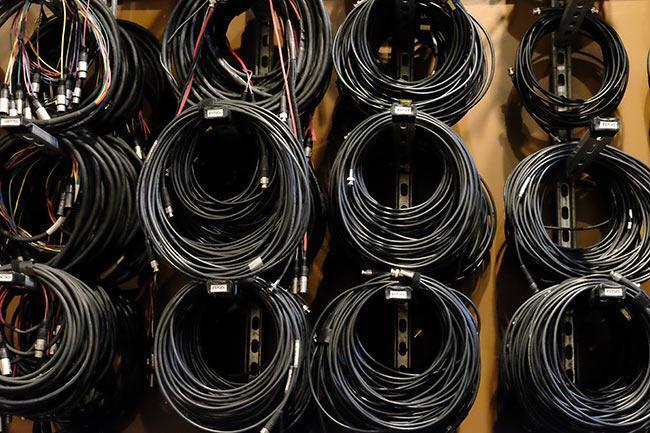
Pro Tip: Don’t pair instrument cables and power cords — it can create unwanted noise due to EMI (electromagnetic interference).
6 — Establish a Routine
The best way to maintain your studio is to establish a routine. Make it a point to clean your studio at the end of every session. Dump all the extraneous junk that collected on your computer. Clean anything in the room that became soiled and eliminate any clutter that accumulated while you were working. The only items that should be left out are the ones you need for your next session. Knowing that your studio is in tip-top shape can be a terrific motivator — you’ll be ready to hit the ground running!
Keeping It Clean
Being distracted in your studio is detrimental to your creative mindset, and a cluttered, chaotic environment is distracting. Keeping your studio clean and free of junk will go a long way toward creating a comfortable, creative atmosphere that’s guaranteed to assure success. Follow these recommendations, and watch your productivity take off!