

There are a lot of exciting things we can do with audio signals — but level matching usually isn’t on the list. Adjusting the volumes of two or more audio sources so that they have equal volume when comparing them isn’t something that usually gets people’s creative juices flowing, but if you’re mastering multiple songs and want them all at the same volume or you want to be able to accurately mix and compare signals, you have to do it. Studies have shown that we perceive louder sounds to have more bass and clarity in the high frequencies. Even as little as 1dB of difference in volume can make one audio signal sound “better” than another. That means that if something sounds louder, we’ll make mix choices that we wouldn’t otherwise if we perceived it to be the same volume as everything else. It also means that if we’re trying to audition two sounds, we’ll be drawn to the louder one, even if it doesn’t sound as good at the same level.
Okay, so level matching is important. But is that really a big deal? Can’t we just make the softer one louder? Unfortunately, level matching usually isn’t as simple as turning up the fader volume or gain at some point in the signal chain of the quieter signal. If two signals have differing peaks, they still won’t sound even. And if you compress them to soften the peaks and turn up the compressor‘s makeup gain, the signal being compressed may sound better because of the operation of the compressor.
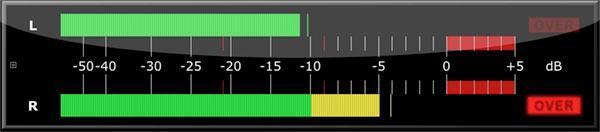
The best way to level match signals starts with having a good metering plug-in that offers accurate Root Mean Square (RMS) metering. This is a meter that focuses on the average loudness of an audio signal rather than the peak loudness that an audio signal achieves. To get technical about it, RMS metering doesn’t just measure the amplitude peaks of your signal, but the duration between those peaks. This makes it a slower measurement because the meters are averaging out the peaks and troughs and their duration to reflect the average loudness. This is vital because RMS metering is better at approximating how your ear perceives a signal. A signal that has a few really loud peaks but a lower RMS is going to sound less loud than a signal with lower volume peaks but a higher RMS. So you’ll want to use an RMS meter as your guide and then use your DAW or audio editor’s faders or gain control to get each audio source’s RMS level as close as possible.
Adjusting RMS levels is the beginning of level matching, but it’s not necessarily the end. If none of the signals you’re level matching have loud peaks, that might be all you need. But if you do have large peaks, matching the RMS energy isn’t going to be quite enough; the signals with big peaks are going to sound louder at those points. This is where judicious use of a compressor comes into play. You don’t need to squash your signal — remember, we’re just trying to reduce the peaks, and we only need to compress them until we don’t perceive them as being louder than our other signal. So generally use a light compression ratio, maybe 1:4 or so, and only a few dB of compression, say 2dB–4dB. That should be enough to bring any peaks down to a level that, even if they still peak higher on the peak meter, won’t trigger the RMS meter, and they’ll sound equal to your ears.
Okay, so are we done now? Well, maybe. If you’re A/Bing two audio files or you just want to temporarily level match your bass, detuned guitars, and bass synth so you can accurately EQ them to fit well with each other, you probably are. But if you’re mastering, those smooth peaks that weren’t a problem for comparison level matching may suddenly be a problem for producing CDs or a mastered digital album where everything sounds the same after being compressed for streaming. In those cases, you’ll want a limiter to help you get the levels of each song to truly fit with each other and never overload the needle.
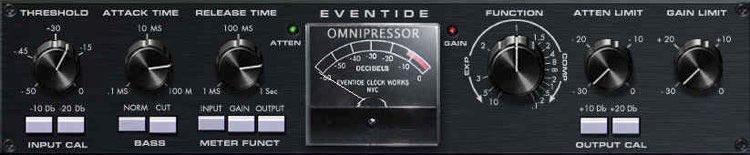
A limiter is a type of compressor that has an extremely high ratio so that its threshold can act like a brick wall and really clamp down on any signal levels that exceed it. In other words, your compressor musically smooths the peaks, and your limiter is your insurance policy against errant peaks that go over 0dB (or wherever you put the limit; generally, -0.1dB is a good limit). That way, when you string multiple songs together, not only will their average RMS level be the same thanks to your level matching and light compression, but your limiter will also catch any peaks to avoid moments that take everyone by surprise.
Level matching may not be glamorous, but it’s necessary. These basic techniques will help you get your audio levels under control. For more advanced techniques, be sure to catch some of the great mastering videos on Sweetwater’s YouTube channel!
If you have any questions about mastering plug-ins, call your Sales Engineer at (800) 222-4700.