Arguably the most versatile tool in your practice arsenal is your iPad. The number of ways to use it to enhance your practice time is staggering and still growing! The portability and versatile nature of the iPad allows you to integrate it however you need: virtual sheet music, audio or video recording, play-along tracks, teaching apps, amplifier or instrument simulator, transcription, or simply a place to store and play back your music library.
ORGANIZE WITH ITUNES
iTunes is, of course, a great place to organize your music. Making iTunes playlists of things you want to work on can help keep you focused. Whether it’s transcribing difficult material or adding songs to your repertoire, make a “to-do” playlist and put the songs in the order in which you intend to learn them. Have a “completed” playlist as well, to show your progress. Playlists for different purposes such as “new band songs” or “stuff that’s really difficult” will help with purpose and direction and make them easy to share with other people who may need to learn them as well.
If those songs need to be examined closer, apps like the Amazing Slow Downer allow you to change the speed of a music file down to 1/4 of the original speed without changing pitch. Simply choose a song from your iPad and load it into the app. The pitch can be altered as well, to help match tuning or to put the music in another key. You can also make a loop of a section that needs repeated study. YouTube is another amazing resource for music and NoteTube is an app that works like the Amazing Slow Downer for YouTube.
NOTATION & CHARTS
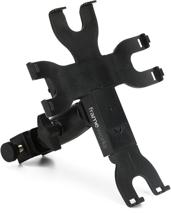
There are basic apps for making notes and complete notation and playback editors, such as Notion. These are handy for organizing written lyric or song charts, keeping up with sheet music or even creating written music. The AirTurn DIGIT is a wireless, bluetooth controller for apps that allows you to turn pages, advance songs, etc., and the added foot controller allows you to do it hands-free. To keep your iPad right where you want it, the Gator Frameworks Adjustable Clamping Tray easily mounts your iPad to any tube-shaped stand, such as drum or mic stands and adjusts for the perfect line of sight.
RECORD YOURSELF
Using a DAW app on your iPad, such as GarageBand, allows you to create tracks to practice with and record your own performance. Listening back to yourself gives objectivity that you can’t have while actually performing. Playing with tracks — or even a simple drum loop — makes you evaluate your ability to perform whatever it is you’re working on and your general sense of tempo.
AMP APPS & INPUT
Apps such as Amplitube are guitar-amp simulators, which are great for lower volume or headphone practice. Using your iPad in this way will require an interface to get signal into your iPad, whether it’s a simple one such as the Line 6 Sonic Port or IK Multimedia iRig, or the more involved Apogee Quartet or Alesis iO Dock II.
EAR TRAINING, THEORY, & MORE
Ear training apps, music theory apps, instrument technique apps, song books, and so many more ways to learn music are available for the iPad that a tour through the App Store is a necessity. Wireless speakers are a portable, no-fuss solution for amplifying everything you’re working on, especially if you need to be portable, making one less connection to deal with.
PUT IT TO WORK
It’s smaller than computer, larger than a smartphone, and has more apps developed for it than any other tablet — the iPad is the ideal practice helper. It can be used as any one or many of your practice tools with the ultimate goal of making you a better musician more efficiently.