
¡Obtenga asesoría en español!  Llámenos hoy a (800) 222-4701
(800) 222-4700 Talk to an expert!
Loading Cart
Your Cart Is Empty

See what's new at Sweetwater.

My Cart this.cartQty
Recording Guitar Bass Keyboard Drums Live Sound DJ Band & Orchestra Content Creators Worship

How to Mimic Feedback for Lead Synths

How to Mimic Feedback for Lead Synths

Guitar feedback has a visceral, transcendent sound that has excited listeners for decades. It’s too bad you can’t get the same kind of effect with synthesizers…right?

Actually, you can — and not just with guitar samples but any solo sound. The key element is adding one or preferably two sine waves to add faux feedback. Note that you don’t necessarily need the sine wave(s) to be in the same synthesizer that’s producing the main sound; you can layer a separate synth with only the feedback element, as long as both can be controlled by the same MIDI controller (e.g., loading two synths into a multitimbral instrument and setting them to the same MIDI channel, Studio One’s multi-instrument mode, etc.). Expressiveness matters too, which we’ll discuss later.

Let’s cover the single sine wave scenario first. Create a sine wave that’s at the fundamental and then transpose it 19 semitones up (octave+fifth). The most convincing effect requires separate amplitude envelopes for the primary sound and the feedback. For the feedback sound, create an amplitude envelope that builds up to a peak in about two seconds. The feedback shouldn’t appear immediately; having done a lot of feedback guitar in my time (ahem), feedback doesn’t happen instantly — you have to coax it into happening. Ideally, the feedback envelope will have a delay parameter before the attack or at least the ability to create a concave attack (fig. 1), so you don’t hear the feedback sound initially.
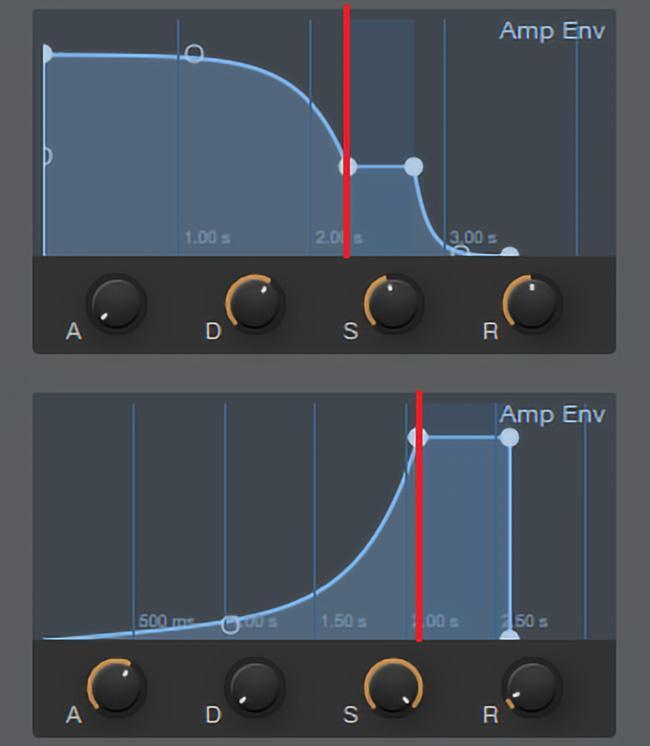
Figure 1: The upper envelope shows the amplitude envelope for the main sound, while the lower amplitude envelope controls the feedback sound. The red line indicates a time of two seconds into each envelope.

For the main sound, set the envelope so that it stays at a constant level for a while but fades to a somewhat lower sustain level at the 2-second mark. The goal is to have the feedback peak at the same time the main envelope goes into its sustain phase. If you add a second feedback note, then tune it 31 semitones (two octaves+fifth) above the main sound. Have the first feedback note decay over about three to four seconds to a lower sustain level, while the second note fades up during that time (similarly to how the first feedback note faded up while the main sound was falling back to the sustain phase).

It’s important to set the sine wave envelope(s) for a believable attack time — long enough so that the feedback shows up with a long, sustained note, but not so long that the feedback never shows up, and not so short that it shows up too soon. For even more control than is possible with envelopes, use a footpedal to adjust the feedback level or a multidimensional controller, such as the LinnStrument or a ROLI keyboard.

As to modulation, for the most expressive sound, tie all oscillators to the pitch bend wheel, so you can do whammy bar effects, as well as add finger vibrato — a real guitar doesn’t have LFO vibrato. If you prefer LFO vibrato for a more “synthetic” feel, then use the same rate and amount for the main and feedback oscillators, and control the LFO depth with the mod wheel. For the most realistic feedback-guitar-like effect, don’t use too much LFO depth. And here’s a final tip: try running the composite sound through an amp sim!

(To hear this effect applied to a synth sound, go to Tinyurl.com/y7njnm2y and check out the solos at 16:05 and 17:03. To hear this technique applied to sampled guitar, go to the 7:35 second mark at Tinyurl.com/y7tdntdf.)

About Craig Anderton

Craig Anderton leads a dual life as a musician and author. As a musician, he has played on, mixed, or produced over 20 major label releases, as well as mastered hundreds of tracks, and recently released the album Simplicity. As an author, he has written over a thousand articles for magazines like Guitar Player, Sound on Sound, and Pro Sound News. He has also lectured on technology and the arts in 38 states, 10 countries, and in three languages. His web site is craiganderton.org
Read more articles by Craig »

Offer applies only to single-receipt qualifying purchases. Select manufacturers may require that only the manufacturer’s products qualify towards the minimum purchase amount needed to be eligible for promotional financing. Otherwise, an invoice that meets the minimum purchase amount and contains at least one qualifying manufacturer product is eligible for promotional financing. No interest will be charged on promo purchase balance, and equal monthly payments are required on promo purchase until it is paid in full. The payments equal the amount financed divided by the number of months in the promo period, rounded up to the next whole dollar. These payments may be higher than the payments that would be required if this purchase was a non-promo purchase. During the last month(s) of the promo period the required monthly payment may be reduced due to the prior months’ rounding. Regular account terms apply to non-promo purchases. New Accounts as of 07/31/2025: Purchase APR is 34.99%. Penalty APR is 39.99%. Min Interest Charge is $2. Existing cardholders: See your credit card agreement terms. Subject to credit approval.

Offer applies only to single-receipt qualifying purchases. No interest will be charged on the promo balance if you pay it off, in full, within the promo period. If you do not, interest will be charged on the promo balance from the purchase date. The required minimum monthly payments may or may not pay off the promo balance before the end of the promo period, depending on purchase amount, promo length and payment allocation. Regular account terms apply to non-promo purchases and, after promo period ends, to the promo balance. New Accounts as of 07/31/2025: Purchase APR is 34.99%. Penalty APR is 39.99%. Min Interest Charge is $2. Existing cardholders: See your credit card agreement terms. Subject to credit approval.

The estimated required monthly payment shown which excludes taxes and delivery equals the amount financed divided by the number of months in the promo period, rounded up to the next cent. During the last month(s) of the promo period the required monthly payment may be reduced due to this rounding. These payments apply only with the financing offer shown. If you make these payments by the due date each month, you should pay off this amount financed within the promo period, if it is the only balance you are paying off. If you have other balances on your account, this payment will be added to any other minimum monthly payments.

Applies only to select items from this manufacturer. Ask your Sweetwater Sales Engineer for more details.