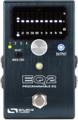
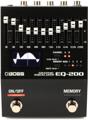
The title may startle you, but I honestly believe that most of your synth sounds can be elevated to new levels of perfection with a good EQ. For this article, I’ll be referencing guitar pedal EQs because there are high-quality EQ pedals, in stereo, with the ability to store up to 128 presets that can be recalled via MIDI program changes. This allows you to create a specific EQ for 128 of your synth presets. The act of dialing up each synth preset will then call up the EQ that you designed specifically for that preset. And all it takes is one MIDI cable. But even though I’m referencing stompbox EQ pedals, the concepts in this article (and its accompanying video) can easily be applied to rackmounted EQs and software-based EQs, as well.
To start, let’s clarify some terms. EQ is short for “equalizer.” There are several types of EQs, but I’ll be talking about graphic EQs and parametric EQs. Both of these EQ types can boost or cut the amplitude (volume) of specific frequency ranges. Graphic EQs feature sliders that are each assigned to a frequency range, left to right, from low to high frequencies. If your car or home stereo has multiple, side-by-side, vertical sliders (either real or virtual), then you’ve probably tweaked a graphic EQ.

Each of the vertical sliders has a frequency value labeled above it. This is the center frequency of that slider. It can boost or cut the amplitude of that frequency and nearby frequencies below and above it by the amount of boost/cut indicated.
Graphic EQs are simple to use and easy to manipulate in real time, and they give great feedback on how their individual slider settings will sound. Some of their drawbacks are that lots of sliders take up space and that you rarely have control over the frequency or bandwidth (Q) of each slider.
Parametric EQs use a knob to choose a desired frequency center, another knob to set how wide that frequency range extends, and then a third knob that determines how much that range’s amplitude is boosted or cut. The beauty of a parametric EQ is that you can precisely set the exact frequency center and width and then boost or cut this area as desired. Some drawbacks include that you can’t look at the knobs and easily see the shape of the EQ like you can with a graphic EQ and that you rarely get as many frequency bands to use at once.

On a basic synthesizer, you might only have a lowpass filter that rolls off frequencies higher than the cutoff frequency. Think of it as a big, heavy blanket that reduces more and more of the high frequencies. But it’s only one blanket; it can’t cut some frequencies in some places and boost some frequencies in other places. That’s where a good EQ pedal can help to sculpt sound timbres that would be impossible without it. Whether you’re moving a graphic EQ’s sliders in real time or just calling up a stationary EQ preset, you’re going to love all of the new possibilities.
Here are some other uses for EQs with synths. If you perform regularly at multiple venues or just use different amplifiers, you could use an EQ pedal to create a dedicated preset for each venue, or amp, that makes it sound “normal” to you.
And finally, as an avid reader of synth, guitar, and effects forums, I often find a thread where musicians are debating whether to spend significantly extra money on a vintage synth, effect, or guitar pickup from a particular year or manufacturing location because it has a little extra brilliance, a little more bottom end, or a more pronounced midrange. Quite often, a good EQ can go far beyond those slightly perceptible differences to create every desired nuance that you want.
Here are examples of different EQs that fit different needs.
Stereo EQ Pedals with Presets and MIDI Program Change
Mono EQ Pedals with No Presets or MIDI
- MXR M108S 10-band EQ pedal
- Whirlwind Perfect Ten 10-band graphic EQ pedal
- Tech 21 Q-Strip EQ and preamp pedal
- Mesa/Boogie Boogie 5-band graphic EQ pedal
If you need help finding the perfect EQ for your situation, whether pedal or rackmounted, give your Sweetwater Sales Engineer a call at (800) 222-4700, and they’ll help find the right EQ for you.