It’s
great to have multiple keyboards and MIDI modules available all at
once. Besides the obvious advantages of having more polyphony (more
notes at once) and more effects, you also get to experiment with
blending sounds made by different brands and types of synthesis.
If
you’re at your studio or home studio, you probably have enough
audio inputs to deal with at least several keyboards at once. But
what if you’re at a rehearsal somewhere else or at a live gig? You
may find that you’ve been allocated either a single input (mono) or
a pair of inputs (stereo) at the console. This is when a dedicated
keyboard mixer becomes invaluable.
Here’s a valuable live sound tip (front-of-house engineers, please cover your eyes for a moment):
If you are the type of musician who makes sure that the volume of every preset you use in a live gig is perfectly balanced to blend with the other presets you play at the same time, you will be better off sending the front-of-house engineer a single, premixed mono/stereo source with all of your sounds combined. This way, they can only change the total volume of your sound and cannot remix your individual levels. On the other hand, if your levels are all over the place, it might be better to give the soundperson everything individually.
Here are some line-level mixers that are both affordable and small enough to be convenient.
Samson SM10 Stereo Line Mixer

If you use many stereo line-level instruments at once, the Samson SM10 is a powerful solution that mixes up to 10 stereo sources at once — with separate Volume, Balance, Monitor, and Effect Send knobs for the first eight stereo channels and simple Volume knobs for channels 8 and 10. It also features mono Send/stereo Return jacks for your external effects as well as separate Monitor Out and Headphone jacks, each with their own Volume knobs. Stereo outs are available in both unbalanced (1/4″) and balanced XLR L/R jacks.
Denon DN-312X Rackmount Mic/Line Mixer

The Denon DN-312X is a low-cost yet feature-packed mixer that offers up to nine monaural keyboard-level inputs (six with 1/4″ inputs and three with RCA inputs) or three stereo inputs (RCA) and up to six microphone inputs. It also has a 3-band EQ as well as the ability to be powered by AC or an external 24V DC source for portable performances. It’s only 6.4 lbs. and will fit into a small rack bag since it’s only one rack space tall.
Radial KL-8 Rackmount Keyboard Mixer

The Radial KL-8 is definitely a pro-level mixer with lots of professional features such as high-quality 24-bit/192kHz AD/DA (analog-to-digital, digital-to-analog) conversion, MIDI In/Out, and two USB ports that also make this an ideal keyboard audio interface for your computer. True stereo Aux Send/Return jacks allow you to add an effects chain to all of your audio sources, and Cue switches on each channel allow you to audition each synth without the audience hearing it. Dual headphone jacks with a high-quality built-in headphone amplifier allow you to practice or tweak your keyboards without any other sound equipment.
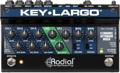
Radial Key-Largo Keyboard Mixer with Balanced DI Outs

The Radial Key-Largo was designed to sit on a tabletop, on a platform on your keyboard stand, or even on a knob-less area of one of your keyboards’ top panels. It can handle up to three stereo keyboards as well as USB audio from your desktop or laptop computer. Separate effect Send/Return knobs for each channel allow you to use any favorite outboard effect on all your keys. It also features 5-pin MIDI as well as USB MIDI. There’s even a convenient Effects On/Off footswitch, a Sustain footswitch that can connect to your keys via MIDI, and an expression jack that lets you control the total volume with an expression pedal. Separate Monitor outs and balanced XLR DI outs finish off this convenient audio-mixing solution.
Rane MLM 82S Mic and Stereo Line Mixer

If you need to mix some monaural keyboards (up to eight) or some microphones (up to four) with some stereo keyboards (up to four), the Rane MLM 82S might be the ideal mixer for you. Very simple yet flexible A+B assignments and Mono (monaural) buttons allow you to combine all three types of signals in a single rack space with pro-quality, balanced XLR L/R outputs.
Ashly LX-308B Line Mixer

If you have lots of line-level instruments and don’t care about mic inputs, then the Ashly LX-308B is a great choice. Each of the eight channels can take balanced (1/4″ TRS) or unbalanced (1/4″ TS) Left and Right sources. But each channel can be mono or stereo, allowing you to mix and match. You can even use all mono sources for up to 16 channels! Each channel has Level, Pan, Mute, and Mic/Line controls, and there are three 1/4″ balanced (TRS) or unbalanced (TS) output jacks that offer both stereo and mono outputs.
If you’re thinking, “Sure, these are all great. But I’m not in a touring band that makes lots of money. I just need something simple that will mix all of my friends’ instruments,” then here are some suggestions for your situation:
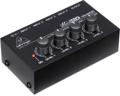
Behringer Micromix MX400 Line Mixer

If you just need to mix four line-level monaural instruments on a budget, look no further than the Behringer Micromix MX400. It has four 1/4″ unbalanced (TS) Input jacks, each with a Volume knob, and a single 1/4″ unbalanced (TS) Output jack. That’s it.
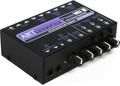
ART PowerMIX III 3-channel Stereo Line Mixer

The ART PowerMIX III is the easiest way to mix three stereo or monaural keyboards and still have features like two stereo headphone jacks, panning per channel, and separate Master and Headphone volumes.
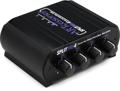
ART SPLITMix4 Passive 4-channel Mixer/Splitter

And finally, the simplest passive line-level four-channel stereo mixer ever made — the ART SPLITMix4. This is for the musician who needs to mix four stereo, line-level instruments with no features at all (except for a volume level on each channel). It doesn’t even use power; it’s totally passive. So, you can’t distort it, you can’t add noise, and it doesn’t add hum. But, each of the four stereo inputs are 1/4″ TRS, which means that you need to use either 1/4″ TRS to 1/4″ TRS cables from the stereo headphone outs of each instrument or use “insert” cables (sometimes called Y cables) that have Left and Right 1/4″ TR plugs on one end and a single 1/4″ TRS cable on the other end. You’ll also need an insert cable to get from the 1/4″ TRS Output jack to your keyboard amp or PA.
Conclusion
I hope this gives you some ideas on how to combine your keyboard rig’s audio into a single mono or stereo signal.