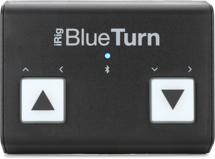
Q: I recently read your articles on use of the iPad. My question regards the use of bluetooth page turners. Using bluetooth page turners with a music app like ForScore disables the iPad’s virtual keyboard, so you can’t type annotations into your music, charts, or scores. There are some workarounds, but none solves the problem for me.
However, ForScore just covered IK Multimedia’s iRig BlueTurn in their news section. The BlueTurn disables the virtual keyboard also, however, ForScore indicates that pressing the left button for three seconds brings the iPad’s virtual keyboard into play. Is this true?
A: Thanks for reading our articles! We tried this with a BlueTurn and ForScore on an iPad Air. It works perfectly. Pressing and holding the left button on the BlueTurn toggles the iPad’s virtual keyboard so that it will open as it normally does when you add a text annotation in ForScore. You have to do this every time you power on the BlueTurn and launch ForScore. But once you’ve done it, the setting stays toggled until you power the BlueTurn off. Doing this does not affect the BlueTurn’s ability to turn pages in ForScore as normal.