

The power and convenience that virtual drum software offers the modern songwriter is incredible. However, nothing replaces the sound and feel of a good human drummer on a well-miked set. Let’s see if we can’t compromise a little. In this article, let’s look at some ways you can program your MIDI drums to have a more natural, human sound and feel.
- “First, Do No Annoying”
- Pick the Right Drum Sounds
- Mute the Onboard Effects
- Play It Yourself
- Adjust Timing & Velocity
- Consider How a Drummer Plays
- Mix Your Drums Like a Real Drum Set
“First, Do No Annoying”
In the world of gaming audio, Marty O’Donnell coined the phrase, “First, do no annoying” (a variation of the commonly misquoted Hippocratic oath’s motto: “First, do no harm”). That suggests that the less attention a gamer pays to the sound design, the better. A gamer’s ability to focus on the game without getting distracted by the sound design makes for a more rewarding gaming experience and is a testament to good sound design. What distracts the most are things that don’t seem appropriate or natural for the surrounding environment or context. If the player casts a fire spell, but they hear a tinkly bell or vibraphone that’s more evocative of an ice spell instead, then that stands out like a sore thumbstick.
Gamers have learned through repeated exposure that ice spells sound tinkly, with bells, chimes, etc. No one taught them this; they just internalized it. Programming MIDI drums (or anything else) is similar. They often sound fake because they don’t conform to the expectations that we’ve learned from years of exposure to various musical and cultural archetypes. While a drummer might be able to focus on programmed drums and still hear some red flags, the average listener is only going to notice your drums are programmed if (1) they don’t serve the environment of the song or (2) they sound inappropriate or impossible for a human drummer to replicate.
Suppose you’re working on a singer/songwriter project where they’re playing an acoustic guitar. If the bassist is on an upright acoustic bass, and someone else is playing the violin, then selecting sounds from a Roland 808 or 909 in this Roland Drum Machine Collection might not be the best choice. Likewise, don’t program double bass drums machine-gunning 16th notes at 240bpm with velocity on 127 for every note for three minutes straight because no human drummer can replicate that (unless they’re Gene Hoglan). Even actual drums played by a human drummer can throw us off if they’re too different from anything we’ve ever heard before (cue Metallica’s “St. Anger” snare).
Pick the Right Drum Sounds
The first step in making programmed drums sound more natural and human is selecting appropriate drum sounds for the project. This alone goes a long way. Any modern drum software worth its salt has a groove player with stock MIDI grooves for you to audition drum sounds, and they likely will conform to your song’s tempo so you can hear them in context. I like to find grooves with some intricacy, with ghost notes on the snare or variations between the parts of the ride cymbal. This gives me an idea of how different velocities will sound when programmed. I also begin by selecting the drum sounds instead of programming drum parts first because the sounds will influence the parts I write. I program more musical drum parts when I work with great drum sounds from the get-go.
Mute the Onboard Effects
Most drum software will have effects like reverb and delay already applied. When you load your software’s drum patches, some will have these effects turned on inside the drum program’s onboard mixer. After finding a preferred patch, go into the drum program’s mixer and mute the reverb and delay. We’re thinking a little ahead here, but the reason for doing this is that you want a more natural and cohesive sound to your drums (and your song). So, everything should sound like it was recorded in the same space. While that stock reverb might sound great on the drums in isolation, it may not blend well in context with the other elements in your mix. When you’re ready to mix, you can create a reverb aux send inside your DAW for your tracks (including drums). I find it’s better to turn off the drum software’s internal effects completely to start.
Remember to neither completely remove the ambience from the room mics, nor turn off the “bleed” from the drums (if your computer can handle it). The room mics add a lot of quality and cohesion to the drum set as a whole. Turn them down at first and then blend them in to taste. When recording a real drum set, microphones will always pick up elements other than what they’re intended to capture, which is known as “bleed” or “crosstalk” (e.g., you’re always going to hear some snare drum in the hi-hat mic and vice versa). If your drum software contains controls for bleed, then leave this on. You can adjust it to taste if you like; however, turning it off entirely will result in an unnatural, disjointed drum sound where every part of the kit sounds like it was recorded in isolation. This is not how real drums get recorded.
Play It Yourself
This may sound obvious, but the best way to get a human drum feel is to have a human play the parts. However, this doesn’t have to be a real drummer on a real drum set. Playing the notes on your MIDI or computer keyboard that match the different parts of the drum set in your virtual drum software can have a surprisingly realistic effect. If you have a drum or sample pad and can use real drumsticks, then even better. For working with MIDI, an electronic drum set is best. It enables you to play a drum set and accurately capture a MIDI performance with realistic velocities and timing (assuming there are no latency issues). And electronic drum sets don’t have to be expensive to get good results.
If your coordination isn’t the best, then don’t fret. Many DAWs have a function called “MIDI Merge” (or something similar) that allows you to play one part at a time and the parts will merge into a single track. In other words, you record the kick drum by itself, then the snare drum, then the hi-hat, etc., and blend them into a single MIDI block.
Adjust Timing & Velocity
Having everything sound identical in volume and 100% quantized to the grid will sound unnatural. We want the drums to have a steady groove, but the fact is that human drummers don’t play perfectly in time, so our programmed drums shouldn’t be perfectly in time either.
Most DAWs have a swing function that lets you slightly displace notes from the grid at a certain percentage or strength. You begin by inserting perfectly quantized individual notes for drums and cymbals into your piano roll and then use swing to displace whichever notes you select at whatever percentage of displacement. By slightly changing the percentage at different points in the beat, you’ll achieve a more natural, human-sounding drum part with a great feel.
Velocity is another thing to be aware of. Great drummers play with consistent volumes between their hands and feet, but their hits still aren’t mathematically exact. So, ensure your drums’ velocity levels aren’t all the same. Again, many DAWs account for this by having functions that randomize velocities or will let you set velocities within specific ranges. These allow you to program consistent-sounding drum parts that still have subtle variations. You’ll have to play with this to learn how it works in your DAW and how to get the best sounds for your song — but the results are worth it. Once you understand how they work, I suggest assigning these functions to hot keys or setting custom key commands or macros if your DAW allows. If you program MIDI regularly, then you’ll use them repeatedly.
Consider How a Drummer Plays
Another consideration is how a real drummer plays drums. Surprise, surprise — most drummers have two hands and two feet. So, if you program a snare drum, a floor tom, and a cymbal crash all on the same hit, then that combination isn’t possible unless the drummer is smacking the cymbal with his forehead.
Drummers tend to emphasize downbeats, so when you’re programming velocities, you might aim to set your strongest velocities on notes that fall on downbeats and weaken the upbeat velocities. Of course, this isn’t set in stone, as up-tempo genres, like punk, may emphasize snare drums on the upbeats and other genres, like funk, feature heavy syncopation. But, generally speaking: downbeats über alles.
When drummers simultaneously strike two drums that are similar in pitch (like two floor toms), the resulting sound is big and beefy. You may be tempted to program your drums similarly, with two floor tom MIDI notes striking together in perfect alignment. However, I’ve noticed that programming two similar drums to hit exactly together is usually a little lackluster by comparison due to phasing between the two samples. Rather than perfectly aligning the two MIDI drums together, try offsetting them a little bit. Anchor one of the drums to strike precisely where you want, then place the other drum very slightly ahead of or behind the anchoring drum. This results in a bigger, beefier sound than having them hit exactly together on the grid. Use your ears to determine what sounds best.
Drummers tend to rush the tempo during drum fills. Even great drummers do this but to a much lesser degree. It adds movement and excitement to the music. Placing some notes in your programmed drum fill (and the downbeat of the next measure) very slightly ahead of the metronome gives it a more human feel.
Finally, listening to great drummers and studying how they play will immensely help you learn possibilities for the drum set’s dynamic ranges and expressive potential. This will make you a much better drum programmer, even if you’re not a drummer. Here’s a list of some recommended recordings:
Mix Your Drums Like a Real Drum Set
This isn’t programming, but your drum mix is a huge part of getting a natural sound. Before you mix, you’ll want to render your MIDI drum parts to audio tracks. Each piece of the drum set (kick, snare, first tom, second tom, etc.) should be on its own channel inside your DAW. You’ll need to learn how this process works for your DAW and virtual drum software. I use Toontrack Superior Drummer 3 in tandem with Steinberg Nuendo 12, and the process looks like this:
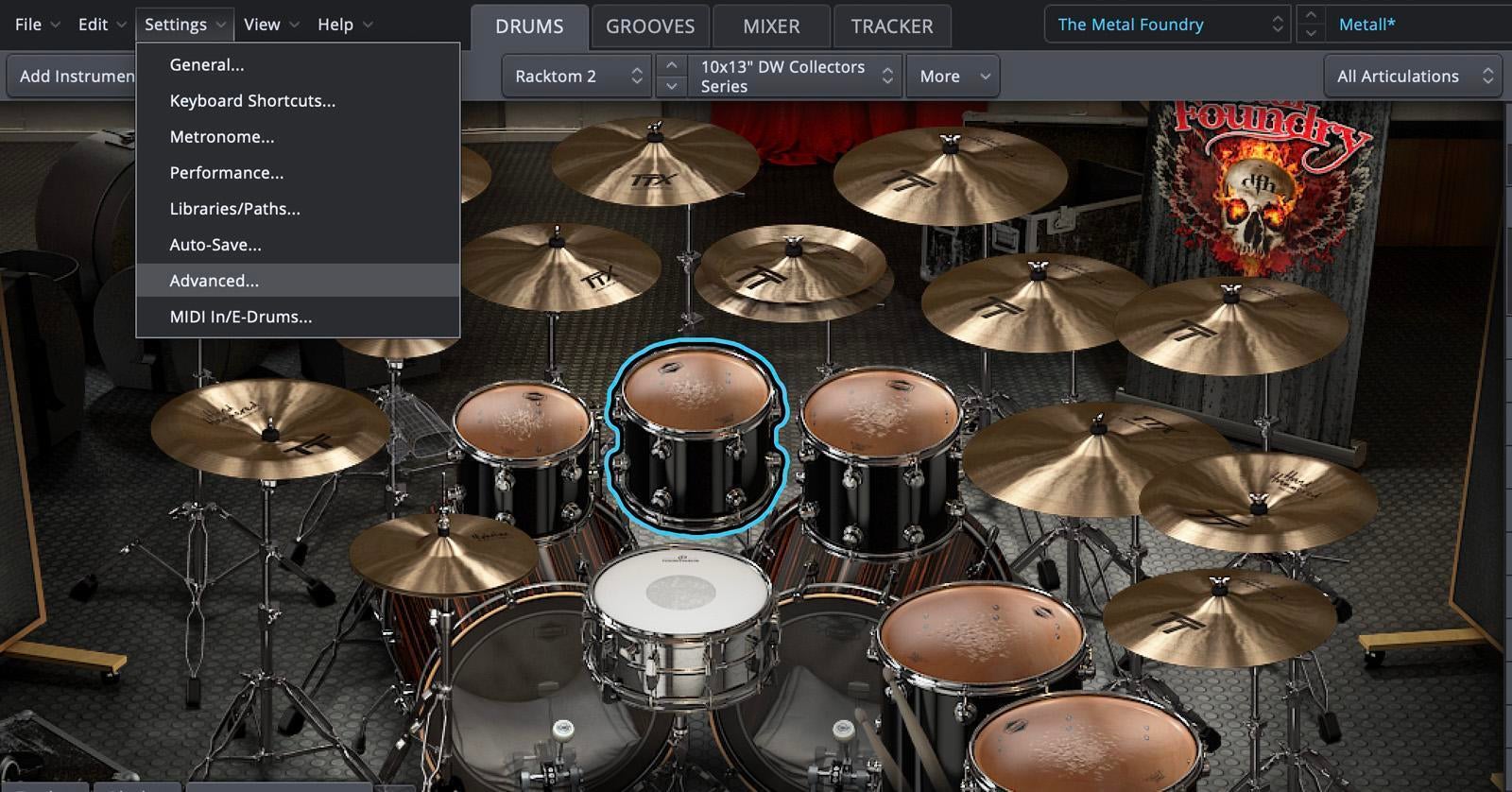
Go to the “Settings” menu inside Superior Drummer 3 and select “Advanced.”

Click the box that says, “Use 32 mono outputs.”
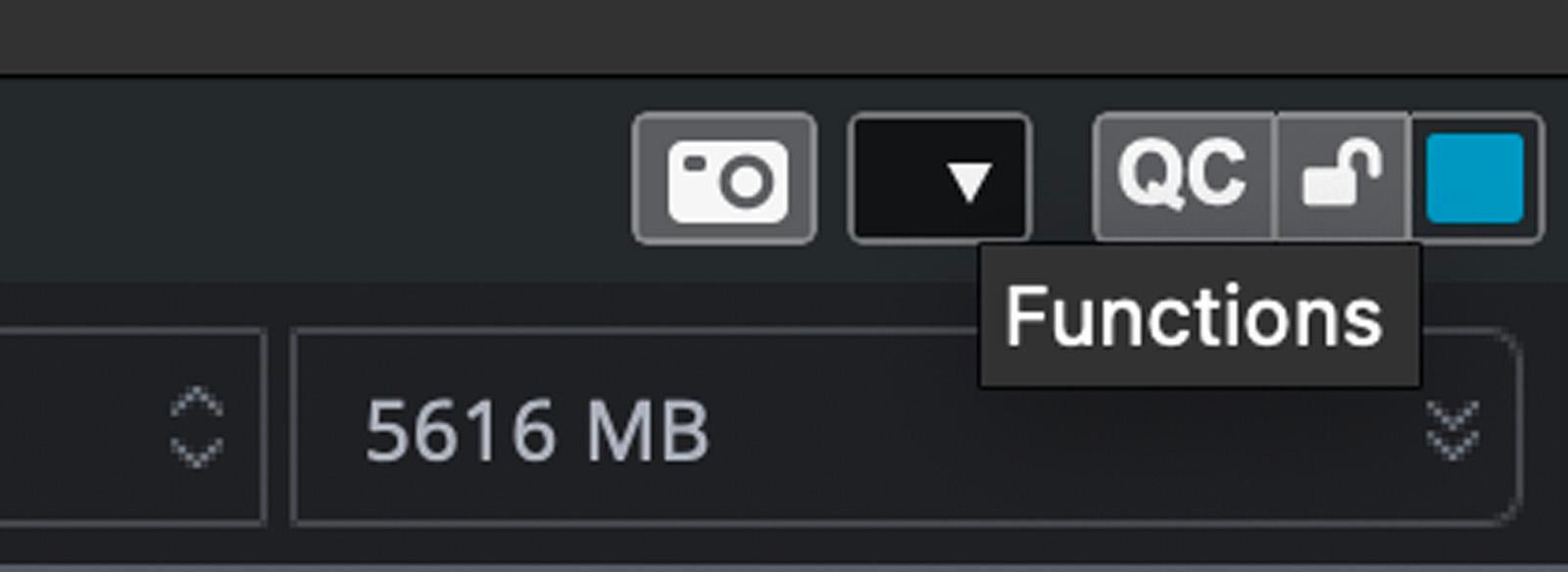
In the top-right corner, there’s a tiny “Functions” arrow. Click that to show the drop-down menu.
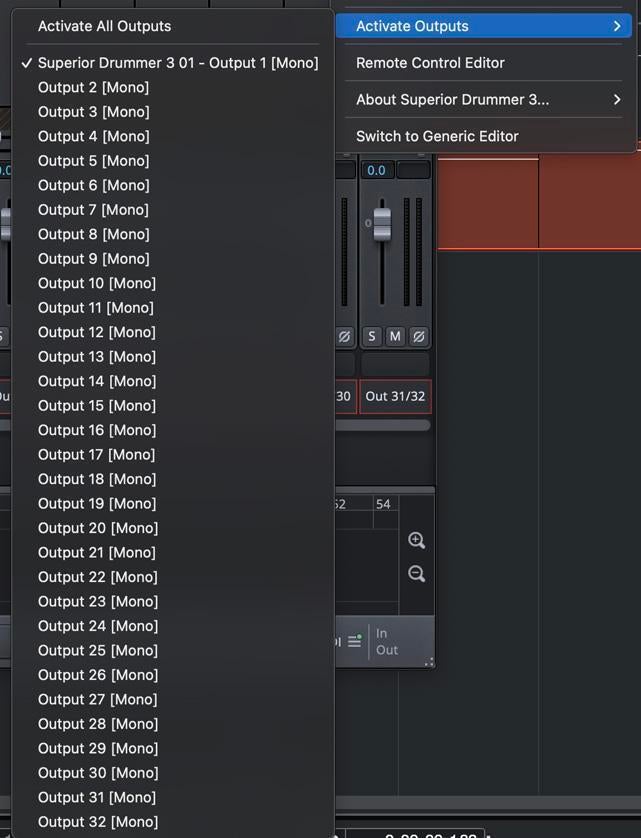
Once the menu is down, hover over “Activate Outputs” and then click “Activate All Outputs.”

Back in Nuendo 12, right-click on the Superior Drummer 3 Instrument Track’s event (which are called “clips” in Pro Tools), hover over “Render in Place,” and then select “Render Settings.” This will bring up the “Render Selection” menu.

In “Render Selection,” select “As One Event” for your “Mode” and “Dry (Transfer Channel Settings)” for your “Processing.”
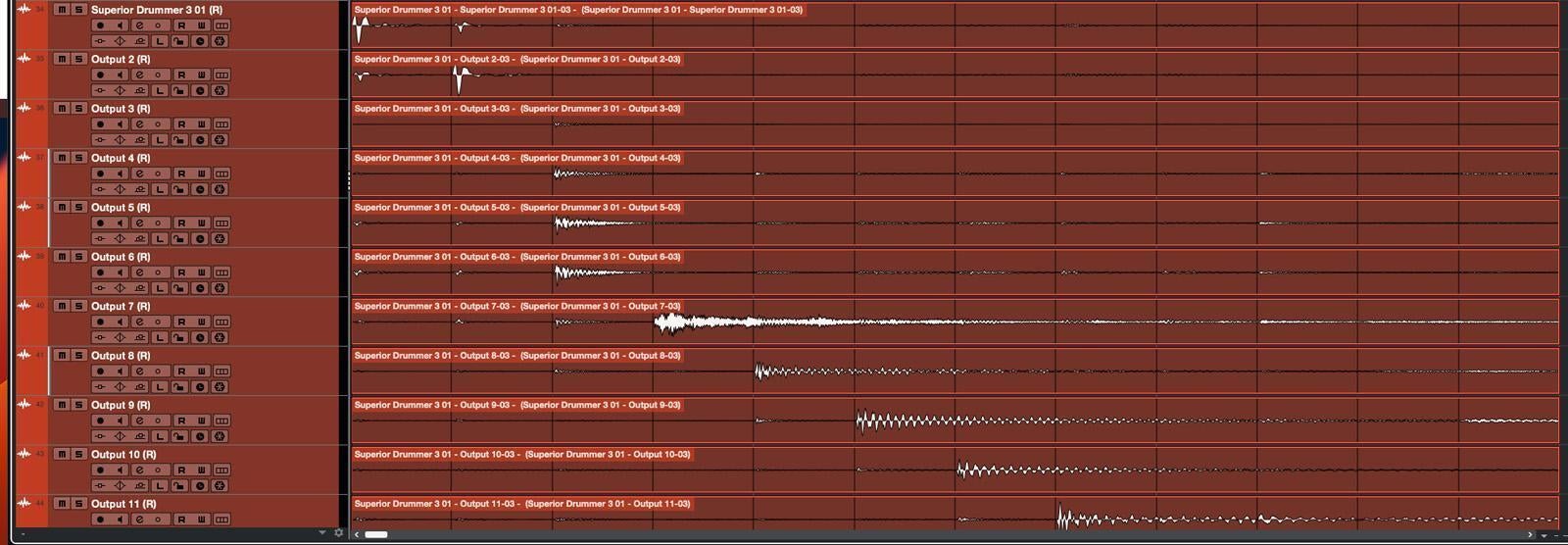
All of your MIDI drum parts should now be on their own audio tracks (which you also now have the joy of renaming).
You might be asking: “Why not just use Superior Drummer 3’s mixer?” Well, there are a few reasons.
Firstly, you’ll probably tweak the drum mix when you add bass, vocals, etc., and their respective frequencies are layered into the mix. If you mix drums by relying on the mixer in SD3, then you’ll have to switch back and forth between two programs to adjust the drum mix. By rendering the drums into your DAW where everything else is being mixed, you can park yourself in one program and streamline your workflow.
Secondly, you can’t use any plug-in you want inside the SD3 mixer; you can only use SD3 plug-ins. If you want to use your favorite plug-ins but haven’t rendered your MIDI drum parts to audio tracks, then you can only use non-SD3 plug-ins on the stereo drum track inside your DAW. This applies the plug-in’s processing to all the drum components simultaneously. This may work, but it may not. However, if you don’t render your MIDI parts to audio, then this is your only option for using non-SD3 plug-ins. Rendering MIDI to audio lets you apply plug-ins to any combination of drums/cymbals you want. In short, it gives you more control over the drum sound.
Finally, audio files take less computer processing power to play back than MIDI instruments. By rendering your MIDI drum tracks to audio and then muting/disabling your drum software, you’re taking a huge load off your computer that can be used for other signal processing.
These reasons together equal a mixing approach akin to how an engineer would process and mix a real drummer on a miked drum set; therefore, it’s a huge benefit for achieving a more natural and human drum sound.
Invest in Your Tools
Programming natural-sounding drums comes down to having great tools and knowing how to use them. Consider investing in high-quality drum software for the absolute best sounds and programming capabilities. Also, be prepared to spend ample time learning the software and how it interacts with your DAW. Here are my suggestions:
And, of course, remember that your Sweetwater Sales Engineer is available to help you with any questions you may have about software, programming, or anything else related to music and audio. Give them a call at (800) 222-4700!