Buying software from Sweetwater is better. Choose from an incredible selection of titles from top developers, get expert advice from your personal Sales Engineer, and spend less time waiting — and more time creating — with nearly instant downloads.
Thinking about taking your first steps into a brave new world of digital audio workstations (DAWs) and music creation software? Whether you’re making the transition from a knobs-and-sliders Portastudio setup or taking the plunge into multitrack recording for the first time, this Sweetwater feature will be your guide through the nine major, beginner-friendly software platforms available today.
Why Go DAW?
Standalone recording environments definitely have their charms. Many of us at Sweetwater fondly remember our pioneer days of multitrack recording through cassette 4-tracks and Realistic-brand mixers. But, these days, software-based recording is definitely where it’s at — not only in terms of editing convenience and track counts but also in terms of quality, flexibility, compatibility, and file exchange with other collaborators and mixing/mastering engineers. Today’s DAWs and software platforms pair digital audio fidelity with the workflow and sound of analog recording setups: console-based mixing environments, tape- and hardware-based effects emulation, and virtualizations of impossible-to-find synths, drum machines, and drum kits. Dollar for dollar, DAWs promise way more flexibility than standalone setups and are generously equipped to take your music in bold, new directions.
Our Favorite DAWs for Beginners
Avid Pro Tools Artist, Studio & Ultimate (Mac/PC)
Your intro to the most popular DAW on earth
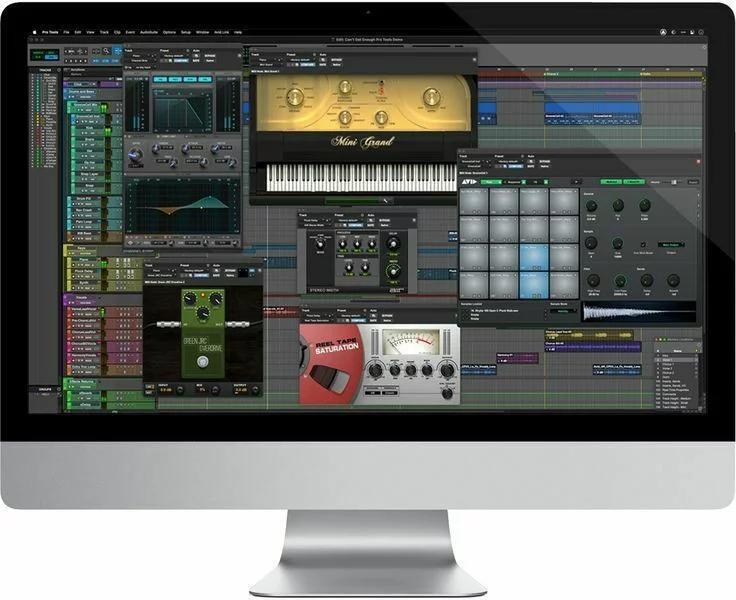
What better entrée into the world of DAWs than an ultra-affordable version of the most popular recording software on earth? For more than 20 years, the name “Pro Tools” has been synonymous with the word “DAW.” Avid Pro Tools Artist gives you 32 tracks of audio-layering freedom and a generous host of effects plug-ins, instruments, and loops to fast-track your production results. For the solo instrumentalist and singer/songwriter, 32 tracks are more than enough to create radio-friendly productions and immersive soundscapes.
Once you gain command over all that Pro Tools Artist can do for your creation process, the transition to Avid Pro Tools Studio is totally seamless. Pro Tools’ monthly and annual subscription options step you up to 512 (64 simultaneous) audio tracks, 1,024 MIDI tracks, numerous effects plug-ins, and video support. Best of all, your Pro Tools Artist projects are fully supported, so if you just need additional tracks or functionality for a particular project, then you’re just a Sweetwater call or online upgrade away.
One feature that cooperative creatives love is Pro Tools’ Cloud Collaboration feature, which connects users to players, engineers, and songwriters all over the world. Say you need a tasty solo for a lead break or a live drummer to put the final sheen on a song, or you want to track a session and then connect with someone who can mix and master it: Pro Tools does all the legwork for you.
Did we mention the plug-ins? Pro Tools has shaped the industry with its great-sounding and visually appealing effects and instrument plug-ins. We’re pleased to report that the plug-ins in the latest version of Avid Pro Tools Ultimate (available with Pro Tools Flex) are better than ever. We’re talking licensed content from Purple Audio, Fairchild, Pultec, and Moog, along with some brilliantly sampled pedal effects and amp models via the Eleven MK II software. It’s just another example of Pro Tools users finding limitless ways to shape their sounds entirely in the box.
And, of course, you can’t mention Pro Tools without talking about its powerful editing features. Elastic Audio. Splitting and joining. Comping. Creating pitch-perfect takes is so simple within Pro Tools that it’s little wonder why users all over the world have made the jump and found their production bases in this ecosystem.
Pro Tools subscriptions and purchases include a year of support, so you’re fully covered in the event of an upgrade coming along between now and next year.
Fender Studio Pro DAW Software
The DAW that does it all

While many veterans know it as Studio One, the newly rebranded Fender Studio Pro continues its legacy as the most streamlined DAW on the market. It was built from the ground up with a “one-window” philosophy, meaning you won’t get lost in a sea of floating menus. For the beginner, this translates to a much shallower learning curve; if you want to add an effect, a virtual instrument, or even a backing track, you simply drag it from the browser and drop it into your timeline.
The latest version introduces cutting-edge AI Stem Separation, which allows you to take any audio file and instantly isolate the vocals, drums, or bass. It’s a game-changer for beginners who want to study how their favorite songs are mixed or create quick remixes. Beyond the tech, Fender has leaned into its heritage by including authentic Mustang and Rumble amp models directly in the software, giving guitarists and bassists world-class tone the second they plug in.
Fender Studio Pro also excels at keeping you in the “creative flow” with its integrated Launcher and Chord Track. You can audition different loops and patterns in a cell-based view before committing them to your arrangement, while the Chord Track allows you to change the key of your entire project without having to manually re-record a single note. Whether you are a songwriter, a beatmaker, or a multi-instrumentalist, this DAW provides a professional environment that feels surprisingly like an extension of your own creativity.
Steinberg Cubase Elements 14 (Mac/PC)
A melting pot of analog workflow and MIDI capability

Steinberg Cubase Pro has long been known as a MIDI powerhouse used by contemporary composers the world over — and Cubase Elements 14 makes the perfect introduction to all that creative firepower. In addition to now supporting the revolutionary MIDI 2.0, Cubase Elements 14 also features Iconica Sketch, which makes complex orchestrations much more procurable among 34 instruments, 140 different articulations, and 5GB of data.
Cubase Elements 14 also features enhanced Chord Pads, which greatly facilitate songwriting and auditioning different chord types and inversions, as well as expansions to Chord Track, Chord Assistant — Circle of Fifths, and Audio to MIDI chords. Five exclusive sample packs from esteemed songwriters and producers make their way into Cubase Elements 14, and Sampler Track 2 receives a major upgrade in the form of Spectral Warp modes, which sound designers are sure to love. Additionally, Cubase Elements 14 has a plethora of its own onboard VST instruments like Groove Agent SE 5, HALion Sonic 7, Flux, and more that are guaranteed to suit any genre.
Elements 14 isn’t just for composing, however — fledgling mix engineers will find a lot to love here, as well. The MixConsole is one of the most valuable elements of Cubase Pro, and it finds its way to Elements 14, as well, which means you’ll be able to learn the feel of a real analog console right from the beginning with Cubase Elements 14.
Colorized Mixer Channels and Track Icons allow you to customize the look and feel of your projects to suit your own unique workflow. The Key and Drum Editors can now be used with the expanded Range Tool, which makes editing much more intuitive, and a breakout channel tab lets you tweak sonic characteristics using the signal flow of a real channel strip without leaving your Project window. Finally, onboard EQs, limiters, compressors, gates, and other studio staples are all here in Cubase Elements 14.
Universal Audio LUNA (Mac/PC)
Transform your Volt interface into a complete production system
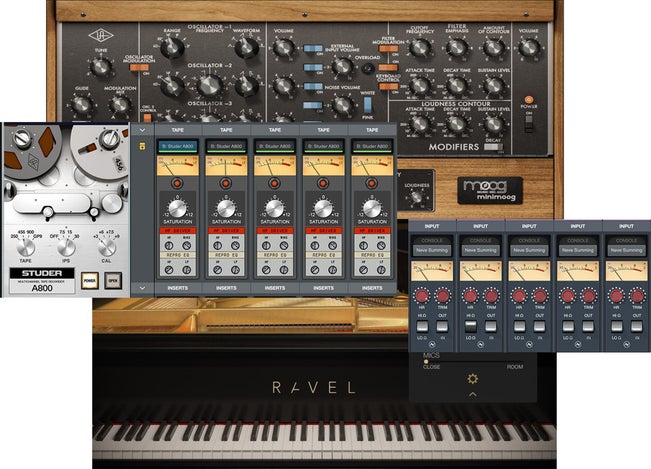
Universal Audio’s Volt series of audio interfaces has changed the game by combining their acclaimed top-shelf analog circuitry and class-leading digital conversion. And, with Universal Audio LUNA DAW software — free for all Volt users on Mac or PC computers — everything you love about your Volt interface becomes completely integrated into an analog-style production environment. From capturing those first moments of inspiration and experimentation with different musical arrangements to your final mixdown and even mastering, LUNA delivers an exceptional production experience.
While LUNA is the first DAW endeavor from Universal Audio, it’s clear that LUNA has been designed to combine serious production power with ease of use. With support for AAF (Advanced Authoring Format) session files, LUNA is ready for you to import sessions from Avid Pro Tools, Adobe Audition, and other popular DAWs. Speaking of other DAWs, LUNA uses key commands familiar to any Pro Tools user, making it easier than ever for experienced engineers to get started with LUNA.
LUNA delivers everything you’d expect from a modern DAW but with fully integrated support for native UAD plug-ins and no discernible latency. Direct monitoring enables zero-latency recording. During mixdown, you can use these included plug-ins: PolyMAX Synth, Century Tube Channel Strip, Teletronix LA-2A Leveler, Pultec Passive EQ, and Oxide Tape Recorder.
So, Universal Audio LUNA DAW software fully integrates your Volt into your production process, gives you an analog-like workflow complete with the vibrant sound of tape saturation and is completely free for Mac or PC-based Volt users — that’s a winning combination for any Volt user.
Cockos REAPER 7 (Mac/PC)
Reap the benefits of this ultra-customizable DAW
Of particular noteworthiness for beginners is Cockos REAPER 7’s 60-day, fully functional free trial, which gives you more than enough time to check out REAPER 7’s functionality and workflow and experiment with its many capabilities to see if it is really the right DAW for you. REAPER 7 also has a much smaller computer “footprint” than most other DAWs and can even be installed and run from a portable or network drive.
If you’re the type who really likes to have it your way, then REAPER 7 is a real whopper of a DAW. First, you can customize seemingly everything about REAPER 7, including its colors, toolbars, layouts, icons, and much more. Plus, you can save different layouts and screensets for different tasks, which can really enhance your productivity as you start to develop the different skill sets needed for tracking, mixing, mastering, etc.
Having said all this, many of the features that make REAPER truly customizable and unique among DAWs are not very beginner-friendly (e.g., ReaScripts). While there is an active community surrounding REAPER, as well as some great YouTube and other online resources available, REAPER requires a serious time investment to get the most out of it. We mention it here because of its relatively low cost to entry, but we feel there are other DAWs available that can get you better results much faster if you’re willing to spend a little more.
Apple GarageBand (Mac/iOS)
The DAW you may already own

This completely free recording software is optimized to make the most of the iPad’s and Mac’s native hardware, and it’s available to every Mac and iOS user. GarageBand’s streamlined interface and integrated instruments are perfect for the user who isn’t super-savvy about DAWs and recording but wants to dive headfirst into music production. Even novice songwriters will have no trouble dreaming up arrangements within GarageBand’s single, multipaned window.
Not only is it easy to use, but also, with the seamless transition between your iOS device and your Mac computer, you can work on your GarageBand projects anywhere. And thanks to a huge collection of Apple Loops, a built-in virtual drummer, and tons of sounds to play with, all you need to get started with GarageBand is some inspiration. Beyond music production, Apple GarageBand offers some great lessons for piano and guitar that are sure to help you progress with your instrument of choice.
Getting started with DAW software can be intimidating, and it’s clear that Apple put a lot of thought into making GarageBand as accessible as possible for new users. It’s a free download for any Mac or iOS user — that’s about as accessible as it gets! While it’s aimed at beginners, GarageBand offers suitable tools to cover everything from sketching out ideas to mastering your final mix. If you’ve been wanting to get into music production with your Mac, iPhone, or iPad, then there’s no reason not to load up GarageBand and see what you can create.
Our Favorite DAWs for Electronic Musicians
Image Line FL Studio 21 Fruity Edition (Mac/PC)
The perfect introduction to loop-based music creation
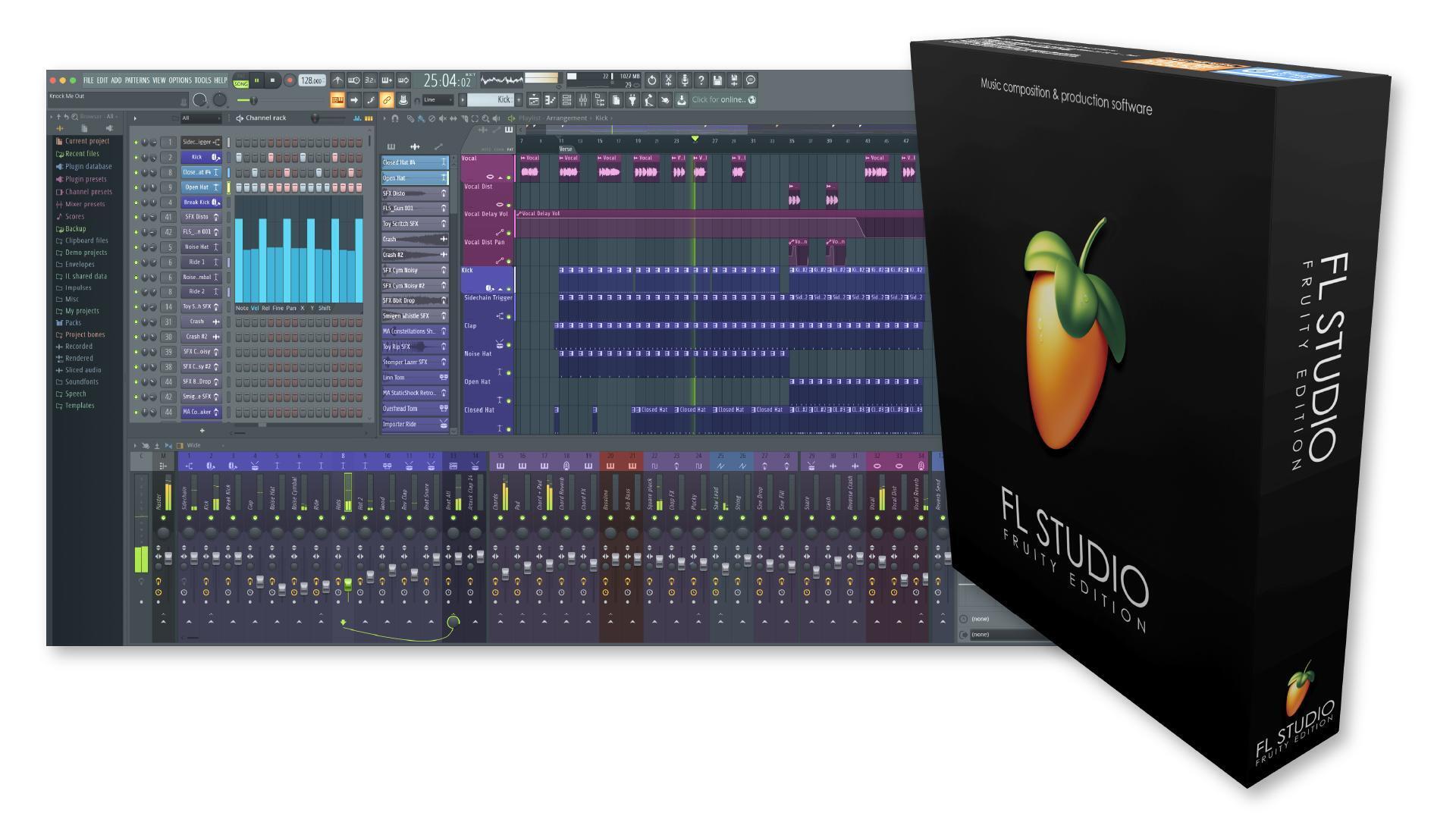
“Fruity Loops,” now FL Studio, has come a long way since its inception. Today, it’s a powerful loop-based songwriting and creation tool. Workflow is streamlined and intuitive, even for novice users. Build a drumbeat. Lay down a chord progression. Create a melody. Before you know it, you’ve got a complete song in the can. Its 11 onboard synths and nine drum machines put you in the driver’s seat of the music that steers your soul. You’ll also find VST and AU support to accommodate your virtual instrument and effects libraries as you branch out.
FL Studio 21 is a great way to get accustomed to such baseline DAW concepts as hardware controller integration, piano roll, quantization, arrangement, time signatures, and more. There are plenty of tools tailored specifically to the EDM and loop-creation environment, including a Paint tool for quick loop duplication and a Stamp tool for adding and implementing predetermined chord shapes.
Don’t let FL Studio 21’s simplicity scare you away. If you’re into loop-based music creation, then this one platform holds your hand from concept to completion. There are powerful channel effects to punch up parts with compression, EQ, saturation, and reverb along with a floating mixer window to create dynamic arrangements with panning, rises and falls, and focal points. There’s even an onboard mastering limiter to get those final tracks extra-hot and spicy.
Touchscreen user? FL Studio 21 also boasts advanced multi-touch support for hands-on creation and mixing control.
Reason Studios Reason 13 (Mac/PC/iOS)
Virtual rack with infinite patchability

Any player who’s comfortable with the synth/Eurorack paradigm of patching gear will take to Reason Studios Reason 13 like a duck to water. This feature-laden workstation offers a unique virtual rack view and some gorgeous hardware-based graphical interfaces for each of its included synths, drum samplers, and effects units — along with a rear view that lets you interface modules in whatever way you see fit. You can even control voltages to create some pretty sophisticated results — a true audionaut’s holiday. The possibilities are endless with Reason 13.
Reason 13 keeps the creativity flowing by convincing your brain you’re working in an analog environment. All the while, modern DAW conveniences — third-party VST support to host all your favorite instruments and effects, native pitch editing, and loop-based or linear track creation — make Reason a compelling hybrid for the artist who wants analog workflow and digital comforts. And now, with the introduction of Reason 13, Reason Studios has given users a ton more reasons to dive in — most notably in Reason’s massive, multi-gigabyte included sound library and the new Reason Rack plug-in. This latter addition lets you access Reason’s powerful, playful sound-sculpting rack as a third-party plug in the DAW of your choice.
Looking to make music on the go? Reason’s companion app, the free Reason Compact, is a powerful audio sketchpad with song templates and some sought-after synth and drum engines baked right in. It’s perfect for bottling those song ideas when the inspiration strikes, for those 15 minutes of downtime between meetings, or while on the train.
Bitwig Studio 5.1 (Mac/PC/Linux)
Control and creativity in ample amounts

Winner of MusicRadar‘s “Best DAW in 2023,” Bitwig Studio 5.1 definitely deserves a mention. Our Sweetwater synth gurus have sung the praises of Bitwig for a long time due to their seamless hardware synth integration, but Bitwig also has many beginner-friendly features, even if you don’t own a Eurorack rig (yet).
First up is what’s called “The Grid.” It’s a modular sound design environment that allows you to load different modules (from the 154 available modules) and then patch them together to discover exciting, new sounds. It’s a unique playground in which to create, and while it can get very robust and deep, its basic mechanics can be understood after only a few minutes of exploration.
Secondly, Bitwig Studio 5 turns the traditional ideas of automation on their heads with what it calls “multi-segment envelope generators” (MSEGs). These five MSEGs, coupled with Bitwig’s Modulation System, give you deep control over your tracks (and entire projects).
Next, Bitwig Studio features over 2,000 presets and clips as well as an excellent menu system and browser that make finding things very intuitive. This makes it very easy to get started with Bitwig, even if you’ve never opened a DAW before.
Finally, if you use either of the other DAWs that we recommend for beginning electronic musicians, then Bitwig Studio 5 actually enables you to import projects from those DAWs, and it also supports Ableton Link version 4.
Still Don’t Know Where to Start? Give Us a Call!
Need some help choosing the best DAW for your needs and budget? Still unclear what a DAW is? No problem! No one in the industry knows more about recording technology than Sweetwater. Heck, our company was born out of the back of a VW van hauling our founder’s mobile recording rig. Give your Sales Engineer a call at (800) 222-4700 or shoot us an email. We’ll get you on the right track.