Welcome back to Sweetwater’s Simple Guide to Modulation series, where we wade in the shallow end of the synth pool to provide you with some basic info to get you started modulating patches on your hardware and software synthesizers. In this edition, we’re looking at envelope generators and how they can be used to modulate parameters such as pitch, filter cutoff, LFO rate, and pulse-width modulation.
For those new to synthesis, envelope generators are a vital component to sound design. Without them, synths would only produce static sounds that start and end immediately as you press and release keys — which would be extremely uninspiring. Envelope generators provide a means for shaping the waveforms to produce a more musical character. Most commonly, envelope generators are used to modulate amplitude over a period of time. They come in a variety of configurations, but the most prevalent type of envelope generator is an ADSR envelope.
What does ADSR mean?
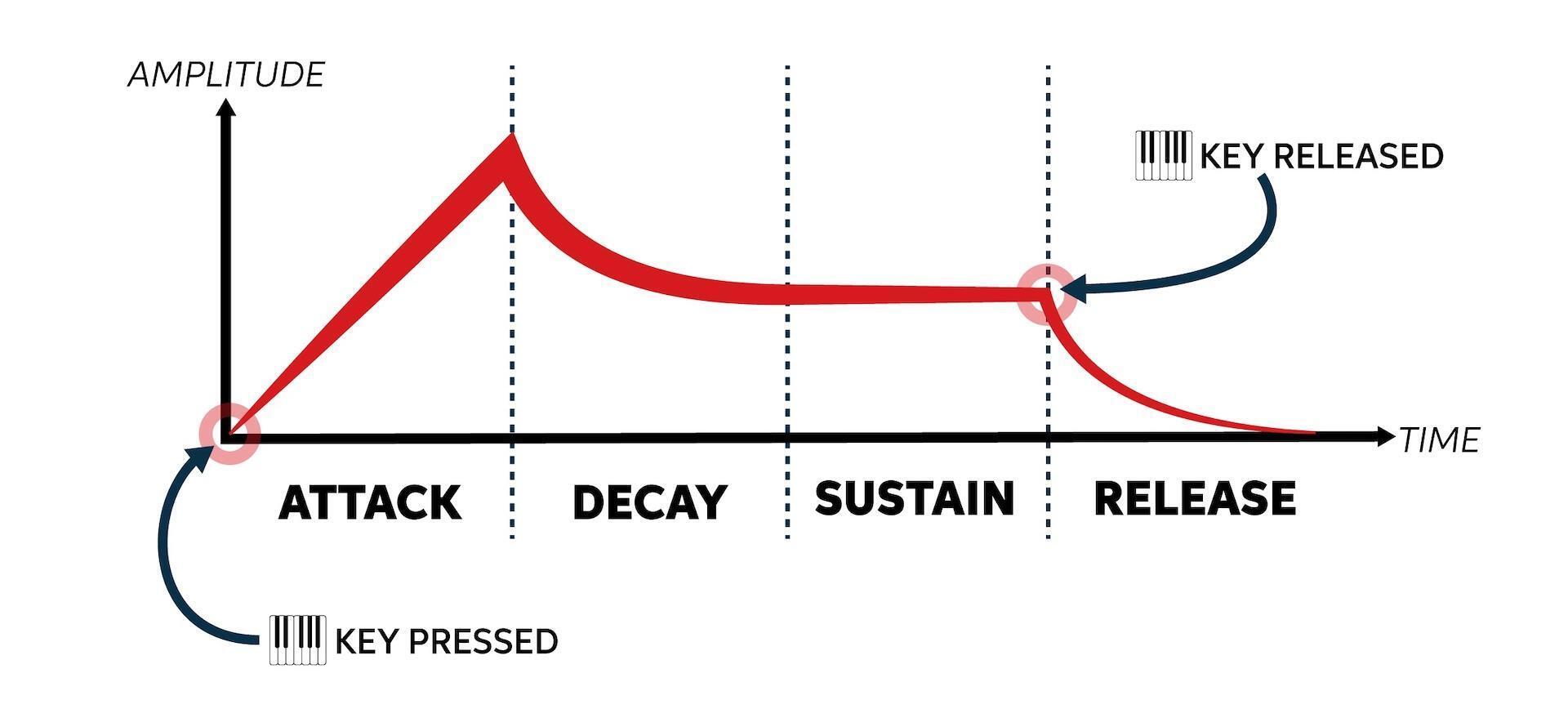
ADSR is an acronym that refers to the four stages of an envelope — attack, decay, sustain, and release. By modifying each of these four stages, you can create a vast array of sounds. So, let’s quickly break down each of the four stages as they apply to the amplitude of a signal.
Attack
Attack refers to the time it takes for a note to reach full amplitude when it is played. This can range from a very fast attack, which will sound a note instantly, such as when you hit a piano key, to extremely slow attacks, whereby the notes increase in volume over time and generate a swelling effect — think of horns or strings that grow louder as a player uses more breath or digs in harder with their bow.
Decay
The second stage of an ADSR envelope, decay, defines the duration of time it takes for a note to fall from its peak amplitude to its sustaining amplitude, which is set in the third stage. We can use an acoustic piano to conceptualize this. Imagine striking a chord with all of your might. You’ll get an initial explosion of sound, a big “bwong!” Then, as you continue to hold down the keys, the amplitude will drop and level off, holding a fairly steady volume until you release the keys. In terms of an ADSR envelope, that first “bwong” was the attack; the sustaining sound is — you guessed it — sustain; and the duration between the end of the “bwong” and when the sound hits its sustaining amplitude is decay.
Sustain
As discussed above, the sustain control sets the consistent amplitude of a note while it’s held. If sustain is set at max, then it will match the attack amplitude level. So, if you want an extremely consistent level with no accent on the attack, which can be useful for certain bass and percussion patches, then max out the sustain and turn the decay all the way down. Conversely, the lower you set the sustain level, the more impact you’ll have during the attack stage — a great method for making dramatic synth stabs.
Release
The final stage of an ADSR envelope is release. Not to be confused with decay, release defines the time it takes for a note to completely die away once a key has been released. By varying the release time, you can mimic the behavior of numerous physical instruments from pitched percussion to drawbar organs and much more. Plus, setting very long release times is the crucial method for generating long, haunting synth drones.
So far, we’ve just focused on how envelope generators can shape the amplitude or loudness of a signal, but we’ll demonstrate how envelope generators can be used to modulate parameters. Operationally, using envelope generators in this way is the same as when using them to modulate amplitude, so we won’t get into the specific mechanics (i.e., control voltages or their digital counterparts). For a more in-depth look into that topic, check out Sweetwater synth guru Daniel Fisher’s “Synth Clips 4: Envelopes” on Sweetwater’s YouTube channel.
Instead, we’re going to listen to a handful of audio clips illustrating the effects that envelope generators can have over four common parameters: pitch, filter cutoff, LFO, and pulse width. All of the clips were made using the Arturia Modular V software synthesizer, which is available standalone or as part of the Arturia V Collection 8 software synthesizer bundle. Based on Dr. Bob Moog’s legendary modular synthesizer, the Arturia Modular V may look a little overwhelming at first. But, even for synth newbies, its modular design, which requires you to connect separate modules via virtual patch cables, offers an excellent way to better understand the basics of synthesis; and numerous tutorials are available online to get you started with this powerful virtual instrument.

Without further ado, let’s jump into modulating parameters with an ADSR envelope generator!
Modulating Pitch
To keep things simple, most of the sound clips presented are based on a single oscillator set to a triangle wave. To best hear the effect of the modulation, we’re playing a single note from a MIDI keyboard, like so:
A nice-sounding, fat analog synth tone, for sure, but it’s a little boring. So, let’s see what happens when we patch an ADSR envelope generator into the oscillator’s pitch and tweak some settings. We’ll use a medium-fast attack, a slow decay, and a relatively fast release. The sustain is turned down completely, which ensures that the note returns to the corresponding note on the keyboard.
As you can hear, the pitch climbs quickly then slowly falls until it hits our original note. By adjusting the ADSR settings, you can create fun ascending and descending pitch effects to use as transitions between song sections. Or you can mimic the behavior of instruments like toms, which can pitch up or down subtly during the attack phase before returning to their fundamental note. Try it for yourself. Instead of playing a musical passage, audition ADSR pitch modulations using a single note. It will give you an excellent understanding of how even slight changes can make a huge sonic difference.
Modulating Filter Cutoff
Even on relatively straightforward monophonic analog synthesizers like the Behringer Model D or the Moog Minitaur, you’ll often have separate envelopes for the amplifier and the filter. For some patches, you may want the envelopes to have the same effect on the amplitude and the filter for a very consistent sound with little or no timbral change during a performance. But, more commonly, you’ll want them to be slightly or drastically different. “Why,” you might ask? To answer that question, let’s return to some nonsynthetic examples.
Bowed instruments, such as violins, violas, and cellos, will be brighter or darker depending on how much a player digs in with their bow. They may play very hard at the beginning of a held note then relax a little, meaning the sound will be initially brighter but then darken. Or they may take the opposite approach, playing very softly at the beginning of the note and then playing much harder at the end to add excitement. Applying a separate envelope to the filter allows us to replicate those characteristics. For instance, a fast attack and decay paired with a low sustain level will give us a bright attack and a darker tail, while a slow attack and a high sustain level will increase the brightness over time. Moreover, since we’re not confined by the physical constraints of real-world instruments when programming synths, we can craft wild, otherworldly sounds using extreme settings, such as the one heard here:
With a slow attack, a fast decay, a high sustain, and a quick release (plus plenty of resonance!), we come up with something akin to the sound of a death ray from a drive-in sci-fi flick!
Modulating LFO Rate
Modulating the rate of an LFO with an envelope generator is a slightly more advanced technique that falls under the realm of complex modulations (which Daniel Fisher covers in “Synth Clips 24: Complex Modulations“). But let’s briefly look at some of the creative possibilities it presents.
As we discussed in “A Simple Guide to Modulation: LFO,” LFOs (low-frequency oscillators) are powerful modulation sources. As Daniel Fisher puts it, they’re “great at making things wiggle.” More advanced hardware and software synthesizers, as well as modular systems and Eurorack rigs, may give us the ability to modulate the modulators! In this case, we’re assigning an envelope to the control-voltage input of an LFO, meaning that the envelope will effectively turn the LFO rate knob for us, automatically, according to how we dial in the settings. Then, we can route the LFO to another parameter. Let’s hear how that sounds when we modulate an LFO with an envelope generator and use that LFO to modulate the pitch of an oscillator.
As you can hear, we get a rapid rate increase that slowly decreases until it hits a rate defined by the sustain level on the ADSR. Now, let’s apply the same effect to the filter cutoff.
Pretty cool, right? We’re treated to a dynamic filter sweep using a very basic complex patch (oxymoron acknowledged!).
Modulating Pulse Width
In our last article, we finished up by demonstrating how we can use an LFO to modulate the pulse width of a square wave, producing timbral shifts to enliven static sounds. Well, a similar thing can be accomplished by assigning an envelope generator to the task, but with a lot more flexibility. Basic LFOs, whether they’re sine waves, square, or sawtooth, have the cyclical nature of those waveforms. On the other hand, envelope generators can produce more complex contours that, when applied to PWM (pulse-width modulation), can have some very interesting and musical results. As with the previous examples, we’re playing a single note, but this time subbing in a square wave, and we’ve assigned the envelope generator to the oscillator’s PWM input. Check it out!
You can hear the satisfying timbral changes as the envelope generator advances through its cycle, starting out full-bodied then getting thinner and reedier before recapturing its initial girth. Using this method in the context of a longer performance is a fun and simple way to inject a bit of randomness and movement to keep your listeners engaged.
Putting It All Together
Now, while all of this is cool from a theoretical viewpoint, what matters is how these methods can be used to produce musically interesting tones. To that end, we’ve put together a short piece that would be right at home in an inspirational 1980s sports movie using only the Arturia Modular V, a handful of plug-in effects, and drum samples from a vintage LinnDrum programmed using Native Instruments Battery 4 (available in Native Instruments Komplete 13). The synth tracks comprise a bass line, a stereo organ sound from two instances of the Modular V, a melody line, and a swell effect to cap it off.
For the bass line, we modulated the filter with the envelope generator to produce a subtle formant effect.
The stereo organ patch takes advantage of pulse-width modulation via the envelope generator to add an organic feel.
Our sprightly melody line gets its flair from an ADSR-animated filter cutoff with the resonance of the filter cranked up.
Finally, we punctuated the ending of the piece with an exclamatory swell using an ADSR-modulated LFO assigned the oscillator pitch.
When all the modulated patches come together, you end up with a rather exciting soundscape that is just begging to be used in a training montage!
Conclusion
There you have it — a very simple guide to modulation with an ADSR envelope generator. We encourage you to take some time with your favorite hardware or software synthesizers and explore all the ways you can use envelope generators for creative sound design! They can yield some very inspiring textures and tones!