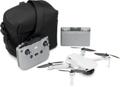
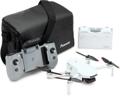
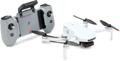
Drone use is on the rise in worship settings! From capturing high-quality aerial footage of campus events to improving safety and supporting maintenance by inspecting hard-to-reach areas such as roofs and steeples, creative videographers are discovering innovative approaches that may surprise you.
A friendly note before we dive in: This article is here to share general information and isn’t intended as legal, regulatory, or safety advice. We encourage you to double-check the latest FAA, state, and local requirements for your specific situation. As always, please operate your equipment safely!
Five Great Drone Uses
Service-focused Aerial Imagery
Leverage the power of familiarity. Sure, aerial videography and photography add beauty and energy to your imagery. But by imparting local flavor, you extend what occurs inside your walls to outside community life.
Consider including drone B-roll footage for:
- Dramatic teaser clips and bumpers
- Sermon and scripture slides
- Storytelling and member testimony moments
- Countdowns
- Scenic backgrounds
Enhance Stream Post-production
Take your worship stream to new heights by incorporating drone shots during post-production. Think of these shots when you want to convey energy, emotion, and movement. Add a sense of scale or inspiration at the right moment.
These B-roll shots can be especially effective:
- Establishing shots
- Jib/crane/cable-style sweeps
- Slow descending/rising shots
- Sweep/arc shots moving horizontally across the platform
- Overhead reveal shots, starting with the focus on the worship leader or a fixture and pulling back to reveal the rest of the platform
Pro Tip: Preserve continuity by filming when everyone is dressed in what they’re wearing for the service. The stage lights, haze, and scenery should match service settings. Record during a pre-service rehearsal when the drone noise won’t be distracting and there’s no congregation to fly over. And, please, have the people you’re filming refrain from looking at the camera!
Marketing & Outreach
Drone footage adds energy and excitement to your worship media, helping every video feel more engaging and memorable. From sweeping campus flyovers in welcome videos to dynamic shots for social media, websites, and promotions, aerial content creates a polished first impression for potential visitors. It also brings fresh life to event recaps, ministry announcements, discipleship opportunities, and celebrations, highlighting the vibrant impact happening both inside and outside the sanctuary through the week.
Here are a few more ways drone footage helps:
- Incorporate captivating establishing shots for promotional or welcome videos, testimonies, virtual tours, training videos, and building-project fundraisers.
- Promote small group picnics, special services, or activities.
- Enhance scroll-stopping social media content.
- Capture the scale and energy of outdoor events with unique angles.
- Showcase community outreach.
- Grab a seasonal background for bulletins, postcards, social media, and websites.
- Elevate a large group photo of staff, volunteer groups, or ministry leaders.
- Reduce first-time anxiety with a campus or parking lot flyover.
- Highlight special services or large-scale community events.
Building Inspections & Maintenance
Drones make it easier and safer to inspect roofs, gutters, steeples, and other hard-to-reach areas without the expense of scaffolding or the risks of ladder work. High-resolution aerial footage can quickly reveal leaking roofs, cracked brickwork, mold growth, peeling paint, damaged flashing, or worn bell-tower components before small problems become costly repairs. Regular drone inspections help you protect your buildings, plan maintenance more effectively, and keep facilities looking welcoming for every guest and congregation member. In addition to the visual assessments that drones can provide, you should always have a full inspection performed by a licensed roofer or another qualified professional, as drone footage may not identify all hazards or defects.
Safety & Security
Drones can help strengthen building safety and campus security with fast, detailed aerial visibility of rooftops, entrances, parking lots, and hard-to-reach areas that are impractical for fixed cameras. Drones provide staff and security teams with greater awareness during events and large gatherings while reducing the need for risky manual inspections. Drones with prop guards can enhance a security team while clearing spaces within the facility. Advanced drone capabilities can also support emergency preparedness training and improve confidence in keeping members, guests, and facilities safe.
That said, drones aren’t a substitute for trained security personnel or professional security systems. If you plan to incorporate drones into your security plan, then we recommend consulting with qualified security and legal advisors to ensure your approach meets applicable privacy laws and best practices.
What You Need to Know Before Your First Flight
The FAA recognizes two primary use cases when it comes to drones under 55 pounds: recreational and commercial. The differences between these two may surprise you. Check the FAA’s helpful website or the Know Before You Fly website for details. Federal, state, and local requirements can be found at pilotinstitute.com.
Recreational Use
The FAA narrowly defines recreational use as solely for the enjoyment of the person piloting the drone. It requires a TRUST certificate, which users must carry while flying. This is the FAA’s only exception to flying commercially. Recreational pilots must use a drone that weighs less than 55 pounds at takeoff and follow all airspace restrictions, including registering the drone and having drone ID (RID), not flying in controlled airspace without authorization, staying below 400 feet, and maintaining visual line of sight. Flow recreationally, drones under 250 grams at takeoff follow the same rules except they do not need to be registered with the FAA or have remote ID. (As with all the FAA guidance we share here, always double-check current rules at FAA.gov!)
Recreational use may include activities such as:
- Flying around an empty parking lot for fun.
- Playing a game of drone tag or racing with friends.
- Taking photos during a walk, while riding a bike, or while camping.
TRUST Certificate
Recreational flyers must pass the FAA Recreational UAS Safety Test to receive a TRUST certificate, which must be carried while operating. It’s an online, open-book test (estimated to take approximately 30 minutes) that covers basic safety regulations. At the time of this publication, the test is mandatory, free, and non-expiring — but keep in mind that FAA requirements can change, so verify current rules before flying.
Flying a drone without carrying a TRUST certificate will result in having to stop flying and may include fines. If you hold a valid Part 107 pilot certification, then you do not need a TRUST certificate. Most other drone use is broadly categorized as commercial. Any commercial use requires a Part 107 Remote Pilot Certificate.
Pro Tip: Always keep a digital backup on your phone. Otherwise, if you lose your certificate, you’ll need to retake the test to get a new one.
Pilot Certification: It’s Probably for You!
Most drone use for businesses and nonprofits requires an FAA Part 107 Remote Pilot Certificate, including drones that weigh less than 250 grams. As a general rule, religious organizations are not exempt from FAA, state, and local drone regulations, regardless, whether the activity is performed by staff or volunteers. It will all depend on the facts, and the only way to get a definitive answer will be to consult with qualified legal counsel for your specific situation. Certification covers both recreational and commercial drone piloting. It is available from FAA-approved testing centers and has a certification fee. At the time of this publication, the certificate does not expire but requires a free biannual training course.
Drone Registration & ID
Drones flown for commercial use that weigh under 55 pounds and drones flown recreationally that weigh 250 grams or more must be registered and have drone ID (RID). Registration is inexpensive and, at the time of this publication, remains valid for three years. RID is a small radio transmitter broadcasting the drone’s identification number. Third-party identification transmitters are available for drones lacking built-in RID. Be sure to check the FAA website for current registration requirements and fees before you fly.
All the drones listed in this article feature built-in RID.
Other Responsibilities
Authorization or notification is required for flying in controlled airspace around airports, over 400 feet above your launch altitude, in designated areas, or in situations addressed by FAA, state, or local authorities. Exemptions are sometimes available upon request. Authorizations and notifications are mostly automated and are completed quickly using a phone app, with response times sometimes under a minute. These requirements are subject to change, so confirm the latest authorization procedures before each flight.
Important Features When Picking the Right Drone
While your specific use case may necessitate different features from storage and dimensions to wind-speed resistance, these factors may help you identify the best unit for your needs.
Prop Guard: This is important for flying inside or around people. Add-on guards may increase launch weight to exceed 249 grams. However, note that, if you plan to fly over people, then you are subject to FAA Part 107 Operations Over People rules and manufacturer limitations. Make sure you review those rules before every indoor or crowd-adjacent flight.
Built-in Remote ID: RID is required for commercial drone use and for recreationally flown drones that exceed 249 grams. Third-party options are available for drones that do not have a built-in identification module.
Collision Detection Sensors: These top, bottom, rear, and front sensors are helpful for flying in tight spaces or around trees. The type of detection system, sensor location, size of objects, and lighting impact effectiveness.
Image Sensor Resolution and Size: Image sensor resolution and size impact color balance, image quality, contrast, and how well the camera captures in low light. Generally, a large sensor size results in more usable results.
Storage Format (internal/external and size): No one wants to run out of storage mid-flight. Storage size also directly impacts video stability and helps prevent dropped frames. The type of storage affects transfer time and workflow. High-speed (both read and write), high-volume SD cards work best. Internal storage tends to have slower read (transfer) rates and is not usually upgradable, so think of it more as a backup for an SD card. If possible, format your SD card on your drone rather than on your computer. Always follow the manufacturer’s documentation and back up your media before formatting any storage!
Maximum Operation Distance: Because you always want to maintain visual line of sight (VLOS), practical operation is limited to under half a mile. Battery life can also limit your flight time, so keep that in mind when planning for a return trip. Operating in areas with dense Wi-Fi traffic, high-voltage lines, and physical obstacles can reduce your effective range. No one wants to accidentally trigger an auto-land feature while inspecting the roof! If possible, set a maximum distance limit in the drone’s application to fly safely. And remember, operating distance is model- and environment-specific. The thresholds and tips shared here are general suggestions, not a substitute for reading the manual!
Controller Type: Some follow-me-style drones can be controlled by voice commands or hand gestures. Other drones may be controlled by a phone app or a hardware controller. If controlling the drone or the camera is accomplished using sealed goggles, such as the Antigravity A1, then a second person may be required to maintain visual line of sight. And make sure your controller is charged before a shoot!
Battery Life/Flight Time: Manufacturers estimate this based on best-case scenarios. It can be affected by weather conditions (especially wind and cold), drone blade condition, flight style, payload weight, battery life cycle, and other factors. A safe rule of thumb is to swap batteries or recharge when the drone battery indicator reaches 20%, though your specific drone may have different recommendations — always follow your manufacturer’s guidance. Also, don’t forget to consider the battery level on your controller!
Flight Modes: Automated flight presets or waypoint missions allow you to pilot the drone without human control. Keep in mind that drones under 250 grams typically have fixed lenses, meaning that the camera records what is directly in front of the drone. Some drones can record GPS waypoints, allowing you to repeat an exact route, which may be handy for a time-lapsed collection of images to provide an update for a building project, for example, or to increase efficiency of a security scan.
Send in the Drones!
Check out these drones. Each has specific advantages from prop guards to flight time, camera type, and control options. All of them weigh less than 250 grams and feature built-in remote ID. We’re sharing these features and specifications provided by the manufacturer. They may change. Make sure to read the published specifications and warranty for the full details.
Potensic Atom 2
Consider the Potensic Atom 2 as an affordable outdoor camera drone with a strong battery life, high photo resolution for its class, and a range of bundle options.
DJI Mini
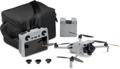
The DJI Mini is a budget-friendly entry into reliable aerial photography that features excellent beginner stability, easy operation, 4K/30 fps resolution, and a Fly More accessory package.
HOVERAir X1 PRO
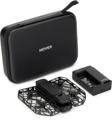
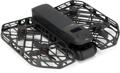
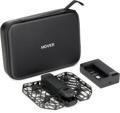
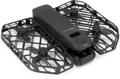
The HOVERAir X1 Pro is a great quick-launch indoor/outdoor option for capturing social media content for leaders, volunteers, and fast-moving worship environments. Rear collision detection helps for advanced follow-me recording.
HOVERAir X1 PROMAX
Step up your game with the HOVERAir X1 PROMAX. This premium automated content drone features improved 8K image quality and extremely easy operation.
DJI Mini 3
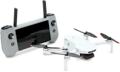
The DJI Mini 3 offers an excellent balance of professional image quality, portability, and extended flight-time battery life for worship production teams.
DJI Mini 5 Pro
Consider the DJI Mini 5 Pro for professional, cinematic worship footage, livestream assets, and advanced ministry production. Includes advanced features such as 360-degree obstacle detection and fast horizontal and vertical speeds.
Antigravity A1
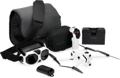
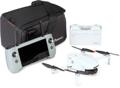
The Antigravity A1 provides a 360-degree view for a wide range of post-production options perfect for advanced 8K cinematic storytelling and premium production environments. Per FAA regulations, a second pilot is necessary to access the goggle view while also maintaining visual line of sight. Don’t rely on the goggles alone!
Drone FAQs
NOTE: We do a deeper dive into the rules around drones and FAA Part 107 in particular, but be aware that FAA, state, and local drone regulations change frequently. The information below is current only as of this article’s publication date and is provided for general awareness. Always check current requirements directly with the FAA and applicable authorities before flying!
If I have a standard FAA Part 107 commercial certificate, then does the 250-gram weight limit matter?
Not really. The commercial certificate covers drones under 55 pounds. But drones under 250 grams — that’s only a little over a half pound — are easy to carry, fast to set up, and simple to pilot. Plus, they offer adequate flight time for many worship-related uses.
Why can’t I use a drone during a service?
Flying drones over people raises both FAA regulatory restrictions (Operations Over People categories under Part 107) and potential civil liability. Additionally, drones would be distracting visually and sonically, usually measuring approximately 70 to 80 decibels. It would be like having a camera-size swarm of hornets and lightning bugs zipping around overhead. It’s best to avoid flying over your congregants.
Can I recreationally fly drones that are 250 grams or more?
Drones under 55 pounds can be flown recreationally if their use qualifies. The same FAA recreational-use rules apply to drones over and under 250 grams, including flying with a valid TRUST certification. Drones heavier than 249 grams require registration and RID. However, drones lighter than 250 grams don’t need to be registered nor have RID to fly recreationally. These rules reflect the requirements as of this article’s publication — always confirm with the FAA before flying.
If I can’t use a drone during a service, then why might I use a drone in my auditorium?
Consider creating shots during rehearsal before a service. You can capture dolly or jib-style shots to use as B-roll. The best time to do this is when the people on the platform are wearing the same outfits they’ll have on during the service and your lights/haze match your service settings.
You may also consider using a drone inside for inspection or security purposes or for making welcome or training videos.
(I do not recommend using a drone to pop rogue helium balloons that escaped during summer camp. That’s all I have to say about this!)
Does the house of worship need drone insurance?
We recommend checking with your insurance broker or agent to confirm coverage for drone operations. The FAA does not require drone insurance for either recreational or commercial use. However, standard insurance policies for worship organizations usually exclude aircraft, which includes drones. Drone insurance generally covers two things: liability to others (including people, buildings, vehicles, power lines, etc.) and hull damage to the drone itself. Check with your insurance company for more details.
If someone donates their time to capture promotional footage for a religious organization on their personal drone and they don’t have an FAA Part 107 commercial certificate, can the organization be fined?
Most likely, yes. Donated or volunteer flights for an organization are generally treated by the FAA as commercial operations, and enforcement actions can reach both the pilot and the organization. Nonprofit organizations, including houses of worship, must function in accordance with FAA, state, and local guidelines. Check the FAA’s helpful website or the Know Before You Fly website for details.
If I buy a drone, what accessories should I consider?
Keep in mind that any accessories attached to a drone at takeoff are included in the weight limit. That’s not a big deal if you have the Part 107 certificate, but it is if you’re flying under the 250-gram recreational-use registration requirement.
Many drone pilots recommend having additional batteries ready. Because drone shots are typically short, you’ll have plenty of opportunity to swap batteries throughout your shoot. Charging hubs allow you to manage and charge multiple batteries simultaneously.
If your drone can use a microSD card, then consider one that has plenty of storage capacity. You won’t be limited during a shoot, and it’s a handy way to transfer all that great footage. A fast V30 SD card can help avoid dropping frames with 4K or higher resolution.
If your drone does not have built-in prop guards, then many times they’re 3D printable or available from third-party suppliers.
When capturing audio for content creation, consider a wireless lapel mic, especially one that cancels out background drone noise.
If your drone does not have built in drone ID (RID) and you need one, then you can add a compact third-party RID device.
Stay Safe in the Air! At Sweetwater, we want you to have the best experience possible with your new product. Just remember to follow local, state, and federal rules, including the FAA and manufacturer’s guidelines. Happy flying!
Get off the Ground!
Call your Sweetwater Sales Engineer at (800) 222-4700 for personalized drone recommendations. We’ll be glad to clear the air and get you flying in no time.
A special shout-out to commercial drone pilot and videographer Tabor J of Taborjphotofilm.com for offering your expertise for this article!