

If you’ve used HDMI with your TV before, then you’ve probably seen the abbreviation ARC and/or eARC on your device’s connection panel. In fact, you’ve likely used ARC/eARC without even knowing it! But what exactly do these terms mean? How do they improve the TV audio experience? Let’s clear the confusion.
When HDMI was released in 2002, it sought to simplify the process of using individual cables to send audio and video data to your TV. Think about your old game system or DVD player — rather than relying on two or even three separate connections to manage video and audio, HDMI condensed it all into one cable, streamlining device setup while containing more than enough power to handle the bandwidth of an HD signal. While HDMI is an excellent option when using your TV’s built-in speakers as an audio output, things become a bit more complicated when throwing an external speaker system into the mix. That’s where ARC and eARC come into play.
What Is ARC?
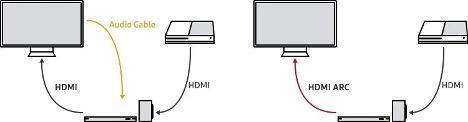
A feature introduced on the arrival of HDMI version 1.4, ARC (Audio Return Channel) improves the carrying capacity of standard HDMI cables. Traditionally, HDMI was developed to send video and audio in one direction (i.e., from your source device to your TV). That meant if you wanted to use an external sound device such as a soundbar or speaker system, then you’d need to utilize an analog or optical cable (now largely obsolete) to send your audio to your allocated playback device. While capable of sending audio and video in a single direction, ARC also features an audio return path, allowing audio signals from your TV to transfer to your playback device within the same connection. This cuts out the optical cable altogether. Both diagrams in the figure below achieve the same goal: connect TV audio to an external device. However, since ARC performs the duties of both the HDMI and audio cable, the diagram on the right does not need an additional audio cable to operate.
What Is eARC?
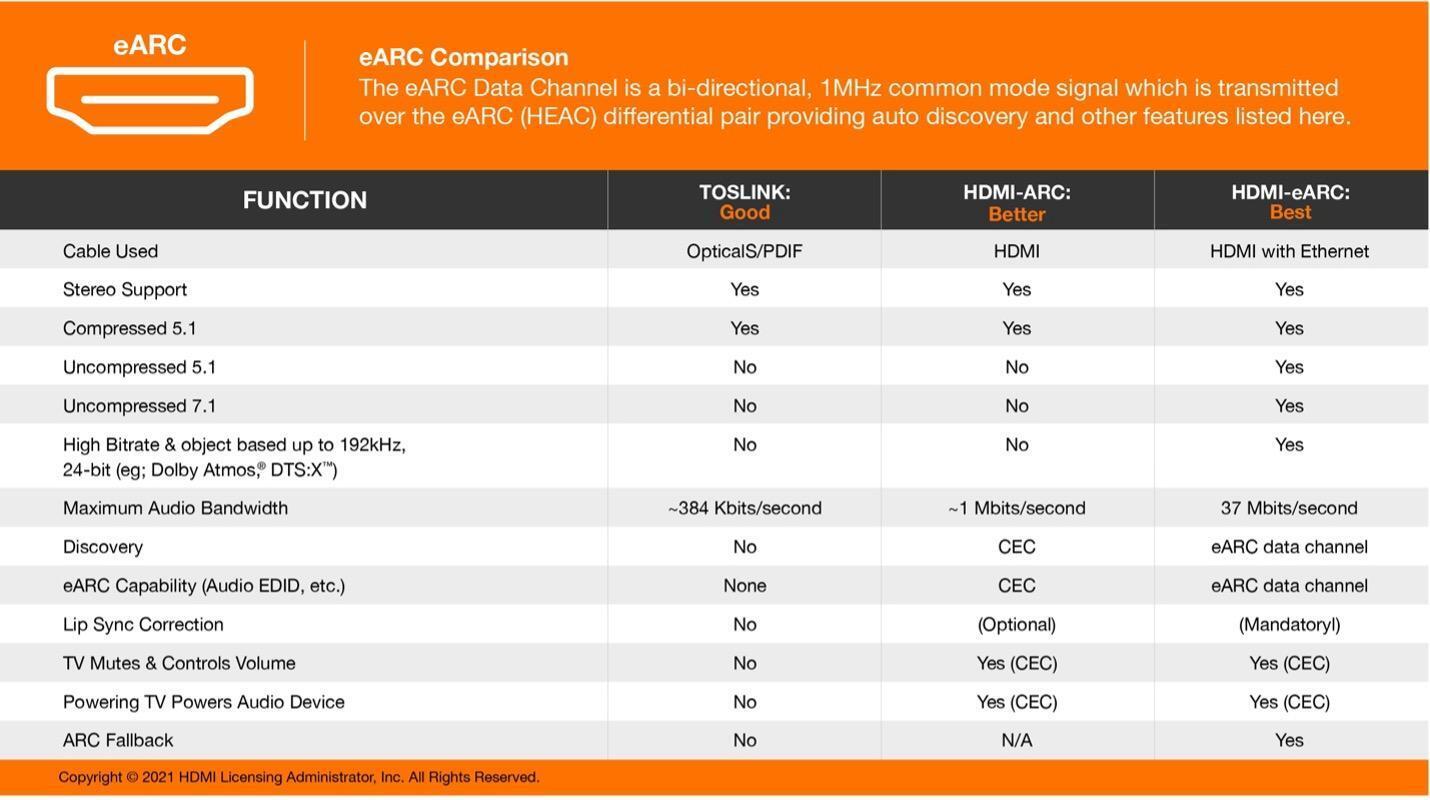
eARC (enhanced Audio Return Channel) functions more or less the same as ARC with one significant difference: increased bandwidth. By utilizing the boosted transfer rates supplied by HDMI’s 2.1 architecture, eARC boasts enough power to support uncompressed 5.1 or 7.1 surround sound audio as well as spatial audio formats such as Dolby Atmos, maximizing achievable sound quality and immersion when using external soundbars or speaker systems. Unlike standard ARC, eARC also provides onboard lip-sync correction, which automatically detects processor delays to keep audio and visuals in line at all times. As eARC connections are more modern and not always included in every setup on the market, eARC’s built-in ARC fallback feature ensures that your cable still supports standard ARC protocol when a device in your setup does not support eARC.
Do I Need ARC or eARC?
If you’re going to use your TV’s built-in speakers, then the answer is simple: neither. However, if you intend to use an external speaker system such as a soundbar, then ARC/eARC is the way to go. Casual listeners and movie buffs using a separate speaker should be more than happy with ARC in their setup because it cuts down on cables and enables control over your TV’s playback settings from a single remote. That said, if you’d like to retain an uncompressed audio signal or employ the benefits of Dolby Atmos or other spatial audio formats in your home theater setup, then eARC is likely the better route to take. No matter which format you choose, always check beforehand that your equipment supports it to avoid future headaches. Likewise, ARC and eARC require High Speed or Ultra High Speed HDMI cables in order to function properly. When in doubt, use an Ultra High Speed HDMI cable; these HDMI cables are backward compatible to support any eARC or lesser setup you may be using. The handy table below outlines the specific capabilities of ARC and eARC in comparison with old-school optical connections.
Get the Most from Your Soundbar Setup!
Considering the rising popularity of soundbars and other TV audio devices on the market, it’s even more important to start exploring the leverage ARC or eARC may give your entertainment setup. Whether it be cables, sound systems, or audio receivers that your current build requires, Sweetwater’s expanding audio catalog is a great place to find your rig’s next addition. No need to get caught up in the technical — if you need assistance involving device compatibility or installation or have any other questions about your equipment, please give your Sweetwater Sales Engineer a call at (800) 222-4700; they’re more than happy to help!