In addition to our extensive range of pro audio gear and instruments, Sweetwater is also your number one choice for band and orchestra products. Because Sweetwater caters to such a diverse array of musicians, we’re often asked questions about how to record brass and woodwind instruments.
In this article, we’re going to explore how to record a trumpet at home. Capturing trumpets — and brass instruments in general — can be challenging. After all, trumpets are loud and tend to unmask every acoustic flaw of your room. Today, we’ll cover home-studio fundamentals, provide microphone recommendations, and supply you with specialized tips for capturing your trumpet’s distinctive sound.
If Your Room Sounds Bad, Then Your Trumpet Will Sound Bad
As we mentioned, trumpets are loud instruments. This means that its sound greatly excites the room in which it’s recorded. A large, lightly reflective room will deliver the best results. Smaller rooms will work, but, thanks to their inherent sonic deficits, they can yield unpleasant sonic artifacts such as low-frequency buildup, standing waves, room modes, flutter echoes, slapback, and a whole host of other nasty, sonically challenging issues. The solution? Acoustic treatment. Check out Sweetwater’s “Acoustic Treatment Buying Guide” for an excellent primer on this topic.
Tired Lips Sink Recording Sessions
It’s also important to take care of your instrument. And we don’t mean your trumpet. We’re talking about you! Embouchure overuse syndrome is a real thing. If you’re going to be spending hours upon hours in a room recording your trumpet, then be sure to warm up properly and to give yourself plenty of rest between sessions. And, if you find yourself straining to compensate for tired lips, listen to your body and take a break.
Building a Basic Home Studio
If you already have a functioning home studio, then you can skip this section. If not, pay close attention — this is important. Assuming you already own a capable computer, you’ll need four essentials to get you up and running:
- DAW
- Audio interface
- Studio monitors
- Headphones
A DAW — a.k.a. digital audio workstation — is your recording software. Sweetwater stocks a wide range of DAW software including Pro Tools, Studio One, Ableton Live, and many others. We recommend that you call your Sales Engineer if you’re unsure which software is best for you.
The audio interface is what pipes audio into and back out of your computer and enables you to hear the sounds that you recorded. Sweetwater boasts a massive selection of USB, Thunderbolt, and Ethernet interfaces for Mac, Windows PC, and iOS devices. Again, if you’re unsure about what will work with your setup, give your Sales Engineer a call.
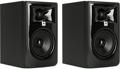
“Studio monitor” is a fancy name for a studio-quality speaker. Studio monitors are how you hear the sound that comes out of your audio interface. JBL 305P MkII, Kali Audio LP-6, and PreSonus Eris E4.5 are three excellent, budget-priced pairs of studio monitors. To learn more, check out our “Studio Monitors Buying Guide.”
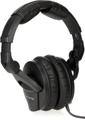
You’ll also need a set of headphones to listen while you’re recording. You’ll want closed-back headphones to keep sound from leaking into your microphone. Sennheiser HD 280 Pro headphones are an outstanding, budget alternative. Read our “Sennheiser Headphones Buying Guide” for more information.
Choose the Right Microphone for the Job
Although you can use just about any microphone to record a trumpet, using the right mic will net you better results. So, what’s the best microphone for recording a trumpet? Well, you can’t go wrong with a ribbon mic. The Royer R-121 is considered a standard for recording trumpet and has been used by many famous recording artists for years. In a home-recording situation, where room acoustics can be questionable, the Beyerdynamic M 160 is almost a no-brainer, thanks to its ambient-noise-rejecting hypercardioid polar pattern. You can even get a stand and a cable with this bundle. What a deal!
Not fond of ribbon mics? Maybe you’re a condenser aficionado. No problem. A neutral-sounding large-diaphragm condenser microphone like the Shure KSM32 will perform like a champ. The KSM32 is a time-tested studio workhorse. It will capture every nuance of your instrument, and it can tolerate extra-loud sources like trumpets without any overload.
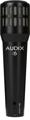
You can also use a dynamic microphone like the Audix i5. It’s not fancy, and it’s not flashy; but, with proper mic technique, it will yield great results.
Proper Mic Placement Is Essential
When recording a trumpet (and most other sources for that matter), proper microphone placement is the key to getting the results you want. A great starting point is to point your microphone straight at the bell of your trumpet and stand 6–10 inches away. Experiment with different angles and distances until you find the sound you want. Be cognizant, however, that the further away you stand from the microphone, the more room you’ll hear. So, if your room sounds bad, then so will your recording.
We’ll supply more information about trumpet microphone techniques in a future article. That said, regardless of how you position your mic, be sure to use a pop filter. This will safeguard your mic against stray bursts of air. This is especially important if you’re using a ribbon as ribbon mics are prone to wind-related damage.
Use Plug-ins to Add That Final Studio-quality Sheen
Once you’ve captured a solid-sounding recording of your trumpet, you can enhance it with a few well-placed plug-ins. Your DAW probably includes a cache of plug-ins to get you started. That said, bolstering your stock plug-ins with a few third-party add-ons is an easy way to take your recordings to the next level.
For starters, reverb is a must-have for adding space and dimension to your playing. A reverb plug-in like iZotope’s Exponential Audio Phoenix Verb will make your trumpet sound like it was recorded in a concert hall. Antares Auto-Tune, while famous for vocal-tuning applications, is also a great way for instrumentalists to rein in stray, out-of-tune notes and stabilize uneven intonation. Auto-Tune Access is an excellent, cost-effective introduction to this industry-standard studio tool. Finally, a double-tracking effect, such as Waves Doubler, is ideal for adding a slick, produced sound to your performance.
Give Us a Call!
Recording a trumpet can be tricky — especially in a home-studio situation. That said, Sweetwater has the gear and knowledge you need to get the job done with professional results. Give your Sales Engineer a call today at (800) 222-4700 to get started!