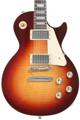
You know the problem: there’s that one song in your set list where you really need an acoustic guitar, but you don’t want to drag another guitar to the gig just for that. Or you’re in the studio and want to layer an acoustic part, but all you have are electric guitars. Is it possible to make an electric guitar sound exactly like an acoustic?
Maybe not, but you can come very close by providing the same kind of sonic vibe and playing the same kind of part an acoustic guitar would play in a song. Best of all, even if you don’t nail the sound of a multi-thousand-dollar acoustic guitar miked with a vintage German tube mic, you can create different, unique guitar timbres. These blur the line between acoustic and electric and add a new element to your sound. Even though I have a couple excellent acoustic guitars, sometimes the acoustic emulation fits better in a mix than either an acoustic or an electric. And, live, you won’t have the kind of feedback problems that often plague acoustic guitars.
Also note that, when playing live, an acoustic-guitar emulation probably won’t sound right with a standard guitar amp. For best results, it helps to feed your emulated acoustic guitar through a flat-response, powered speaker system like those from Bose, JBL, Mackie, PreSonus, QSC, etc. In the studio, go direct into your audio interface.
Why Do Acoustic Guitars Sound Different?
For a convincing emulation, we need to take several factors into account.
- The guitar’s body is like a resonant filter that interacts with the sound; a solidbody electric doesn’t have the same kind of characteristics.
- Acoustic guitars usually use thicker strings that generate more output and that are made of different materials than electric-guitar strings. It may be my imagination, but electric guitars sound more “acoustic” with thicker strings.
- The frequency response is very different. Acoustic guitars are brighter and may also have a peak in the bass range (fig. 1). If the acoustic guitar is miked, then we also need to consider the mic, miking position, and room.
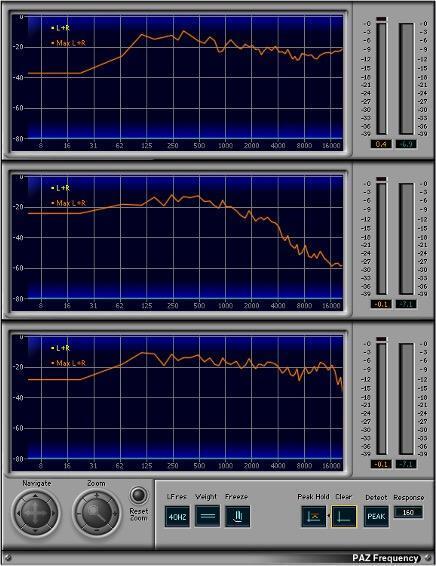
Figure 1: (Top) The Waves PAZ analyzer shows the spectrum of a Breedlove Oregon Concert CE through its LR Baggs electronics.
(Middle) Les Paul Standard with humbucker pickups in the middle position
(Bottom) The same Les Paul after compensating with Ozone Match EQ
For our purposes, the goal is to obtain the sound of an acoustic guitar’s electric output. Trying to emulate particular mics and rooms is way more complicated and, in this context, not really all that necessary. We’ll include plenty of audio examples and evaluate the pros and cons for each option.
1. Curve-Matching EQ
This is a studio-only solution because it’s not in real time. IK Multimedia Master Match and iZotope Ozone Match EQ analyze a reference signal (in this example, the Breedlove acoustic guitar) and a target signal (the Les Paul) and apply the reference’s EQ spectrum to the target (fig. 2).
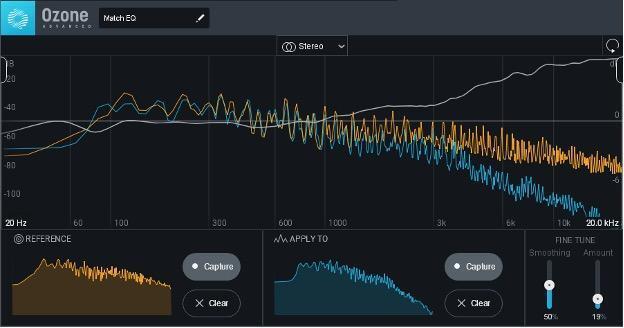
Figure 2: The orange line shows the curve for the Breedlove, and the blue, for the Les Paul. The gray line shows the EQ curve that compensates for the difference in frequency responses. The Amount and Smoothing controls in the lower right vary the amount of EQ applied to the target.
The end result makes an electric guitar sound more acoustic, as you’ll hear in the first three audio examples. I went out of my way to choose two guitars that seemed like oil and water — the bright, present sound of the Breedlove and the dark, beefy sound of the Les Paul.
But here’s the really cool part: Pan the Breedlove and the curve-corrected Les Paul oppositely, and you’ll have a fantastic doubling effect.
In a mixed song, guitars that sound more similar make it even harder to tell the two apart when spread in stereo. Also, a semi-acoustic guitar can sound more “acoustic” under some circumstances.
Pros: You only need software to create correction curves. It provides useful alternative sounds, especially for doubling.
Cons: Non-real-time only. You can’t violate the laws of physics — for example, if an electric guitar has no output above 8kHz, a correction curve can’t boost sounds that don’t exist.
2. Line 6 Variax
Variax guitars offer several acoustic-guitar voicings (fig. 3). Emulations include the Martin D-28, Martin 0-18, Gibson J-200, and two 12-strings (Martin 12-28 and Guild F212).

Figure 3: The Variax’s Acoustic setting accesses five acoustic-guitar models
Because the Variax offers a wide variety of electric- and acoustic-guitar models, when you do need an acoustic sound, all it takes is turning a knob. What’s more, alternate tunings are also only a knob turn away. With a standard acoustic guitar, your audience might doze off before you finish retuning.
The first-generation Variaxes got pushback because the guitars weren’t equal to the electronics. That changed around a decade ago when Line 6 introduced guitars designed by James Tyler. The newer Shuriken models are also outstanding, and even the lower-cost Standard line is several cuts above the first Variax guitars. There’s much to be said not only for the Variax’s shape-shifting talents but also for the guitars themselves. The following examples are three of the Variax acoustic emulations.
Pros: Realistic acoustic sound and vibe. No need to change your playing style. Alternate tunings are icing on the cake. Lots of other guitar sounds, and also has standard pickups that don’t require power. Part of the Line 6 ecosystem, which includes Variax Workbench software, Helix integration, etc.
Cons: Can’t retrofit an existing guitar. With alternate tunings, physical string tunings don’t change, which can be distracting. No MIDI output.
3. MIDI Guitar
The BOSS GP-10 and Roland GR-55 (fig. 4) both include acoustic guitar sounds as well as other instruments. However, you need to install the Roland GK-3 divided pickup on your guitar, and use a 13-pin cable, to obtain separate outputs for each string. Some guitars already come with a suitable hex pickup and 13-pin output (e.g., Godin’s Multiac SA guitars like the MultiAc Grand Concert Deluxe nylon-string guitar or LGXT electric guitar). Also note that MIDI guitars can drive external synthesizers and samplers, some of which have excellent guitar sounds. Fishman’s TriplePlay can trigger MIDI synthesizers and has the advantage of wireless operation, so you don’t need the 13-pin cable. It’s a sophisticated system and relatively easy to retrofit on most guitars.

Figure 4: Roland’s GR-55 provides synth sounds and traditional instrument sounds and can drive MIDI-compatible synthesizers.
The GP-10 sends MIDI data over USB, so, in addition to using its internal sounds, it can drive computer-based virtual instruments. The GR-55 includes a standard 5-pin MIDI connector for hooking directly into hardware synthesizers, MIDI interfaces, and audio interfaces with 5-pin MIDI connections.
MIDI guitar is not glitch-free; although, in live performance, people may not notice it . . . and, in the studio, you can edit out the glitches. Here is a nylon-string guitar preset from Studio One‘s Presence XT instrument driven by MIDI guitar.
Finally, for monophonic guitar to MIDI, the Sonuus G2M is under $100. Not being able to play chords is a limitation, but the G2M is an inexpensive way to get into the world of triggering hardware synthesizers.
Pros: In addition to triggering sample-based guitar sounds, MIDI guitar can also trigger sounds like synths, strings, cellos, pads, sound effects, etc. MIDI data can be recorded into your computer, and edited, with a degree of finesse not possible with audio (editing can also compensate for tracking issues). For live performance, having so many sounds at your disposal can be huge, particularly for cover bands.
Cons: You need to play very cleanly, and, even then, you’ll encounter at least some glitching and tracking issues. You may find that flatwound strings give better tracking than roundwounds. Not all synthesizers are ideal for MIDI guitar, and not all guitars are ideal for retrofitting with the hex pickups needed by most systems.
4. BOSS AC-3 Acoustic Simulator Pedal
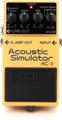
How much can you expect from a $154 pedal? Probably more than you thought. The BOSS AC-3 (fig. 5) is compact, rugged, and time-tested, and it gives an alternate guitar sound when you want to go acoustic.
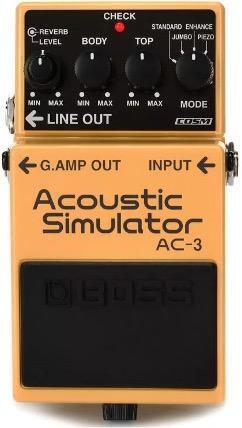
Figure 5: The BOSS AC-3 has won a lot of fans for its reliable acoustic emulation.
Pros: Value for money. No need to alter playing style. Rugged and small enough to integrate into any pedalboard. User reviews generally indicate it exceeds expectations. Rewards those who have the patience to dial in the right settings for their particular guitar and pickups.
Cons: The simple set of controls doesn’t mean this is a simple box. There’s a learning curve, so you’ll need to experiment with your pickups and the various controls. Even slight control changes can make the difference between “I’m returning this” and “I can’t live without it.”
Also note that this option is a twofer: The Line 6 Helix includes an AC-3 emulation as part of its arsenal of EQ effects. As such, any comments that apply to the BOSS AC-3’s sound pretty much apply to this emulation. However, given the popularity of the Helix and that the AC-3 emulation was included in a free update, Helix owners can just call up the AC-3 emulation (it’s listed under EQ > Acoustic Sim) and call it good. There’s also the advantage of being able to use the Helix EQ to further shape the tone, which offers alternatives to the basic sound (fig. 6). This audio example shows this preset applied to the Les Paul Standard file from audio example 2.
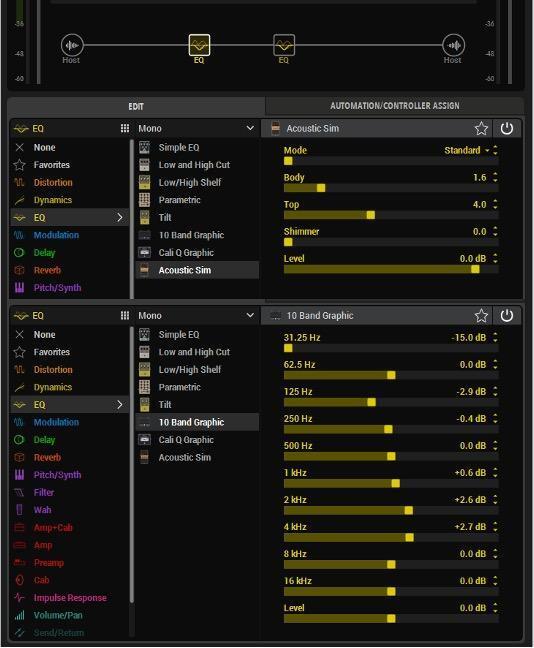
Figure 6: Following the AC-3 with this Helix 10-band graphic-EQ setting produced a sound that was more to my liking for a particular track.
Pros: The Helix includes all the other effects you need to bring out the best in an acoustic emulation, like reverb and stereo imaging. If you have a Helix, then the emulation doesn’t cost anything extra. Unlike the BOSS hardware, the Helix can store presets and assign parameters to the Helix footpedal.
Cons: Same as the BOSS AC-3.
5. Blue Cat Audio Re-Guitar
Blue Cat Audio makes some brilliant plug-ins, and Re-Guitar is a creative solution for various types of guitar emulations. It’s not limited to only acoustic-guitar sounds because it can emulate a variety of different pickup types. You tell the program what kind of pickup you’re using and then choose the type of pickup sound — or acoustic guitar — you want as a target (fig. 7).

Figure 7: Blue Cat Audio’s Re-Guitar plug-in emulates different pickup types and acoustic-guitar bodies.
It takes some tweaking to bring out the best of what Re-Guitar has to offer . . . but keep tweaking because the sound you want is probably in there. Also, don’t overlook the built-in acoustic simulator “stompboxes.” Audio example 10 uses Re-Guitar’s Jumbo acoustic emulator. Compared to the original Les Paul Standard file, you can hear we’ve come a long way.
Pros: Lots of emulations for electric-guitar pickups, not just acoustic-guitar bodies. You don’t have to modify your playing style. Value for money. Many customization options, like changing the acoustic-guitar body size and resonance. Includes two stompbox-type acoustic simulators.
Cons: Learning curve, although it’s relatively short. It’s more convincing to convert an electric-guitar sound to a different electric guitar than to an acoustic sound.
More Electric-to-Acoustic Tips
Many guitar players want plug-and-play solutions, and I can’t blame them — when you want to play music, you don’t want to go into technician mode. But here are some extras that can improve the overall effectiveness of acoustic-guitar emulators.
Tip #1: Record the sound of hitting your strings
Set up a mic close to your strings and record it along with your guitar. This sound is something we associate with acoustic guitar. You’ll need to EQ it — I usually boost the very highest frequencies, drop the mids around 1–2kHz, and cut the bass (fig. 8). But, sometimes, the opposite works best (fewer highs, more bass — it depends on what complements the emulation). No matter which acoustic-guitar emulation you choose, this can add a more realistic feel.
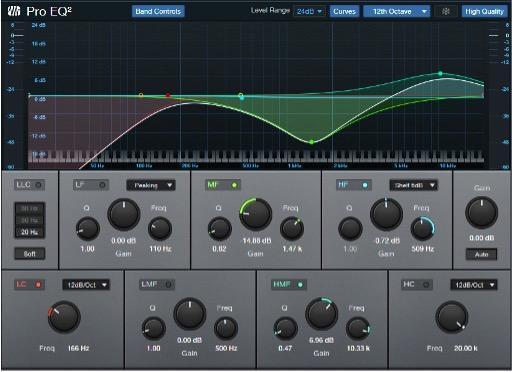
Figure 8: EQ settings for recording the sound of miked strings, but your mileage may vary (and it probably will).
Tip #2: Convolution reverb
However, don’t load it with a reverb impulse — load it with an impulse from an acoustic-guitar body and mix it in about 30–40% with the emulated guitar sound (or, if your reverb doesn’t have a mix control, add the convolved sound in parallel). This is an effective way to graft a “body” onto your guitar. It doesn’t matter whether you’re using Digital Performer’s ProVerb, Studio One’s OpenAIR, Waves’ IR-L — pretty much any convolution reverb will work.
To find acoustic-guitar impulses, search the web. The Line 6 forum for Helix is a particularly fertile source for links. Both free and commercial guitar impulses are available. Audio example 11 is the Blue Cat AC Sim 1 stompbox sound. Audio example 12 is the same basic file but adds in the miked-string sound, a body convolution impulse, and one of my custom “Surreal Reverb” impulse responses. It doesn’t sound exactly like a miked acoustic guitar — but it sure doesn’t sound like an average electric guitar either.
Tip #3: Don’t believe what you read on the internet
Okay, you knew that already . . . but you’ll read comments like: “you have to use the neck pickup”; “only sounds good with the middle pickup position”; “the acoustic guitar emulations sound remarkably realistic”; and, of course, “doesn’t sound like an acoustic guitar.” As with so many things in life, you get out of these what you put into them — so experiment with different approaches.
And the Winner Is . . .
I’m a lucky guy. I play guitar and have acoustic guitars, so I don’t need any of these options. Or do I? What I’ve found is that having all these tones at my disposal is intoxicating. Sure, I can record my acoustic guitar. But these options can give multiple variations on a theme.
With the Variax, getting acoustic tones has always been easy. I don’t have any Martin guitars, but the Variax Martin emulations give me a reasonable facsimile of “that” sound. When I need hyperrealistic sounds that the Variax doesn’t have, and if I can play cleanly enough, MIDI guitar can drive sampled instruments that provide the sounds of instruments like nylon-string guitars, mandolins, unique steel-string guitars, and so on.
If I was going out to do a gig, then the AC-3 would be perfect — whether as a stompbox or as a preset in my Helix live-performance rig. Re-Guitar gets the nod when I’ve recorded a guitar part and want to change it after the fact. I don’t do that much, but, when I do, it’s a useful (and fun) piece of software. And then there are the tips mentioned above that can enhance any approach.
Granted, nothing sounds like an acoustic guitar as much as a physical acoustic guitar. But so what? The real point is that nothing sounds like emulations of acoustic guitars either. When you want to venture into new territories of titanic tone, all I can say is . . . your acoustic emulations await.