

In this article, I’ll explore the following topics:
- What Is Comb Filtering?
- What Does It Sound Like?
- How Does Comb Filtering Impact You?
- Where You Might Hear Comb Filtering
- Ways to Eliminate Comb Filtering
What Is Comb Filtering?
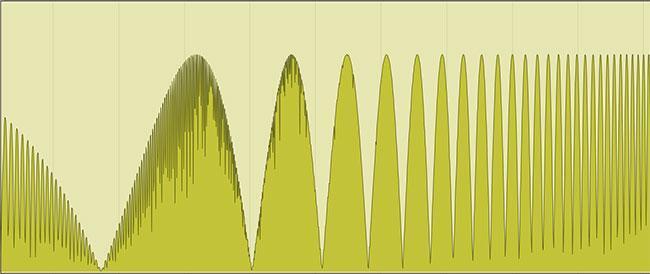
Comb filtering is a phenomenon that happens when the same sound arrives at the listener’s ears (or a microphone) at different times with a very small delay between the signals. This delay can be anywhere from one sample to several milliseconds, up to 15ms–20ms. (Once the delay passes 15ms–20ms, the ear perceives it as delay.) The slightly delayed signal can be created acoustically, as with a sound reflected from a hard surface (wall or glass pane), or electronically (either intentionally or not) through the use of delays or latency. The cancellations caused by the delayed arrival will create dips at certain frequencies. Depending on the time delay, some frequencies are reinforced while others will cancel out, causing a frequency response that looks similar to a comb — with lots of teeth (dips).
What Does It Sound Like?
Before I get into the specifics of why this happens, let me tease it with this video of what happens when I combine two channels of the same pink-noise source and then gradually delay one of the channels. Watch the right side of the display, and you’ll see (and hear) the nulls start at the highest frequencies and then slowly work their way down into the mid and lower frequencies. You will see the teeth of the “comb” multiply and move left as the time difference increases.
Comb Filtering: Noise with Swept Delay
Most people think this sounds like a jet plane landing. And guitarists find it reminiscent of a phase shifter or chorus, both sounds that are created using this technique.
The Science Part
To understand comb filtering, I need to explain the fundamentals of waveforms. I promise I’ll keep it simple.
1. Let’s start with a sine wave, a very simple wave that sounds like what you hear from a tuning fork. You can generate a sine wave with a synthesizer or a tone generator in your DAW. It sounds like this:
2. A sound wave has peaks and dips (corresponding to compression and decompression of the air). A single wave cycle consists of one peak and one dip, and it looks like this:

3. The length of that wave determines the pitch that we hear. Take, for example, A440, which sounds the musical note “A” and equals 440 Hertz (or cycles per second). The length of the wave at 440Hz is 2.57 feet. If you could see an A440 cycle in the air, it would start at zero and then create a peak (positive) followed by a dip (negative) and return to zero. That full wave would be 2.57 feet long, or roughly the length of your arm.
That’s about as technical as we’ll get. Easy, right?
The Acoustic Part
When we combine waves in the air, that’s when things get interesting. Let’s start with that sine wave (above) coming from a speaker directly to your ear.
If there is only a single path, then the wave that reaches your ear is unchanged. But what happens if there are two paths — one longer than the other? If that second path is exactly 1.5 times longer than the direct path (if the direct is 2.57 feet, then the second path would be 3.86 feet), then the two waveforms cancel when they arrive at your ear because one is fully positive and the other is fully negative, just like adding 1 + -1 = 0. They cancel out.
The same is true electronically. If there are two paths from a single source and one is delayed slightly, then there will be cancellation. Think of a direct path from a guitar to an amp combining with a delayed signal. When they combine, certain frequencies will cancel out.
But why does it have so many dips?
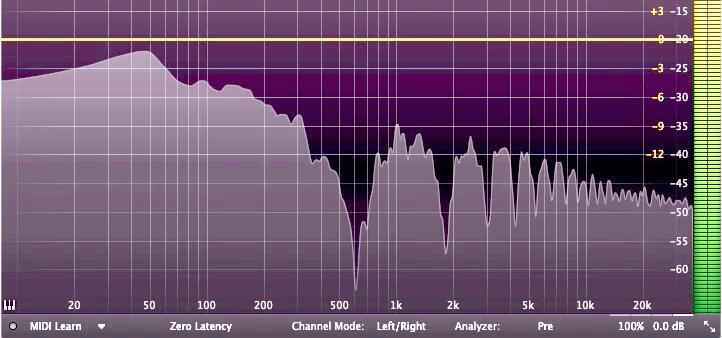
The reason there are so many dips is that some frequencies reinforce each other (the peaks) while others completely cancel out (the sharp dips). Depending on the time difference, there are multiple dips at different frequencies.
Here’s a video that demonstrates comb filtering using pink noise. In it, I duplicate and delay the original signal in 1-millisecond increments (1/1,000 of a second). Listen through the sample, and you’ll hear musical components as the cancellations proceed.
Comb Filtering: Noise with Stepped Delay — 1-millisecond increments
Here’s the same source file, but I’m nudging the audio by 1-sample increments, which is 1/96,000 of a second. Watch what happens to the audio.
Comb Filtering: Noise with Stepped Delay — 1-sample increments
That’s interesting, right? But that’s just noise. What difference does that make to music?
How Does Comb Filtering Impact You?
Well, if you imagine listening to a source and hearing EQ changes like those seen in the images above (steep 20dB dips), then it’s easy to imagine how those drastic dips might cause something to sound very unnatural.
Here’s one musical example. I took a guitar part, split it onto two tracks, and played them perfectly in sync. On the next 2-bar phrase, one track is delayed by 10 milliseconds. Listen to the impact of that on the sound. Then each subsequent 2-bar phrase is delayed by 10 more milliseconds. The differences are not subtle at all. As the time changes, the frequencies where the dips occur change and drastically alter the sound. Understanding comb filtering explains why this is happening.
This video demonstrates another example of swept comb filtering that we encountered when miking up a Fender Bandmaster with a single Neumann U 67 for our Pete Townshend “Won’t Get Fooled Again” article. Listen how the sound changes as the microphone moves away from the amp. This is caused by the combination of the direct sound of the amp and the reflections off the wood floor. The changes in the sound are drastic!
Where You Might Hear Comb Filtering
Here are situations where you will commonly encounter comb filtering.
- Using two mics at different distances from the same source. Note: If the distance between the mics is large, then the dips will be small enough to be unnoticeable.
- Having a hard surface near a microphone. The reflections off the hard surface can cause an audible delay perceived as comb filtering, similar to the way that light reflects off a mirror.
- Having a hard surface reflecting a speaker sound. If you have a hard surface that is creating a dual path (speaker to ear plus speaker to surface to ear), then it can create comb filtering in your monitoring.
- Using two speakers projecting into the same space. In live settings, using multiple cabinets whose coverage overlap can create comb filtering in that overlap.
Ways to Eliminate Comb Filtering
Now that you recognize the sound of comb filtering, here are ways you can eliminate its detrimental effects.
- Pay attention to latency (in software or plug-ins) when recombining signals in a digital workstation.
- Be careful when using multiple microphones on a single source, such as on drums or anything acoustic.
- Watch for reflections from your speakers off hard surfaces (including the desktop or nearby walls) when listening (in the studio).
- Be cautious when using multiple speakers that are not time aligned or whose coverage overlap (in live settings).
Conclusion
Comb filtering can be a big deal and can wreak havoc on your sound as a result of latency in a DAW or time delays in loudspeaker arrays. Understanding what it is and how to solve for it is a critical skill for anyone who works in sound. I hope this explanation and the examples have helped you to understand the fundamentals of comb filtering.
Additional Resources