

Image-Line’s FL Studio was originally released in 1998 as a 4-channel MIDI drum app called “Fruityloops.” Rebranded as “FL Studio” in 2003, this software is now a feature-packed DAW that’s a popular choice for hip-hop producers, beat makers, and electronic musicians. But to get the most out of the software, you really need a hardware controller. Which one should you choose? Here are our picks for the best MIDI keyboard controller for FL Studio.
Nektar Impact LX+ Series
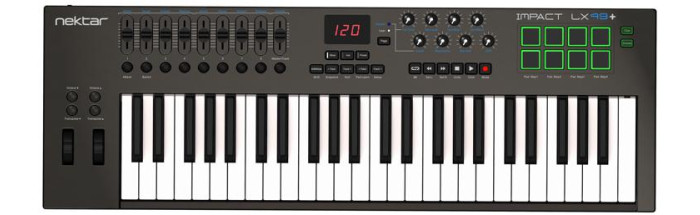
Nektar’s Impact LX+ Series is a solid choice for integration with FL Studio, thanks to its intelligent mapping features, which give you hands-on control over your project. With it, you can navigate between tracks and take command of FL Studio’s transport without even touching your computer. You also gain tactile control over your virtual instruments, FX plug-ins, and a whole lot more. Plus great-feeling keys, pitch and mod wheels, pads, and knobs are sure to turbocharge your creativity. And the series of Nektar Impact LX+ keyboards has something for everyone. Need something portable and affordable? Grab an LX25+. Need a large controller for your studio? Get an LX61+. The LX49+ offers a perfect compromise between its larger and smaller siblings.
Click here for the official Nektar guide to using the Impact LX+ Series with FL Studio.
Nektar Panorama P Series

If you’re a producer searching for a studio keyboard controller with deep FL Studio integration, Nektar’s Panorama P Series takes the concept to a whole new level with unprecedented control over your plug-ins, mixer, and transport controls. Our favorite feature here at Sweetwater is the Panorama P Series’ motorized fader section. It’s always wired in to your currently selected channel on FL Studio’s mixer, putting you firmly in the driver’s seat. You also get easy access to Mute, Solo, and Arm functions. What’s more, these keyboards include an auto-mapper that makes mapping your favorite plug-ins and VIs to the hardware controls a breeze. The Panorama P Series boasts rock-solid synth-action keybeds with velocity and aftertouch sensitivity. Once you get one of these controllers, your mouse and keyboard will officially begin collecting dust! Sized just right for the studio producer, the Nektar Panorama T Series includes the 49-key P4 and 61-key P6.
Click here for the official Nektar guide to using the Panorama P Series with FL Studio.
Check out the Nektar Panorama P in action on electronic music producer/artist Haywyre’s remix of Michael Jackson’s “Smooth Criminal.”
Akai Professional MPK2 Series
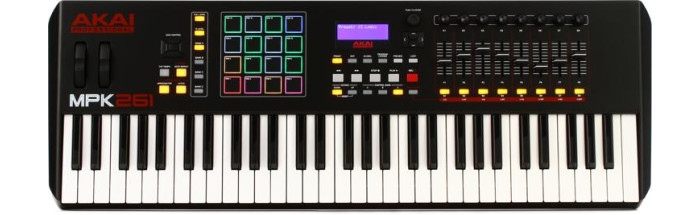
Akai’s MPK2 Series offers a powerful way to control FL Studio with aftertouch-enabled keybeds and RGB-illuminated MPC-style pads. Electronic musicians that are familiar with hardware will appreciate these keyboard controllers’ authentic MPC functionality, which includes MPC Swing with the tight, organic groove that MPC users rely on, and MPC Note Repeat and Full Level, which make it easy to build beats and construct short melodic sequences. Also onboard is an arpeggiator that makes exploring more complex melodic ideas a breeze, with adjustable resolution, range, and patterns. You also get comprehensive transport and parameter control, pitch bend, modulation, and octave controls. If you’re an MPC aficionado, the MPK2 Series was tailor-made for you. The Akai MPK2 Series is comprised of the MPK225, MPK249, and MPK261, providing a great solution for mobile performers and studio producers alike.
Click here for the official Akai guide to using the MPK2 Series with FL Studio.
Novation FLkey Series

Novation’s FLkey series of controllers are some of the first portable instruments to take full advantage of FL Studio’s unique stage-meets-studio workflow.
Right from the keyboard, you’ve got all you need to sequence parts, quantize beats, make instrument and mixer tweaks, and even safeguard live performances using custom Scale and Chord modes — without so much as touching a mouse or trackpad. And that’s just scratching the surface. Power users will discover endless ways to streamline their workflow with FLkey’scustomizable modes, pads, and pots.
Setting up your Novation FLkey controller is as simple as it gets. Simply connect the keyboard to an internet-connected laptop running FL Studio, and the controller does the rest. There are no drivers to install and nothing else to configure inside the host.
Controllers in the Novation FLkey family include the 2-octave FLkey Mini and 3-octave FLkey37. In our tests, the FLkey37 made it quicker to access FL Studio’s key functions without menu diving while the FLkey Mini tended to make a better desk companion when pounding out beats at home. Both keyboards feature sustain pedal inputs and MIDI out and include a 6-month license to FL Studio Producer Edition.
Akai Professional MPK Mini MKII
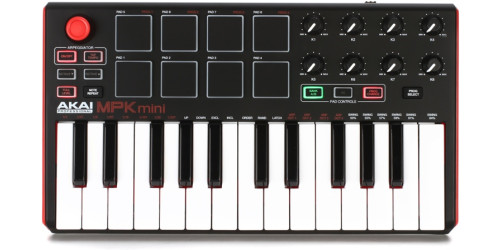
Want powerful MPC-inspired functionality in an uber-portable package? If so, the MPK Mini MKII deserves a serious look. Although it’s small enough to fit in your backpack, this USB bus-powered controller is a phenomenal all-in-one solution for interfacing with and manipulating FL Studio, virtual instruments, plug-ins, and more. You get 25 velocity-sensitive synth-action mini keys, Octave Up/Down buttons, an ergonomic 4-way thumbstick for pitch-bend and mod duties, and eight backlit, velocity-sensitive MPC-style pads. MPC Note Repeat and Full Level functionality, plus eight assignable Q-Link knobs and an onboard arpeggiator round out the MPK Mini MKII’s robust feature set. This keyboard controller is available in three colors. And if you want the ultimate in portability, check out the all-in-one MPK Mini Play — it boasts 128 built-in sounds with 10 drum kits, includes a built-in speaker, and can be powered by three AA batteries. With it, you can sketch out ideas when you’re on the go, then plug into your computer when you’re ready to finalize them.
Click here for the official Akai guide to using the MPK Mini MKII Series with FL Studio.
Alesis VI Series
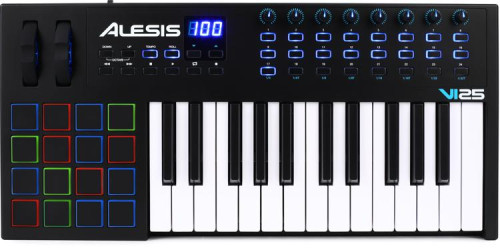
Armed with an impressive array of backlit pads, assignable knobs, and flexible buttons, the Alesis VI Series is an ideal vehicle for taking command of FL Studio. Velocity-sensitive, semi-weighted keys with aftertouch and Octave Up/Down buttons expand these USB MIDI keyboard controllers to the full melodic range, enabling you to play an endless variety of bass lines, chords, and melodies. You also get dedicated transport controls. This series of keyboards runs the full gamut from portable travel companion all the way to desktop powerhouse. No matter which model you choose — the VI25, VI49, or VI61 — you’re assured a high-quality music making experience. And they’re all bus powered!
Click here for the official Alesis guide to using the VI Series with FL Studio.
Explore the Full Potential of FL Studio
Adding a MIDI keyboard controller to your rig will vastly improve your workflow when using FL Studio. It will transform your setup from a simple DAW to an ultra-powerful amalgamation of hardware and software. Want to streamline your productions but not sure which keyboard to choose? Give your Sales Engineer a call at (800) 222-4700. They’ll set you up with the best one for your needs.