

When vinyl ruled the earth, mastering engineers were reputed to perform technical feats no mere mortal could comprehend — let alone aspire to — and that reputation was pretty much justified. Because vinyl demanded challenging compromises involving album length, level, song selection, and the amount of bass and treble, finding the sweet spot among all those factors was difficult. Furthermore, albums (collections of individual tracks) were the norm. So the mastering engineer also balanced track-to-track levels and tonal quality, as well as provided input on sequencing the song order.
With vinyl’s technical constraints reduced to niche applications and the availability of sophisticated audio editing tools like Steinberg WaveLab and Magix Sound Forge, some wonder whether mastering engineers still deserve to be considered an elite crew of audio magicians — let alone whether they’re even needed at all. Well, here’s the reality of mastering:
It’s the ears, not the gear.
Mastering requires expert analysis of a track, identifying possible problem areas, then knowing how to fix those problems. This requires superb ears backed by experience, which is why for mission-critical projects, it’s usually best to engage a pro mastering engineer.
However, every mastering engineer started someplace — and there’s no reason not to continue developing your own skills and experience. So I highly encourage musicians to try their hand at mastering. If nothing else, it will help you understand the issues that mastering engineers face.
Combine Mixing and Mastering, or Separate the Processes?
Because mixing and mastering required different skills and tools, the mix engineer would give a stereo master to the mastering engineer, who would take it from there. With today’s DAWs, you can insert mastering-quality plug-ins for EQ, dynamics, and other processors into your virtual mixer’s master bus to master the mix. Which approach is better?
- The main advantage of treating mixing and mastering as separate processes is that the mix becomes solely about achieving the best possible level and tonal balance. Then you can move to a different mindset about how best to take that mix to the next level. And when assembling albums, if all your mixes are done, it’s easy to listen to each mix in the context of the other finished mixes and edit for uniformity.
- A disadvantage is that if mastering changes a mix’s sound, then you need to go back and alter the mix, run another 2-track master, and see if that works better.
- An advantage of combining mixing and mastering is that because mixing and mastering occur in parallel, you can make any needed adjustments to the mix while listening to the final result.
- A disadvantage is that you won’t have a fresh perspective on mastering if you’re switching back and forth mentally between mixing and mastering.
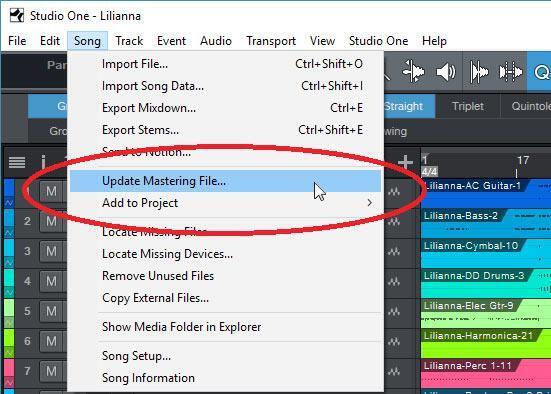
However, you can also “split the difference” by concentrating on the mix until you’re ready to master it, and then commence master bus processing to give the final polish. PreSonus Studio One (Professional version) users have another option, because of the linkage between the multitrack Song page and the assembly/album-oriented Project page. In a nutshell, you can initiate a mixdown from the multitrack-oriented Song page to a stereo file in the mastering-oriented Project page. You can then do the mastering, assembly of the stereo song files, and exporting from the Project page. However, if you need to revise some element of a mix, you can jump over to the track’s Song page, make the tweak, and then compile a new mixdown to the Project page (fig. 1).
Unique Advantages of Mastering in Your DAW
With DAWs, you can mix all your tracks into a single track within the DAW. Different DAWs have different names for this process, but you usually select all your tracks and then choose a function like Bounce or Mixdown (fig. 2). For this application, you don’t want to incorporate any processors in the master bus — leave those decisions for the mastering process (just remember to mute the existing mixes before generating a new one).

This is extremely useful if you separate the mixing and mastering processes: You have a variety of mixes from which you can choose the “winner” for mastering. This can go to a mastering engineer, or you can then master it yourself using your DAW’s master bus processors. And if you later decide you need to make a few edits, just do another mix (you may not even need to do a new mix, but simply punch in the section where you want the change).
If you prefer to combine the mixing and mastering process, this approach is equally useful, because now you can create a collection of masters. In this case, you want to make sure any mix incorporates the master bus processors (fig. 3). Then you’ll be able to compare finished, mastered tracks.

There are many advantages to keeping your mixes or masters within a song project.
- After generating a mix or master, you can live with it for a while. If you need to make changes, generate another mix or master (it’s often a good idea to keep the older version for comparison).
- These tracks will be saved with the rest of the song’s files. So saving the song saves your mixes or masters as well. This really helps organize backups.
- You can cut and paste among the different versions. For example, if one master has perfect verses but another nailed the choruses, you can copy and paste the appropriate elements to create a new master.
- Some DAW-specific processes are often not available in stereo editing software (e.g., using clip or track automation to add level variations).
Integrating Other DAWs with Studio One’s Project Page
There’s a reason why more musicians choose to use multiple DAWs, because they all have their “special sauce.” Although some think you can use Studio One’s mastering-oriented Project page only with Studio One songs, that’s not the case.
When I want to master projects from other DAWs but also take advantage of specific Studio One features, I export each track individually. If I want to use Studio One’s Song page features (like Harmonic Editing or the Arranger track), I export without any processing or automation and continue working in Studio One. If the song is mixed, I export the tracks with all processing and automation (fig. 4). On playback, the song will sound like it did when it was mixed in the other DAW.

In either case, it’s then possible to “compile” the song’s mix into a 2-track file in the Project page and start the mastering process. If any changes need to be made, they can be done to the tracks on the Song page. (Even when I bring over finished tracks with processing and automation, sometimes I want to make a last-minute tweak or two.)
So You Can Master in a DAW…
Yes, but remember — it’s the ears, not the gear. You can master in any DAW if you have good ears and know how to use even minimal tools. But all the tools and editing software in the world won’t help if you don’t have the experience to analyze a song objectively for issues that need to be fixed.
And how do you get that experience? Start mastering your mixes in your DAW! You can always take them to a professional mastering engineer if you’re not happy with the results.
If you have any questions about DAW mastering software or plug-ins, don’t hesitate to reach out to your Sweetwater Sales Engineer at (800) 222-4700.