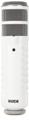
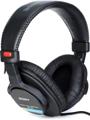
Podcasting has seen a meteoric rise in popularity in recent years. With thousands of podcasts covering niche topics, and room for many more, there’s never been a better time to create your own podcast. If you’re not sure how, you can even find podcasts about how to start your own podcast! Thanks to the popularity of podcasts, finding killer gear and getting set up is easier than ever. Whether you’re looking for a traditional studio setup or a mini-studio that’ll fit in a backpack, Sweetwater can help you find the gear you need at the price you want to spend.
Podcast Starter Kit
If you’d rather just buy a bundle and save yourself the time spent researching options, you can choose a pack that will provide you with everything you need to get started. Whether you’re just starting out in podcasting and are reluctant to commit to an expensive setup or you need a high-quality setup without any hassle, we have options for you.
If someone is starting a podcast, then you can set them on the right path from day one with the AKG Podcaster Essentials with AKG Lyra USB Microphone and 371 Headphones. This high-powered bundle covers all the basics, starting with an AKG LYRA USB mic. With this microphone, all you’ll need to do is plug it into your computer, and you’ll be good to go! It captures vocals in stunning 24-bit/192kHz quality, while its 4-capsule mic array enables you to record with four incredibly useful polar patterns. Plus, its built-in headphone jack makes monitoring a piece of cake. Speaking of headphones, this bundle includes those, too — a great-sounding set of AKG K275 headphones, to be exact. These headphones offer amazing performance, and their durable, metal construction ensures that they’ll last a long, long time. They also fold for easy transport. With the AKG LYRA USB Microphone and K275 Headphones Podcast Starter Kit, even a beginner can sound like a pro!
For advanced podcasters, RODE and RME offer bundles with some of their hottest products. The RODECaster Pro Podcasting Bundle has the versatile RODECaster Pro interface that has tons of features designed specifically for podcasting. This bundle also includes a RODE broadcast mic, boom arm, headphones, and all the accessories you need.
For more information about our podcasting bundles, call your Sweetwater Sales Engineer. They’ll be happy to help you find the gear that’s best for your specific podcast.
Best Microphones for Podcasting
Benefiting from decades of research and development, the highest-quality microphones for podcasting are the same mics you’ll find in broadcast studios around the world. Relatively low sensitivity and high off-axis noise rejection allow these popular models to capture clear and direct sound while cutting down on background noise. USB microphones additionally offer plug-and-play convenience, without the need for an audio interface, and may be directly compatible with your iPhone or iPad. Below we’ve listed some of the best mics you can use for podcasting.
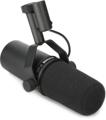
Shure SM7B
The SM7B is a timeless option for broadcast and voice-over work. This dynamic mic is used by podcasters around the world, and for good reason. It has a switchable bass roll-off and midrange boost that let you fine-tune its response to your voice.
Blue Microphones Yeticaster Broadcast Bundle
Blue’s Yeti series microphones are ideal for desktop recording and have long found favor among avid podcasters. These USB condenser mics include three capsules for mono and stereo recording plus figure-8 configuration, which is ideal for interviews. The Yeticaster Professional Broadcast Bundle includes the Yeti and a desktop boom stand.
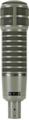
Electro-Voice RE20
One of the most popular broadcast microphones of all times, the RE20 is highly directional and virtually immune to popping.
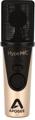
Apogee HypeMiC
The HypeMiC from Apogee is a USB condenser microphone that’s designed with podcasting in mind. The HypeMiC has studio-quality compression that ensures your voice won’t be forgotten in the mix. It includes a tripod and pop filter to help get you set up.
Best Audio Interfaces for Podcasting
If you’re using microphones that don’t have a USB connection, you have to route your mic into your computer using an audio interface. There are almost infinite options to choose from when you’re thinking of buying an audio interface, including the number of inputs, phantom power, and the quality of the preamps. Luckily, Sweetwater has compiled a helpful list of the Best Audio Interfaces for Your Home Studio. This guide will walk you through the pros and cons of the hottest interfaces on the market today.
Some interfaces are designed specifically for podcasting. Take the RODECaster Pro and the TASCAM Mixcast 4 for example. It features great preamps, faders, and programmable pads to add your own sound effects to your podcast. Other interfaces, like the Focusrite Scarlett 2i2 3G, have XLR/TRS combination inputs that will work perfectly well for podcasting and other audio applications.
Best Headphones for Podcasting
Having good headphones makes it much easier to create stunning audio. Whether you’ll use your headphones for monitoring levels when recording or creating a final mix, your headphones are just as important as all your other gear. You’ll want headphones that are comfortable, especially if you’re going to be recording for long sessions. No matter what headphones you choose, remember that your headphones are an investment. Buy a set that you love, and they will serve you well for many years.
If you’re new to podcasting, the Sony MDR-7506 headphones create professional-quality sound at a budget-friendly price. Another great option is the Shure SRH840A. These ‘phones provide a crystal-clear midrange that’s perfect for monitoring vocals. Want to know more about choosing the right headphones? Check out Sweetwater’s Headphones Buying Guide.
Other Great Podcasting Gear
Standalone Recorders
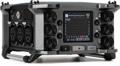
Standalone recorders are great for hybrid podcasting systems. They allow you to easily capture audio in the field and take it back to your main DAW for detail work. The Zoom F6 multitrack field recorder has six XLR connectors and can record up to 14 tracks of audio. Standalone recorders work well when you’re recording a panel of people and need multiple mics. Field recording pros also love the Sound Devices MixPre-3 II, which offers uncompromising fidelity and simple operation both in the field and in the studio.
Handheld Recorders
Zoom pretty much has the market cornered when it comes to accessible handheld recorders, and few devices have ever had as much of an impact on mobile recording as the Zoom H6 Handy Recorder. This 24-bit/96kHz recorder includes a pair of great microphones plus four XLR/TRS combination inputs for external mics. The Zoom H6 has interchangeable capsules for various microphone configurations available for purchase.
Handheld recorders are invaluable tools for working outside the studio. They’re easy to set up and create high-quality recordings almost anywhere. Most handheld recorders record in stereo and are compatible with external mics. If you want to record high-quality audio outside your studio, a handheld recorder will have you covered. For more information about handheld recorders, check out our Handheld Recorder Buying Guide to find the best one for your needs.
Smartphone Mics
If you plan to record some segments of your podcast on your smartphone, you don’t have to settle for less than desirable quality. Thankfully manufacturers have pocket-sized mics that will help you step up your game and the quality of your podcast.
RODE’s iXY-L stereo mic is iOS compatible and designed to fit in your pocket. When it’s time to record, just plug it in and you’ll be capturing 24-bit/96kHz audio. Another fan favorite around Sweetwater is the Shure MV88+ video kit. You’ll be able to record high-quality video on your phone with full 24-bit/48kHz digital audio. Both of the mics we mentioned are iOS compatible and deliver incredible audio quality that will wow your listeners.
Broadcast Stands
If you’re setting up shop in the studio, then we highly recommend a good broadcast boom, such as the On-Stage Stands MBS5000 or RODE PSA1. The convenience of being able to reach up and adjust your mic position whenever you need to will save you a ton of time, and these stands make it easy to get ideal mic positioning while keeping an eye on your displays and running the show all at the same time.
Best Recording Equipment for Podcasting
Before you start making purchases, it’s important to identify your workflow and how you’ll actually record and upload the podcast. For example, if you want to record interviews while camping in the mountains, a boom stand that attaches to your desk just won’t work for you — no matter how cool it looks on paper. For that remote application, a simple handheld recorder would work wonders. Workflow is a major part of podcasting, and the gear you choose can make a big impact. You also need to decide how much you want to spend, especially if you’re starting from scratch.
Portability, Complexity, and Flexibility
There are three basic podcast system configurations that can be defined by their portability. How portable you need to make your podcast rig really depends on the nature of your podcast. If you’re looking to record on location and upload your work as soon as possible, you will probably need a fully mobile rig. If you’re producing comedy, commentary, or anything that doesn’t require field recording, then a studio system is likely the way to go. Of course, a hybrid system will work best if you plan to capture on-location audio and bring it back to your studio for editing and mixing.
As is the case with most technology, there’s a direct correlation between complexity and flexibility. The more flexible the technology, the more complex it has to be. While complex systems can greatly increase your options, the increased number of steps can slow down your usual workflow. If it’s a streamlined production process that you’re after, a simplified setup could be your best bet.
Here’s an overview of three kinds of podcasting setups, with rankings from least (one star) to most (three stars) for each characteristic.
| Portability | Complexity | Flexibility | |
|---|---|---|---|
| Studio | * | * | ** |
| Mobile | *** | ** | * |
| Hybrid | ** | *** | *** |
Here are examples of each of these three recording setups.
1 . Studio Podcasting Setup
Typical Workflow
- Record material in your DAW while choosing best takes, making notes, and adding processing as you go
- Edit material, adding music beds, effects, and other audio
- Process/mix tracks into final podcast
- Publish
Portability
When you think of a studio, portable would not be the first word you’d use to describe it. However, today’s home studios can consist of nothing but your laptop, a desktop audio interface, microphones, and monitoring equipment, which can be speakers or headphones. Even though that’s not a lot of gear, studio setups benefit from being stationary. Dedicated production spaces allow you to control your acoustics and to set up studio monitors and keep full-size microphones mounted to broadcast booms or heavy mic stands.
Complexity
You might expect the nearly limitless potential of a studio environment to result in greater complexity, but it’s actually the other way around. Being able to define your workflow with DAW software and have tools designed to improve your workflow (rather than to accommodate portable production platforms) means you can easily tailor your system to fit the way you work. DAW environments are intended to cover recording, editing, and mixing entirely, and make the most of the screen real estate and user interfaces such as your mouse, keyboard, and other inputs. These elements make studio systems far more efficient than similar options on mobile platforms.
Flexibility
While studio systems are more flexible than a purely mobile platform, they are less flexible than hybrid mobile/studio rigs. This is the result of the sheer flexibility you get from DAW recording platforms. Studio setups only suffer from reduced flexibility when it comes to portability, and that limitation depends entirely on the studio gear you use.
2. Mobile Podcasting Setup
Typical Workflow
- Record audio in mobile DAW or recording app, usually in single takes, often adding sound bites/audio on the fly
- Edit audio using limited/more cumbersome touchscreen environment
- Clean up audio to compensate for nonideal recording environment
- Add extra effects and sound bites
- Mix and final polishing
- Publish (usually from recording app)
Portability
Since they’re designed entirely around mobility, this kind of podcasting rig is the most portable. In a purely mobile podcasting rig, the idea is to pull out your phone or tablet, hook up a mic or two, record your show, and post it all — possibly without so much as finding Wi-Fi. Nothing beats a fully mobile rig when it comes to applications such as on-location interviews that need to be produced and posted online as soon as possible.
Complexity
It may seem counterintuitive, but the limited flexibility of mobile podcasting can actually complicate your workflow since you are forced to work around the limitations of the technology involved. Using mobile apps with a smartphone or tablet offers lots of options for mobile podcasting. However, mobile apps may have fewer workflow options than desktop applications, and even the best multi-touch user interfaces are more cumbersome than mouse and keyboard systems. While these two elements add up to limited workflow options, the need to work within these limitations can make establishing a comfortable workflow challenging.
Flexibility
The flexibility of purely mobile podcasting setups isn’t likely to bother you so long as you’re content to work within the limitations of mobile podcasting apps. On the whole, however, there isn’t a lot of flexibility to this kind of system. By virtue of being super portable, gear selection is more limited than what you’ll find in the studio. The more mobile you need to be, the less gear there is to choose from. Efficient editing is limited on mobile platforms. This means that you’ll generally have to work with what you record in the first place. If you’re great at getting polished results while recording, then you’ll be just fine. However, if you’re new to podcasting, you’ll find yourself having to cope with less than ideal results or an awkward editing process.
3. Hybrid Podcasting Setup
Typical Workflow
- Record audio in mobile recording app or standalone portable recorder
- Transfer audio to computer and organize it before importing it into DAW
- Clean up and process audio to compensate for nonideal recording environment
- Edit audio, adding music beds, effects, and other audio
- Process/mix tracks into final podcast
- Publish
Portability
In terms of allowing you to go to the source to record material, hybrid podcasting systems offer all the benefits of mobile systems. However, they aren’t truly as portable as mobile systems, since hybrid podcast production assumes that you will return to your studio, or at least to your laptop, to polish and publish your work. This makes hybrid systems only marginally more portable than studio systems, especially ones built around laptops and USB mics.
Complexity
Hybrid podcasting systems combine some of the limitations of mobile recording and the freedom of studio editing, which makes them significantly more complex than either option on its own. That’s because you still have to conform to a mobile workflow and then import your work into your DAW and process the audio from there. In most cases, the major benefits of being able to gather audio in the field and then polish it in the studio are tempered by the limited organizational abilities of mobile recording. Once you develop a routine and get organized, hybrid systems don’t feel so complex, but the initial learning curve can be daunting.
Flexibility
Here’s where hybrid systems shine. Most hybrid systems come as a result of wanting greater mobility from a studio system or getting more editing power from a mobile system. This is particularly true if you aren’t benefiting from being able to publish in the field. While the added potential does make hybrid podcasting systems more complex, that extra control brings incredible flexibility and results in a much more polished result. If you’re more of a run-and-gun reporter, the hybrid model is perfect for you. You can choose to use a purely studio or mobile workflow when each is more convenient for you.
If you have any questions about setting up your podcasting system, give your Sales Engineer a call at (800) 222-4700. They’ll be happy to discuss all the options with you.