PreSonus raises the bar for affordable audio interfaces, with their new AudioBox VSL lineup. Available in 2-, 4-, and 18-channel models that come loaded with PreSonus’s award-winning Class A XMAX preamps, there’s an AudioBox VSL interface for any-sized rig. But the hardware is only the beginning. These great-sounding USB audio interfaces give you the power and flexibility of PreSonus’s amazing Virtual StudioLive software.
Have you ever tried to record vocals without having basic reverb or delay in the monitor mix? It’s like trying to drive with one eye closed — you can do it, but it’s not comfortable. True, most DAW software will allow you to add processing to your monitor outputs, but the considerable delay this adds can be disorienting instead of helpful. The included Virtual StudioLive software sits between your AudioBox VSL interface and your DAW, providing you with the near-zero-latency monitor processing typically found on only expensive DSP-powered interfaces. Now you can get the same pro-caliber monitoring options you’d expect from a pro studio, without the added expense of onboard DSP processing.
But that’s not all! PreSonus’s Virtual StudioLive software gives you the same high-quality Fat Channel dynamics processors and EQs featured in the StudioLive 16.0.2 recording mixer. You can even use these same processors to record and monitor, so you can produce polished recordings as you track. What’s more, PreSonus’s Virtual StudioLive software is fully compatible with their StudioLive Remote iPad app for hands-on control that’s perfect for mixing and punching in from the vocal booth. To find out more about PreSonus’s amazing AudioBox VSL interfaces, call your Sales Engineer today!
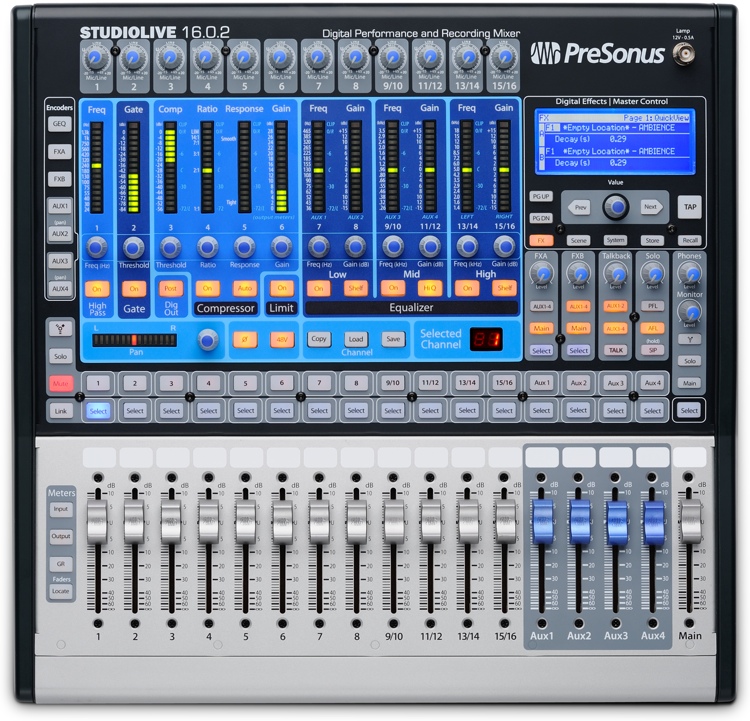
PreSonus StudioLive 16.0.2
 Recently, I spent time with the PreSonus 24.4.2 digital mixing console — the big dog in the PreSonus digital mixer family. I really enjoyed that console; it took me back to when I used a “real” board in my studio. The question was, would the new StudioLive 16.0.2 digital mixer, the smallest member of the StudioLive family would stack up?
Well, I can tell you right now, it more than stacks up! The StudioLive 16.0.2 may be physically smaller than the 24.4.2, but that doesn’t mean that it lacks power or features. With 16 channels, 16 line inputs, 12 mic preamps, four aux sends, and two built-in digital effects (with two additional dedicated sends and two stereo returns), the StudioLive 16.0.2 is equipped for a good-sized live sound situation. Plus, you get a full-featured gate, a compressor, a 3-band sweepable EQ, and a sweepable highpass filter on each channel; a talkback mic input with level control; two sets of stereo main outputs; a mono output; and stereo monitor and headphone outputs.
In the studio, you can connect it to your computer via FireWire for remote control, setup, editing, and archiving purposes. (You can control everything from the mixer’s front panel, but being able to see it all on-screen is very nice.) You can also use that same FireWire connection to route the 16 mixer inputs into your DAW, or to route 16 outputs from your DAW back into the mixer. The StudioLive 16.0.2 comes with PreSonus’s Capture software for quick recordings, as well as their Studio One Artist software for applications that require a more full-featured DAW.
I used the 16.0.2 with my MacBook and the PreSonus software, but also with Reason 6 (see page 8) and Pro Tools 9. It worked flawlessly in each case. I used it for simple stereo monitoring, for multitracking, and for sending 16 channels out from the DAW for mixdown. I found working with the digital mixer in conjunction with a DAW is a true joy! I substituted the onboard EQ and compression for the plug-ins I was using on my mixes, as well as the two onboard effects processors for plug-in reverbs and delays. I was pleased with the results in every case! There’s just something that works about using a real mixer with your DAW.
The combination of a laptop and the 16.0.2 (which doesn’t have a much bigger footprint than the laptop itself) is a powerhouse — you could easily base your entire studio around this pairing. And you still have a great mixer to take out to live gigs. That all adds up to a tremendous value and a very cool mixer.