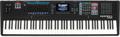
When you’re in Setup mode on your Kurzweil (K2000, K2500, K2600), you can quickly check your work by having a sequence recorded that will use the sound(s) you are working on. It’s easy to initiate a sequence from Setup mode. All you have to do is press the Left and Right cursor buttons simultaneously. Pressing them again will stop the sequencer. Once started you can use the Up can Down buttons to initiate a song Pause, and again for a song Continue command, which initiates playback from where you paused. These handy tricks work in virtually every mode of operation, including sample editing.