

Virtual drum modules often provide the rhythms that propel today’s electronically oriented music. To get the most out of these instruments (or samplers playing drum sounds), you’ll want to take advantage of their many editing possibilities. This includes editing the MIDI data feeding them, as covered in “Nailing the Classic Rock Vibe, Part 2: Feel,” but there are also many ways to tweak how their parameters respond to MIDI data — and many signal processing techniques to enhance the overall sound. So let’s delve into useful drum edits that can help elevate your drum parts.
1. Tune drums to the song’s key.
When drummers tune their drums, it’s not to impress people who think drummers aren’t real musicians. Drum tuning is particularly important with toms and resonant kick drums (fig. 1). If the kick’s out of tune, it can fight with the bass or confuse the song’s sense of key.
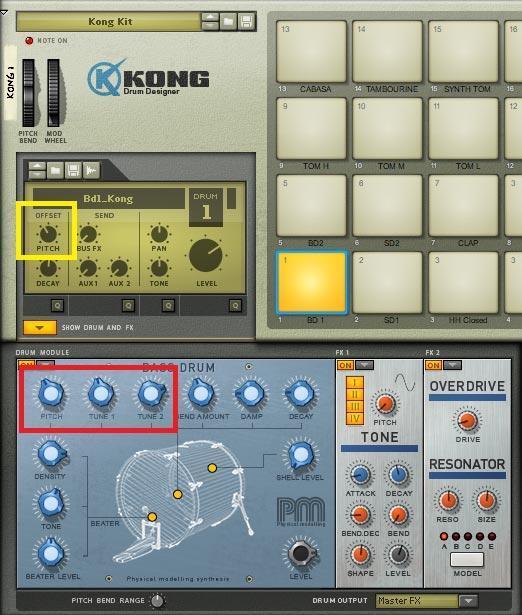
The tuning doesn’t have to be the same pitch as the key; fifths and other intervals work well too. If you’re not sure what the drum’s pitch is, sweep a resonant filter until the response peaks, which means you’ve isolated the drum’s fundamental. That’s the frequency you want to tune.
2. Create multiple drum variations from one.
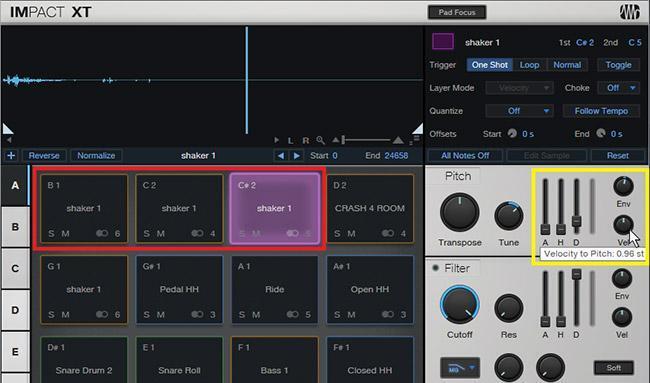
A major buzzkill with electronic drums is hearing the identical sound over and over, but we can fix that. For example, to play a two-hand shaker part with only one shaker sample, copy the sample and detune it by 30 cents (or more) to provide a slight sonic variation (fig. 2). Detuning can also create a family of cymbals or toms from one cymbal or tom sample. And alternating snare drum roll hits to snare drum samples with slightly different pitches can give a much more realistic sound.
3. Cut the low frequencies when feeding reverb.
Kick and low toms don’t sound good when going through reverb, because they can muddy the overall sound. If you’re sending the mixed drum sound into a reverb bus, insert a highpass filter prior to the reverb and take out the low frequencies. Start rolling off around 200Hz — or maybe even higher.
4. Add a little saturation — it’s a beautiful thing.
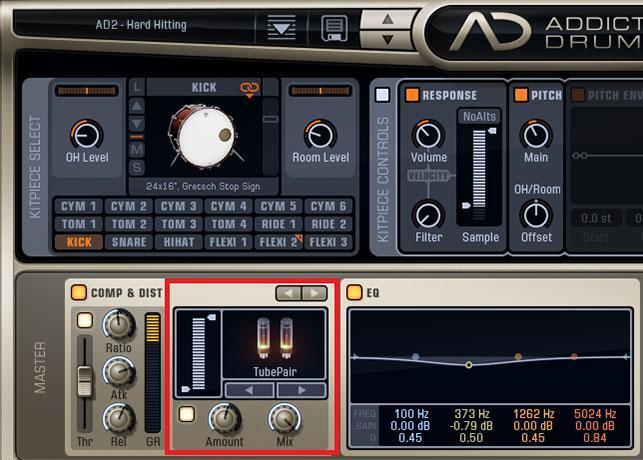
When you need kick or toms to cut through a mix, a little saturation does wonders (fig. 3) — especially with TR-808-type analog drum sounds. You may be surprised at how little saturation you need for kicks and toms to pop, as well as how much saturation you can add before it becomes objectionable.
5. Use radical transpositions to create new sounds.
Are there any gong samples in your drum plug-in? Yeah, I thought not. To create a gong, copy your longest cymbal sample. Detune the copy by -12 to -20 semitones. Then detune the original cymbal sample by about -3 semitones. When layered together, the slightly detuned cymbal gives a convincing attack, while the highly detuned one provides the sustain.
6. Create pitch shifts to accent velocity.
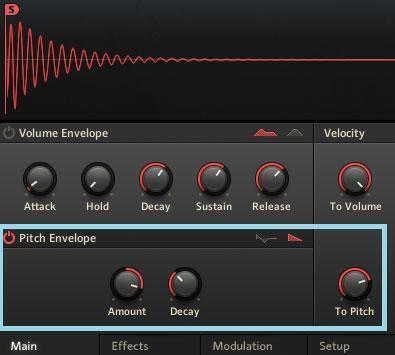
A pitch envelope (fig. 4) can add realism, if set to no attack and a slight decay, by having velocity alter the envelope amount. A small increase emulates a drum’s skin being stretched when it’s first hit, which raises the pitch. To create a disco-type “falling” sound, increase the modulation amount and decay time.
7. Modulate filter cutoff.
For dynamic control that goes beyond tying velocity to level, assign velocity to tone so that hitting the drum harder produces a slightly brighter sound (e.g., increase a lowpass filter cutoff frequency or modulate a tone control to boost the highs). This gives extra emphasis to the hardest hits.
8. Change the sample start point.
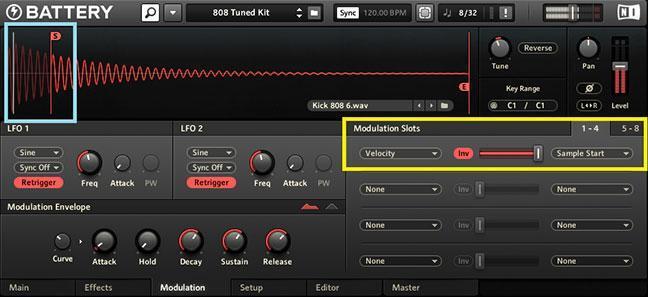
Altering a sample’s start point with velocity control (most samplers, and many virtual drum instruments, offer this feature) can add convincing dynamics that make synthetic sounds far more realistic. Set the initial sample start point late into the sample, so it’s past where the attack occurs. Next, edit velocity with enough negative modulation so that higher velocities move the sample’s start point closer to the beginning. At low velocities, you don’t hear the sound’s initial attack; at maximum velocity, you’ll hear the entire attack (fig. 5). You may need to add a very slight attack time to avoid clicks when you first hear the note.
9. Employ envelope modulation for hi-hats.
One of the most annoying features of electronic drums is the hi-hat. A human drummer works the hi-hat constantly, opening and closing it with the pedal, but the electronic version often consists of unchanging snapshots of open, closed, and pedal sounds. So try using a MIDI controller (such as a mod wheel) to vary an open hi-hat sound’s envelope decay time. Shorten the decay for a closed hi-hat; as you extend the decay, the hi-hat opens gradually. I usually play the hi-hat note with my right hand and move the mod wheel with my left. However, this operation also lends itself well to post processing — record the part, then overdub the needed controller changes.
10. Assign toms to mute groups.
Hitting a drum that’s assigned to a mute group will cut off any other drum that’s assigned to the same group and still sounding. This is intended mostly for hi-hats, so that playing a closed hi-hat sound will shut off an open hi-hat. However, it’s also helpful to assign toms with long decays to the same mute group. Too many simultaneous tom decays can muddy a track. When you assign them to the same mute group, not only do tom rolls sound cleaner, but this also conserves polyphony.
And here’s a bonus tip: remember that real drummers use dynamics so that the rhythm flows instead of starts and stops. No matter what genre of music you like, it’s highly educational to listen to brilliant jazz drummers like Elvin Jones, Mike Clark, Roy Haynes, Art Blakey, and Jack DeJohnette. Check out some of these videos:
2012 Chicago Jazz Festival: Roy Haynes solo on drumset and tap
Art Blakey & The Jazz Messengers – Night in Tunisia 1961
Jack DeJohnette – drum solo – Modern Drummer Festival 1997