

Volta: Testing analog outputs for control voltage compatibility
The Volta User Guide lists approved MOTU audio interfaces. If you’re using an audio interface or D/A converter from a different manufacturer, you should contact the manufacturer to find out whether its analog outputs are DC-coupled.
If you are familiar with measuring DC voltages, you can use practically any voltmeter or multimeter to test a device’s outputs for DC coupling.
You should be familiar with using a voltmeter and standard electrical safety procedures before proceeding.
- First make sure that the meter is set to measure DC voltage. If your meter does not have an auto-ranging feature, you will need to manually select the voltage range to measure. Analog outputs on professional audio gear will typically produce between ±2VDC and ±9VDC if they are DC-coupled, so set the measurement range accordingly.
- For any output, whether it is balanced or unbalanced, connect the negative probe to the ground conductor and connect the positive probe to the non-inverting signal conductor. It is probably easier to connect the probes to the free end of a cable that is plugged into the output jack than it is to attach them to the output jack itself. (This is especially true for TS, TRS, and RCA outputs.)
Connecting Test Probes to Signal Conductors output jack type positive probe negative probe note TS tip sleeve TRS stereo tip sleeve Stereo headphones outputs are typically stereo TRS jacks. With a TRS-to-dual TS adapter cable, both channels of the output jack can be used for CV. TRS (bal.) tip sleeve Use a TRS-to-TS adapter cable. The TRS plug’s ring conductor should be left unconnected. XLR pin 2 pin 1 In a standard XLR output, pin 1 is ground and pin 2 is positive. Some XLR outputs may be wired with pin 1 to ground and pin 3 to positive. RCA pin ring - In a compatible sequencer application, instantiate the Volta plug-in. One of Volta’s slots must be routed to the interface output that you want to test. Refer to Chapter 3, “The Volta Plug-in”, in the Volta User Guide for specific details about how to configure this routing in the sequencer application.
- Add a ramp control source to the slot you’re using. It will be labeled Ramp 1 in the Volta window. Using the sequencer’s automation insertion tools, insert a Ramp 1 automation point with a value of 1.00 at the beginning of the sequence. This will cause the hardware output to produce its highest possible DC voltage.
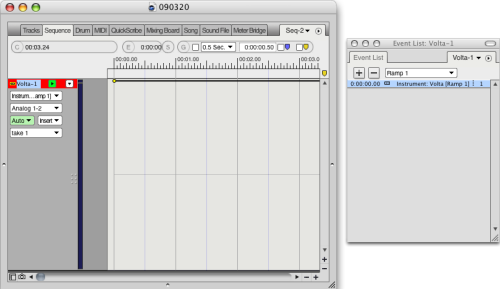
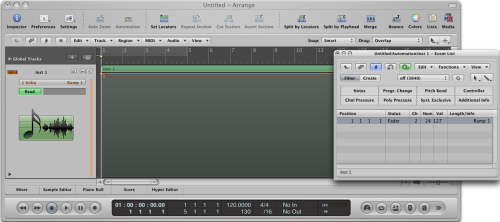
- Observe the voltmeter’s voltage reading. If the meter is being overloaded because the incoming voltage is out of range, adjust the range measurement range up. If the meter continuously reads 0VDC and you are sure that Volta is generating a signal to the appropriate hardware output, then you should adjust the meter’s measurement range down. When an output is DC-coupled, the meter should display a steady DC voltage measurment (such as +4.5VDC). If the meter can not make a steady measurement, then the output being measured is not DC-coupled. It is blocking very low frequency and DC signals, which means that it is not useable as a CV output.
If you do not have Volta installed on the system you wish to test:
- Follow steps 1 and 2 above.
- Download this Volta test audio file.
- In a compatible sequencer application, import the downloaded audio file and add it to a mono audio track.
- Assign the output of the audio track to the analog output you wish to test.
- Play the sequence. The test file will cause the hardware output to produce its highest possible DC voltage. Then follow step 5 above.
When you need help, Sweetwater has the answers!
Our knowledge base contains over 28,000 expertly written tech articles that will give you answers and help you get the most out of your gear. Our pro musicians and gear experts update content daily to keep you informed and on your way. Best of all, it’s totally FREE, and it’s just another reason that you get more at Sweetwater.com.


Offer applies only to single-receipt qualifying purchases. Select manufacturers may require that only the manufacturer’s products qualify towards the minimum purchase amount needed to be eligible for promotional financing. Otherwise, an invoice that meets the minimum purchase amount and contains at least one qualifying manufacturer product is eligible for promotional financing. No interest will be charged on promo purchase balance, and equal monthly payments are required on promo purchase until it is paid in full. The payments equal the amount financed divided by the number of months in the promo period, rounded up to the next whole dollar. These payments may be higher than the payments that would be required if this purchase was a non-promo purchase. During the last month(s) of the promo period the required monthly payment may be reduced due to the prior months’ rounding. Regular account terms apply to non-promo purchases. New Accounts as of 07/31/2025: Purchase APR is 34.99%. Penalty APR is 39.99%. Min Interest Charge is $2. Existing cardholders: See your credit card agreement terms. Subject to credit approval.
Offer applies only to single-receipt qualifying purchases. No interest will be charged on the promo balance if you pay it off, in full, within the promo period. If you do not, interest will be charged on the promo balance from the purchase date. The required minimum monthly payments may or may not pay off the promo balance before the end of the promo period, depending on purchase amount, promo length and payment allocation. Regular account terms apply to non-promo purchases and, after promo period ends, to the promo balance. New Accounts as of 07/31/2025: Purchase APR is 34.99%. Penalty APR is 39.99%. Min Interest Charge is $2. Existing cardholders: See your credit card agreement terms. Subject to credit approval.
The estimated required monthly payment shown which excludes taxes and delivery equals the amount financed divided by the number of months in the promo period, rounded up to the next cent. During the last month(s) of the promo period the required monthly payment may be reduced due to this rounding. These payments apply only with the financing offer shown. If you make these payments by the due date each month, you should pay off this amount financed within the promo period, if it is the only balance you are paying off. If you have other balances on your account, this payment will be added to any other minimum monthly payments.
Applies only to select items from this manufacturer. Ask your Sweetwater Sales Engineer for more details.