
SweetCare Remote Software Download
Getting Started with SweetCare Remote
Our Sweetwater Support team can assist you remotely! We can provide online remote-access assistance for your Sweetwater-purchased hardware and software.
Sweetwater Support can quickly and effectively help you using free remote-control software called Splashtop. Our expert team can view and control your system to troubleshoot and get you back up and running as soon as possible with your permission.
Splashtop and SweetCare® Remote have been thoroughly tested by our Sweetwater Support team and provide a highly secure remote maintenance solution. Your connection is established via fully encrypted data channels.
While you can download this software at any time, please contact our Sweetwater Support staff at (800) 222-4700 ext. 6400 to discuss your troubleshooting needs.
Please note this service is for troubleshooting only. We cannot provide remote training for your software or hardware.
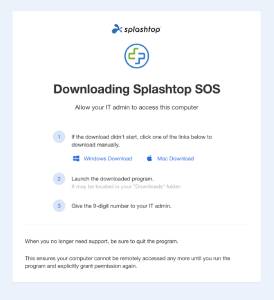
- Lets Sweetwater Support connect to your computer
- Only YOU can initiate the connection
- Secure, encrypted method of remote control
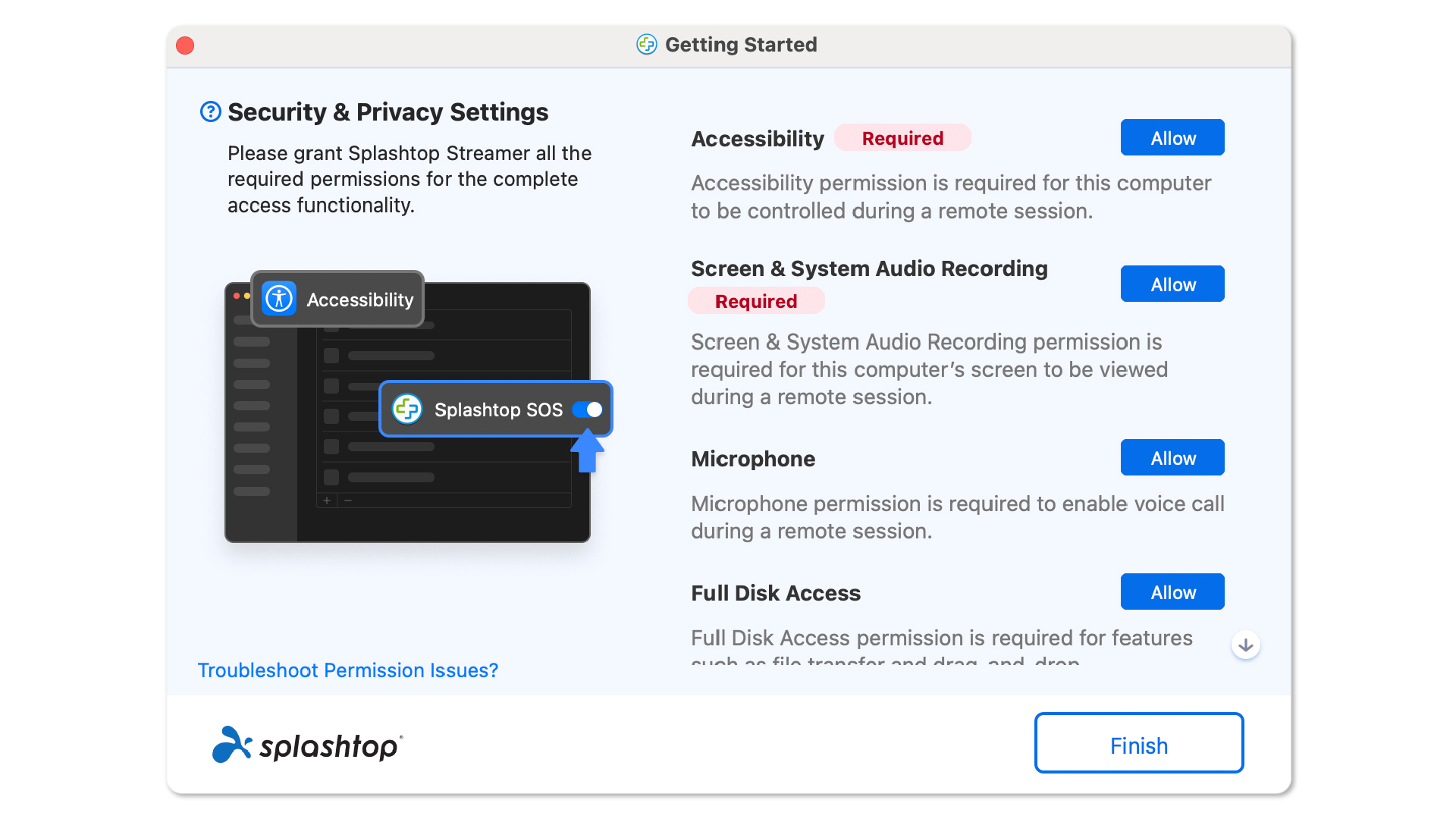
macOS Security Settings
Enable all required security and privacy settings for your PC or Mac computer to continue with Splashtop remote software.
Sweetwater Remote Support Terms and Conditions
You are about to establish a shared remote connection with a Sweetwater Support specialist. By starting the Splashtop software, you accept the following Terms of Use:
- You control when we connect. A Sweetwater Support specialist cannot connect to your device unless you allow the connection.
- You can end the session at any time. You may disconnect the remote support session whenever you choose.
- We may see your screen. Once connected, the Sweetwater Support specialist may be able to see your entire screen or screens, not just the app, setting, or issue you asked us to help with.
- Camera access is optional and requires your consent. During a support session, the Sweetwater Support specialist may ask for permission to use your mobile device camera so we can better understand and troubleshoot your issue. For example, we may ask to view your device, cables, connections, audio equipment, instrument setup, settings, ports, or other equipment related to your support request.
- You may say no to camera access. You do not have to allow camera access. If you deny camera access, we will try to help you in another way when reasonably possible.
- You may turn off camera access at any time. If you allow camera access, you can revoke it at any time by using the controls in your device, the Splashtop SOS app, or by ending the remote support session.
- Only show what is needed for support. If you use camera access, please point your camera only at the item or area needed to troubleshoot your issue. Avoid showing personal documents, payment information, passwords, private areas of your home, other people, minors, or anything else you do not want the Sweetwater Support specialist to see.
- Protect private information before and during the session. Before starting the session, please close or hide files, apps, browser tabs, notifications, photos, messages, account numbers, passwords, and any other confidential or personal information that is not needed for support.
- We will use access only for support. Sweetwater will use remote screen access and camera access only to provide the support you requested, troubleshoot the issue, and improve or complete the support interaction, consistent with Sweetwater’s Privacy Notice.
- We will not intentionally access unrelated information. Sweetwater Support specialists are expected to focus only on the issue you asked us to help with and to avoid viewing unrelated personal information when reasonably possible.
- We will not intentionally copy, download, delete, or transfer your files without your permission. If a support step requires access to a file, setting, log, screenshot, or other information on your device, the Sweetwater Support specialist should ask for your authorization before taking that step.
- Live camera view is not intended to be recorded. Unless Sweetwater gives you a separate notice and obtains any required consent, camera access during the support session is intended for live troubleshooting only and is not intended to create a recording of your camera feed.
- Splashtop may process session information. The Splashtop software may process information needed to provide the remote support connection, such as connection details, device information, session metadata, and technical logs. Sweetwater’s and Splashtop’s applicable Privacy otices may provide more information about how that information is handled.
- Remote support is for troubleshooting, not training. Sweetwater Remote Support sessions are intended to help troubleshoot a specific support issue. They are not intended to provide general product training.
- We expect respectful conduct. Sweetwater believes in treating every person fairly and with respect, and we ask the same in return. Support specialists may pause or end a session if a customer uses abusive, threatening, harassing, discriminatory, sexually explicit, or otherwise inappropriate language, behavior, or shared content, or if the customer’s conduct prevents the specialist from providing support.
- Support availability may be limited. This service is available only during Sweetwater’s normal support hours and may require prior arrangement with a Sweetwater Support specialist.
- Your device, software, network, and data security remain your responsibility. You are responsible for maintaining your device, software, firewall, antivirus or security tools, backups, passwords, and network security.
- Sweetwater is not responsible for issues it does not cause. To the fullest extent permitted by law, Sweetwater is not responsible for pre-existing problems, third-party software or hardware issues, network issues, security settings, malware, data loss, device failure, or other faults that Sweetwater did not cause, even if they are discovered during or around the time of the support session.
- Limits on liability apply where permitted by law. To the fullest extent permitted by law, Sweetwater’s liability for remote support is limited to losses directly caused by Sweetwater’s intentional misconduct or gross negligence. To the fullest extent permitted by law, Sweetwater is not liable for any indirect, incidental, special, consequential, or punitive damages, including but not limited to loss of data, loss of profits, or business interruption, regardless of the cause of action or theory of liability. Nothing in these terms limits any rights or remedies that cannot legally be limited under applicable law.
- Do not continue if you do not agree. If you do not agree to these terms, do not start the Splashtop SOS session.
Terms last updated June 16, 2026.