

How to check the firmware version of you Strymon TimeLine
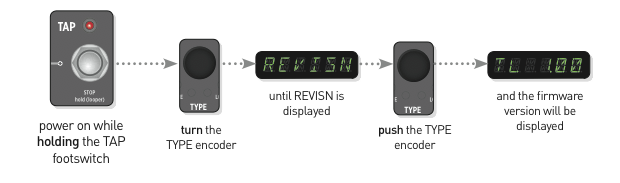
To check the firmware version on your TimeLine:
- Power up while holding down the TAP footswitch.
- Turn the TYPE encoder until REVISN is displayed.
- Push the TYPE encoder, and the firmware version will be displayed.
The information above was found on the Strymon support page.
http://www.strymon.net/faq/how-do-i-check-the-firmware-version/
Related Articles
When you need help, Sweetwater has the answers!
Our knowledge base contains over 28,000 expertly written tech articles that will give you answers and help you get the most out of your gear. Our pro musicians and gear experts update content daily to keep you informed and on your way. Best of all, it’s totally FREE, and it’s just another reason that you get more at Sweetwater.com.

