

How do I get Sonivox Vocalizer working in Sonar?
First you must have Sonivox configured as a soft synth and not an audio plugin.
To do this in Sonar, go to Utilities > Cakewalk Plug-in Manager and click on VST Audio Effects in the left pane, then Vocalizer in the right pane. Click the “plug-in properties” window, then check the box that says “configure as synth”
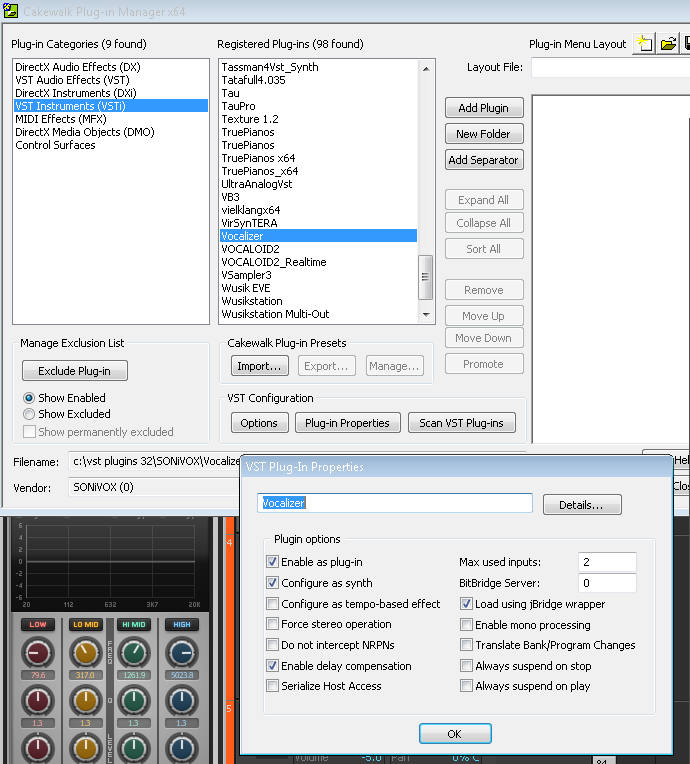
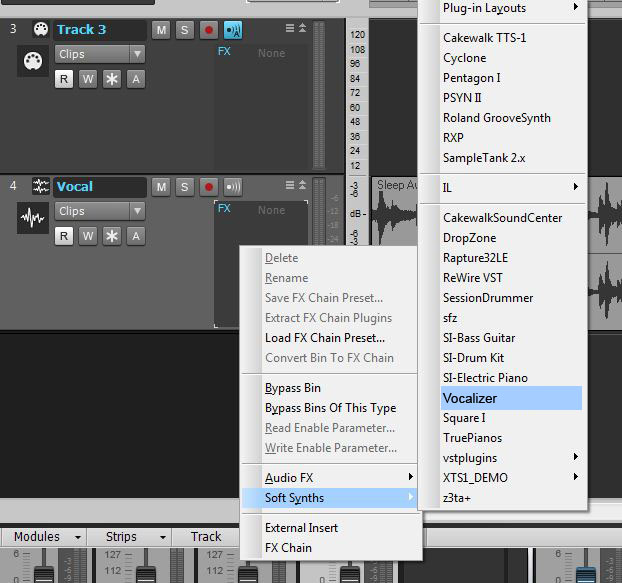
Next you can insert the plugin as a soft synth on your vocal track. This will not work if you use the Insert> Softsynth menu. Instead, right click on your plugin insert window on your audio track and insert it from the soft synth menu.
Next, create a MIDI track and set its output to “Vocalizer”. If you play your audio back you won’t hear anything until you create a MIDI sequence on the audio track, so be sure to use your MIDI controller to record a sequence first.
When you need help, Sweetwater has the answers!
Our knowledge base contains over 28,000 expertly written tech articles that will give you answers and help you get the most out of your gear. Our pro musicians and gear experts update content daily to keep you informed and on your way. Best of all, it’s totally FREE, and it’s just another reason that you get more at Sweetwater.com.

