

BOSS PX-1 Plugout FX Pedal Quickstart Guide
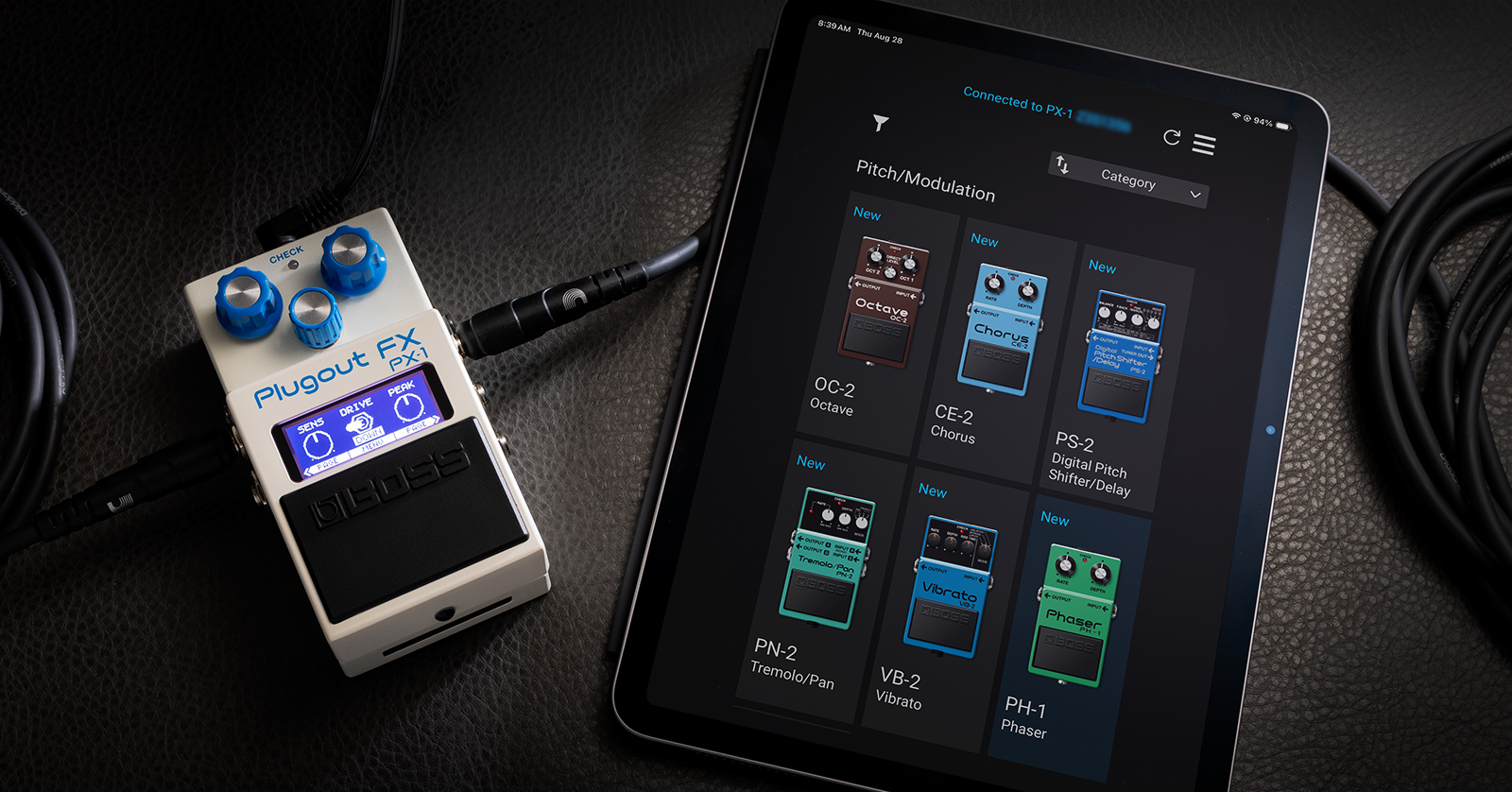
The tones of the classic BOSS guitar effects pedals from the 1970s and 1980s live again in the new BOSS PX-1 Plugout FX pedal. With the free BOSS Effect Loader app on your phone, you can select from 16 classic pedals. Let’s get started.
- Register Your Purchase
- Download the Owner’s Manual
- Download the BOSS Effect Loader App
- Update the Firmware
- Getting Oriented with the PX-1
- BOSS PX-1 Connections
- BOSS PX-1 Effect Loader App
- BOSS PX-1 Demo Videos
- BOSS PX-1 Knowledge Base
Register Your Purchase
Take a moment to register your purchase with BOSS. You’ll see a blue card with a QR code in the box, or you can click this link to the Roland Backstage login page, where you can log into your existing account or create a new one.
Follow the prompts to enter the serial number from the bottom of your unit and register your purchase. This will activate BOSS’ 5-year warranty.
Download the Owner’s Manual
One classic BOSS stompbox is easy to use, but one device housing 16 of them will require a bit of configuration and know-how. Download the owner’s manual from the BOSS PX-1 support page.
Download the BOSS Effect Loader App
- On your iPhone or iPad, download the BOSS Effect Loader app from the Apple App Store.
- On your Android phone or tablet, download the BOSS Effect Loader app from the Google Play Store.
Update the Firmware
The first time you take your PX-1 out of the box, you need to update its firmware to ensure compatibilty with the BOSS Effect Loader app for your mobile device, and to install the 8 additional effect pedal models from the app.
Head over to our SweetCare BOSS PX-1 firmware update guide.
Getting Oriented with the PX-1
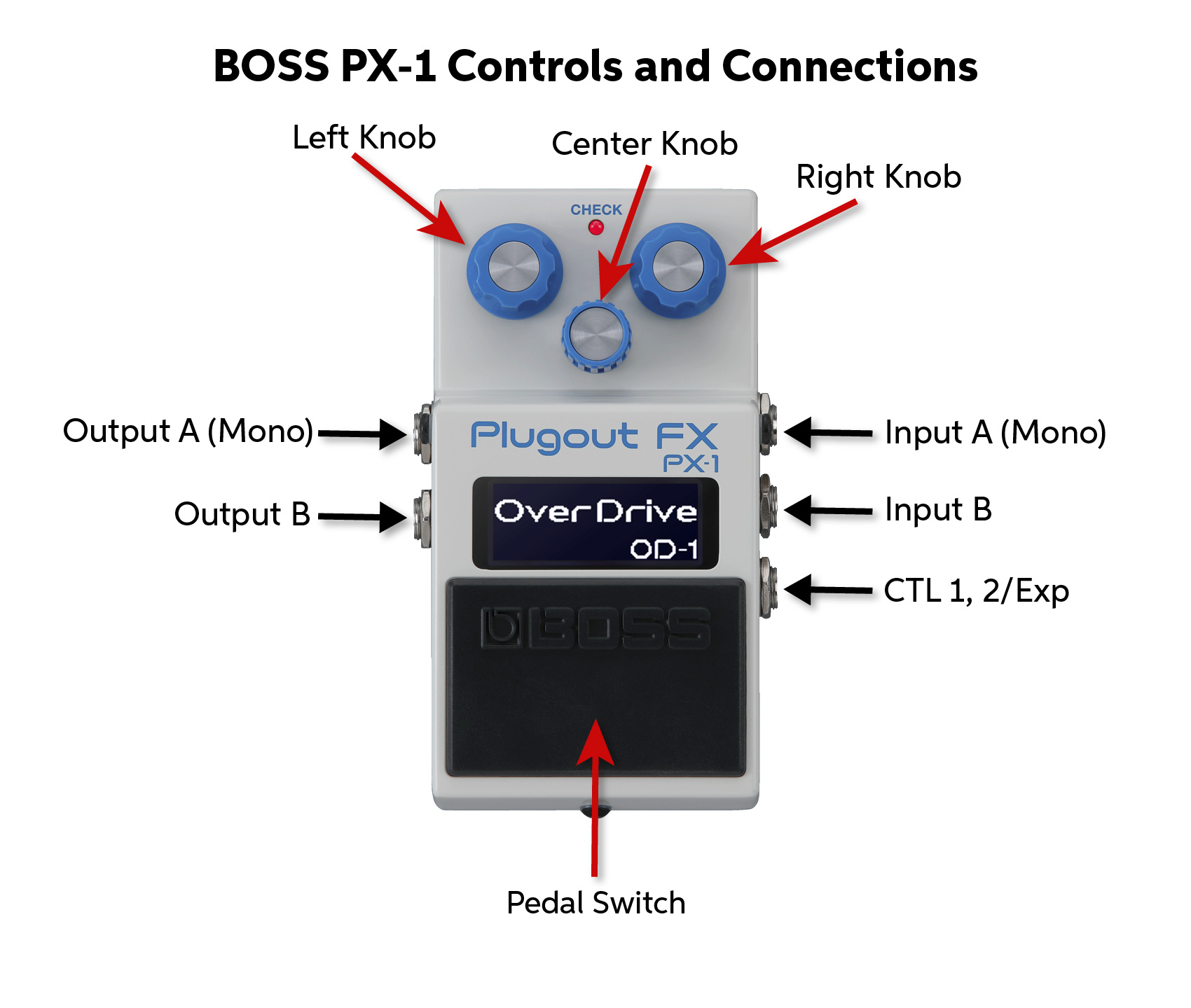
BOSS PX-1 controls and connections
The Plugout FX is a stompbox, but don’t attach it to your pedalboard right away. First, put it on a table, and let’s explain how to navigate its features.
To audition the effects, connect your guitar to the Input A (Mono) jack with a 1/4-inch TS instrument cable.
Power the unit with the included BOSS 9-volt power supply.
Connect the Output A (Mono) jack to your pedalboard or amp.
BOSS PX-1 Effects Pedals
Out of the box, the PX-1 comes loaded with eight (8) pedal models that are fixed in memory. (For the history buffs, we’ve included the year of the original pedal’s release.)
- OD-1 Overdrive (1977)
- SP-1 Spectrum (1977)
- PH-1 Phaser (1977)
- CS-1 Compression Sustainer (1978)
- TW-1 T Wah (1978)
- DS-1 Distortion (1978)
- SG-1 Slow Gear (1979)
- SD-1 Super Overdrive (1981)
There are eight (8) additional effects slots into which you can load these models from the BOSS Effect Loader app:
- CE-2 Chorus (1979)
- BF-2 Flanger (1980)
- VB-2 Vibrato (1982)
- DD-2 Digital Delay (1983)
- DF-2 Super Feedbacker & Distortion (1984)
- OC-2 Octave (1982)
- PS-2 Digital Pitch Shifter/Delay (1987)
- PN-2 Tremolo/Pan (1990)
In the future, BOSS plans to make additional pedal models available as in-app purchases.
BOSS PX-1 Controls
The three knobs on the front of the unit look like traditional stompbox knobs, but each one is a rotary encoder with a push button. The function of each knob changes according to the context of the mode you are in, as shown on the display screen.
Selecting an Effect
Power the pedal.
- Click the center knob to enter Menu: Select Effect on the display screen.
- Turn the center knob to scroll through the pedal models.
- To select a model, click the right knob to Execute.
You’ll briefly see the name of the pedal displayed on the screen.
Depressing the pedal switch engages the effect, and the Check light comes on. Depressing it again bypasses the effect.
By default, the pedal switch is in latching mode, but in the menu, under Pedal Setting, you can change this to momentary mode. You can save a different setting for each pedal.
Knobs and Parameters
Knobs and Labels
Labels on the display screen show you the parameters you can adjust by turning the knobs.
For example, when you select the CS-1 Compression Sustainer, the left knob is Level, the center knob becomes a switch to toggle Treble on and off, and the right knob is Sustain.
Some models are of BOSS pedals that had four knobs. For example, on the original PS-2 Digital Pitch Shifter/Delay, the fourth knob was a Mode selector that let you choose among six different settings.
When you load the PS-2 model, you’ll see the three knobs assigned to Balance, F. Back, and Manual.
Click the right knob for the Page function, which takes you to a second menu page. On this page, now the left knob becomes the Mode selector. Choose a mode.
Click the left knob to go back to the first page. Now the three knobs resume their original functions, and the left knob once again controls Balance.
Menu Navigation
As you load each pedal model, at the bottom of the display you’ll see
< Page | Menu | Page >
This is how you navigate between the unit’s menus.
Clicking the left knob moves you back one page. Clicking the center knob returns you to the main menu. Clicking the right knob moves you forward one page.
Swap Function
While you can only use one pedal model at a time, you can set up the Swap function in the Menu to quickly toggle between any two models that you choose. This feature becomes available when you connect an external footswitch.
Learn more in the BOSS PX-1 Owner’s Manual > Playing with this unit > Explanations of other functions (MENU screen).
Carry Over
For delay effects, you can enable the “tail” to continue ringing out after you bypass the pedal. You can also use this with the Swap function so that the tail continues when you switch to a different pedal model.
At the end of the menu pages, there’s a parameter labeled “Carry Over,” which you can switch on or off.
BOSS PX-1 Connections
Inputs A and B
For a mono guitar signal, use an instrument cable with a 1/4-inch TS plug in the Input A (Mono) jack.
For stereo input, connect another cable to the Input B jack.
CTL 1, 2/Exp
Optionally, you can control the PX-1 with external accessories that are not included. You can connect either:
- A dual footswitch such as the BOSS FS-6 or FS-7
- An expression pedal such as the BOSS EV-30
Either of these options uses a TRS cable.
Each pedal model has parameters and options particular to that model that you can assign to the footswitches and the expression pedal. Tap tempo is supported for time-based effects. Using the menu, you can make and save your own assignments per model.
Learn more in the BOSS PX-1 Owner’s Manual > Connecting an external pedal.
Outputs A and B
For a mono output, use an instrument cable in the Output A (Mono) jack.
For stereo output, add a second instrument cable in the Output B jack.
Some pedal models offer stereo output, in which case it’s necessary to go into the Menu and configure Output as Mono or Stereo.
There’s also a third mode: Dry/Effect. When you select this, Output A provides the mono effect, and Output B passes the dry signal with no effect.
DC In
Power the pedal using the included BOSS 9-volt power supply in this jack.
USB-C
This connection serves two functions:
Power the unit with a USB-C power cable attached to a wall charger or power supply rather than the included 9-volt DC power supply.
Connect the unit to your Mac or Windows PC with a USB-C data cable to enable MIDI clock sync from your DAW, and to update the unit’s firmware.
You can also power the unit over USB-C from your computer or a power bank.
Note that this connection is for control data and power only. The PX-1 does not transmit digital audio over USB and does not function as an audio interface. To record the output from your unit, connect its analog outputs to an audio interface.
MIDI In
The PX-1 supports MIDI clock sync. On the back panel, connect a 1/8-inch TRS cable to the MIDI In port. Connect the other end of your cable to the MIDI Out port of a controller device.
Use a Type A adapter with a 1/8-inch-to-5-pin-DIN connection, such as the BOSS BMIDI, to connect to a device that uses a standard MIDI cable.
Bluetooth
The PX-1 has a Bluetooth connection to your mobile device for connecting to the BOSS Effect Loader app to download new pedal models and to configure the unit. Bluetooth settings are found in the menu.
BOSS PX-1 Effect Loader App
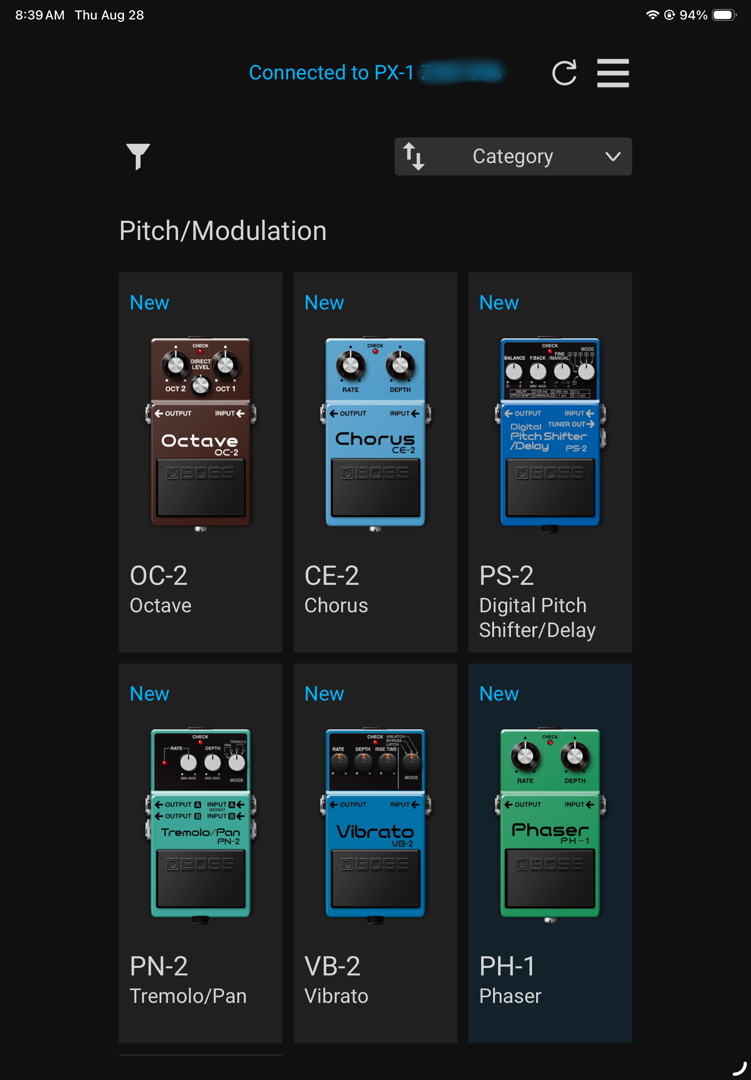
The BOSS Effect Loader app on iPad
The BOSS Effect Loader App for iPhone, iPad and Android devices enables you to download additional pedal models to the PX-1. With each model you select, the app gives an explanation of its function and features.
To connect your PX-1 to your device and the app:
- Go to your device’s system settings and make sure Bluetooth is enabled. However, don’t try to pair the PX-1 while in your system settings.
- Launch the app, and within the app, bring up the Bluetooth Setup.
- Tap Connect. Follow the prompts.
Tap on one of the 8 additional pedal models to read information about it. Tap Select and it will load into the PX-1’s memory. The models you load will remain in the PX-1’s memory when you are not connected to the app.
Within the app, you can log in to your Roland/BOSS account. When BOSS makes additional pedal models available, you will be able to purchase and install them here.
BOSS PX-1 Demo Videos
Here’s the introductory video from BOSS
BOSS PX-1 Plugout FX | Everything You Need to Know
Sweetwater’s Mitch Gallagher demonstrates the key features here.
BOSS PX-1 Plugout FX Pedal Overview with Mitch Gallagher
BOSS PX-1 Knowledge Base
Boss provides their Knowledge Base for the PX-1 Plugout FX, with answers to frequently asked questions.
Related Articles
When you need help, Sweetwater has the answers!
Our knowledge base contains over 28,000 expertly written tech articles that will give you answers and help you get the most out of your gear. Our pro musicians and gear experts update content daily to keep you informed and on your way. Best of all, it’s totally FREE, and it’s just another reason that you get more at Sweetwater.com.

