


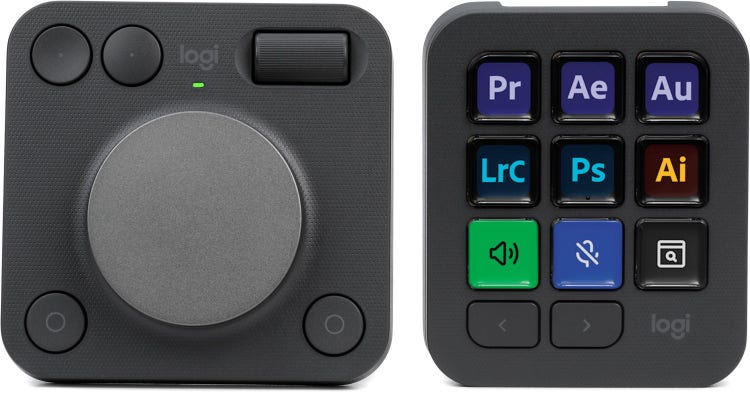

Customizable Control to Create Your Way

Across livestreaming, gaming, video editing, 3D art, graphic design, and myriad creative fields, the Logitech MX Creative Console offers a 2-part suite of customizable controls that’ll supercharge your workflow and streamline your workstation. The ultra-pliable symbiotic ecosystem of the MX Creative Console features two distinct yet interdependent pieces: the MX Creative Keypad and the MX Creative Dialpad. Each side of the setup supports personalized arrangements unique to your software essentials, minimizing clicks, dodging pesky menu diving, and maximizing efficiency, tailored to your creative flow. What’s more, key-based shortcuts, multi-page modularity, and context-specific dial behavior let you totally reimagine how you interface with your art and work — an experience that Sweetwater’s content creators celebrate for helping conquer writer’s block, giving you innovative methods to create at the speed of your imagination. With the Logitech MX Creative Console, dynamic interfacing is here to work for you, from ground-up custom control to software-specific options found in the Logi Options+ app and plug-in Marketplace.
Related Videos: MX Creative Console Customizable Desktop Interface - Graphite
MX Creative Keypad
Sleek and streamlined, the MX Creative Console’s keypad will optimize your workflow. Its nine LCD-backlit keys are custom-assignable to perform singular tasks, multi-click functions, and complex app-specific actions. Moreover, the MX Creative Keypad’s dual Page buttons support up to 15 pages of 9-button control — 135 distinct functions, shortcuts, tools, and actions for each app using the MX Creative Console. All this is in addition to the supplementary control and fine-tuning abilities of the MX Creative Console’s other half, the MX Creative Dialpad.


MX Creative Dialpad
If the MX Creative Console’s keypad reduces clicks and streamlines navigation, then the MX Creative Dialpad handles the nuances of your creative process. Its namesake dial is robust yet laser-focused, giving you a 360-degree field of control that actively adapts to speed. The dial also supplies a satisfying tactility that reinforces the precision of slower rotations and the practical range of faster turns. What’s more, the dial’s behavior is specific to the context of functions queued up by the keypad, and because of its endless rotation, tapping the connected key on the MX Creative Keypad automatically returns your modifying values to their default settings. Back, Forward, Right, and Left buttons are assignable to myriad functions, including activating the virtual-overlay Action Rings of deeper context-specific controls and tools, while the Fluid Roller is perfect for scaling tools, zooming, panning, and more.
Logitech MX Creative Console Features:
- Highly flexible, powerful, and personalized suite of workflow-enhancing creative tools
- MX Creative Keypad features 9 LCD-backlit keys and a 15-page capacity for up to 135 app-specific shortcuts, tasks, actions, and more
- MX Creative Dialpad includes a suite of multifunction and detail-focused refinement tools for deep control, nuanced adjustments, and context-specific performance
- Logi Options+ app allows you to effortlessly customize your creative console
- Marketplace offers ample means of discovering profiles and performance configurations pre-built for your favorite and essential apps
- Adjustable stand ensures ergonomic consistency to create your way

