

FabFilter Pro-Q 4: More Fab Than Ever!

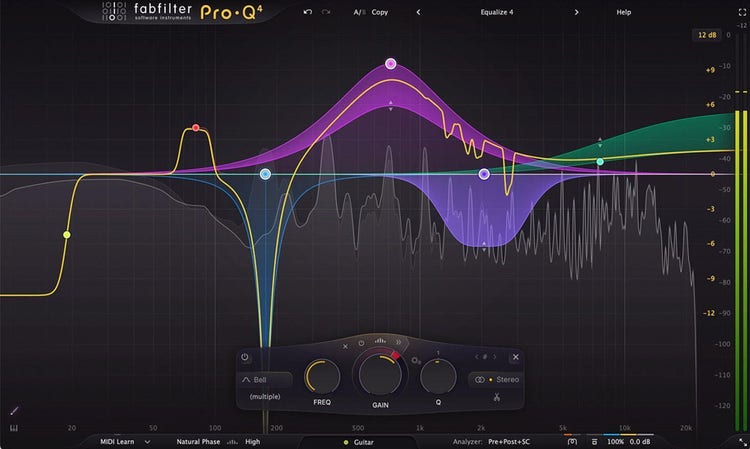
FabFilter's latest iteration of Pro-Q 4 sees this beloved workhorse EQ plug-in's already legendary workflow improved with some added polish. New features such as an Instance List, Sketch EQ, Character Modes, and a retooled Dynamic EQ section will streamline your workflow and further enhance your tracks. Spectral Dynamics represents an efficient yet subtle way to attenuate problematic frequencies. A new All Pass filter shape also makes itself known as a great way to check phase relationships. Additionally, since Pro-Q 4 won't replace Pro-Q 3, you'll be able to open your older sessions with no problems and even use multiple versions simultaneously. Worried about a steep learning curve? Don't be: Everything you knew and loved about Pro-Q 3 is present and accounted for, including incredible sound quality, EQ match, stereo or mid-side processing modes, MIDI Learn, A/B comparison, and more.
Note: This product is an opportunity for owners of previous Pro Q versions to upgrade to FabFilter Pro-Q 4 at a reduced cost. Please consult your Sweetwater Sales Engineer for details.
Related Videos: Pro-Q 4 EQ and Filter Plug-in - Upgrade from Previous Pro-Q Versions
Absolutely dynamite dynamic EQ
For those times when standard EQ moves won't apply due to the varying levels of the input signal, you'll be glad to have a tool like Pro-Q 4's Dynamic EQ section at your fingertips. It tames loud cymbals, sibilance, and wayward bass notes in a way that's easy, efficient, and, best of all, musical. Plus, it even works in Linear Phase mode, and its new Spectral Dynamics functionality only engages when certain frequencies cross the threshold. It's a subtle yet exceedingly powerful way to craft your mixes.
Paint a happy little EQ curve
With the FabFilter Pro-Q 4's new EQ Sketch mode, there are no EQ mistakes. Now you can draw your own filters and shelves in one single gesture. It's a real timesaver that will soon become the first step for all of your mixing sessions.
Don’t simply flip the phase
You'll find Pro-Q 4's new All Pass filter to be incredibly useful for adjusting and listening to phase relationships between related tracks in a mix. Additionally, it does so without ever changing the gain of what you're working with.
Add some character
The FabFilter Pro-Q 4 plug-in introduces three new Character modes. The default Clean mode is the original transparent sound that you know and love. Engage Subtle mode for a slight vintage saturation, or try Warm mode for a more obvious tube-style sound coloration.
Safely upgrade
Sweetwater studio engineers know that there can be a tinge of apprehension with new software versions, particularly when it's something as near and dear to their hearts and mixes as FabFilter Pro-Q 3. However, Pro-Q 4 is a completely safe upgrade. It doesn't replace Pro-Q 3 — or even versions 2 and 1. This not only means that you can open sessions that use an older version without encountering any workflow issues, but you can also use any versions together at the same time! And, of course, Pro-Q 4 reads all previous versions' presets.
FabFilter Pro-Q 4 Features:
- FabFilter's esteemed EQ plug-in — better than ever with everything you loved about Pro-Q 3 and more
- New All Pass filter shape introduces phase adjustments without changing the gain
- EQ Sketch lets you draw any EQ curve you'd like — a great starting point for your mixes
- Instance List enables you to control all instances with just one plug-in interface and enables EQ Match plus copying and pasting of EQ bands or presets
- Spectral Dynamics help you fix troublesome frequencies even more easily than before
- Spectral Analyzer with real-time analysis for pre-EQ, post-EQ, and external signals
- Character modes (Clean, Subtle, and Warm) add an analog feel to your mixes by introducing vintage non-linearities
- New Attack and Release settings and optional sidechain filtering in the Dynamic EQ section, plus less distortion for an overall clearer sound and works in Linear Phase mode
- Fractional slope settings (e.g., a 3.5 dB/oct LP or HP filter)
- Enhanced accuracy when utilizing linear phase processing
- Improved analog matching and sound quality in Zero Latency and Natural Phase modes
- Click and drag or scroll with the mouse wheel to change EQ values directly
- Full immersive audio support up to 9.1.6 Dolby Atmos
- New, exciting look and feel
- Safely upgrade — doesn't replace older versions; you can use different versions simultaneously
