Some people say pitch correction sucks the humanity out of vocals — because it can. But it doesn’t have to, if you know the right way to use it.
What You Need to Know About Pitch Correction
The most common pitch-correction mistake is thinking that pitch and tuning are the same. Pitch is defined by a sound’s frequency. Tuning involves adjusting pitch to conform to a scale (e.g., Western music’s even-tempered 12-tone scale).
Tuning isn’t flexible, but pitch is. String quartets adjust pitch on the fly. Jazz “blue notes” deviate from the pitches of a scale. Guitarists bend notes, and vocalists slide between notes.
But a note that’s not tuned to a scale is not necessarily a “bug” that needs to be fixed! Pro vocalists use subtle, subconscious pitch variations to convey emotion. Pitch changes relate to tension, release, and emotional impact. Slightly flat notes can build anticipation before arriving at a note that’s perfectly in tune. Slightly sharp notes add an edge, or urgency.
When pitch variations convey emotion, using pitch correction to fix a “mistake” causes a mistake. Here’s how to make sure pitch correction enhances, not damages, your vocals.
Sounds Right vs. Looks Right
Automatic pitch-correction software analyzes note pitches, compares them to standard scale frequencies, and then tunes the pitches sharp or flat to quantize (or snap) them to the desired tuning. The key to natural-sounding pitch correction is simple: correct only notes that sound wrong and do so manually. By disabling snap, you can move notes to where they sound right, which isn’t the same as where they look right. Fig. 1 shows why what’s “correct” is not always what’s “right.”
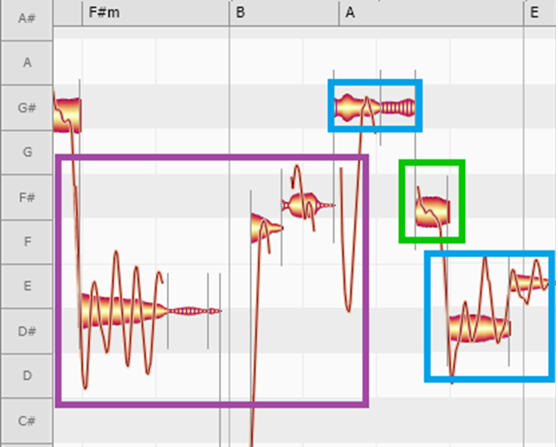
In fig. 1, only the notes with blue outlines are quantized to scale. The first note outlined in purple starts off quite flat compared to E, the next note is even more flat compared to F-sharp, and the last note just before the tuned note is only a little flat compared to F-sharp. The first two notes create tension, the third note starts to resolve the tension, and the tuned note in blue releases the tension. The note outlined in green is a little flat, again adding tension before reaching the tuned notes on the right that are outlined in blue. Quantizing the notes outlined in purple and green would strip away the subtle feel of tension and release. Often, I quantize only the first and last notes in a phrase.
Fig. 2 (below) shows part of Madonna’s vocal from “Ray of Light.” It underscores how vocals that look right don’t necessarily sound right.
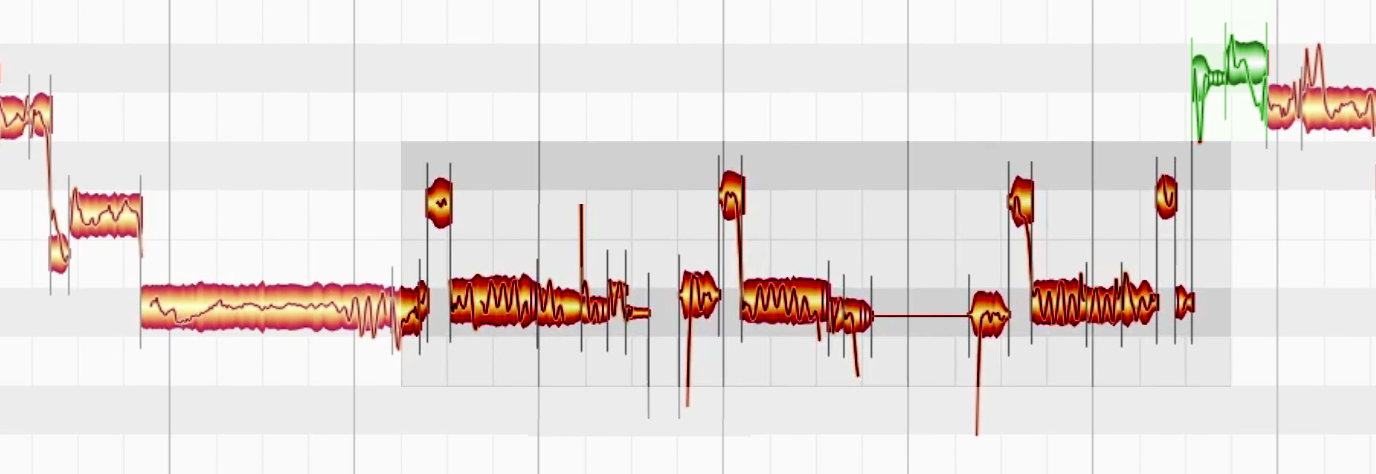
The notes on the left are tuned almost perfectly to a scale. The section colorized in red repeats
“and I feel . . .” three times as the intensity builds in that part of the song. The notes are slightly sharp to add tension, with the biggest deviation in the second and third “and I feel.” Then, just before hitting the highest, perfectly tuned (green) note on the right to release, the green note just before it is slightly flat. Pitch “correcting” these nuances would nullify the emotional impact.
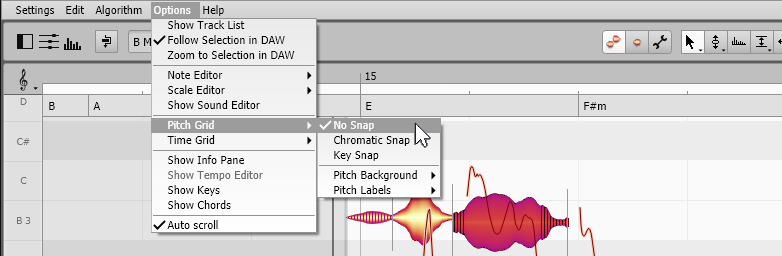
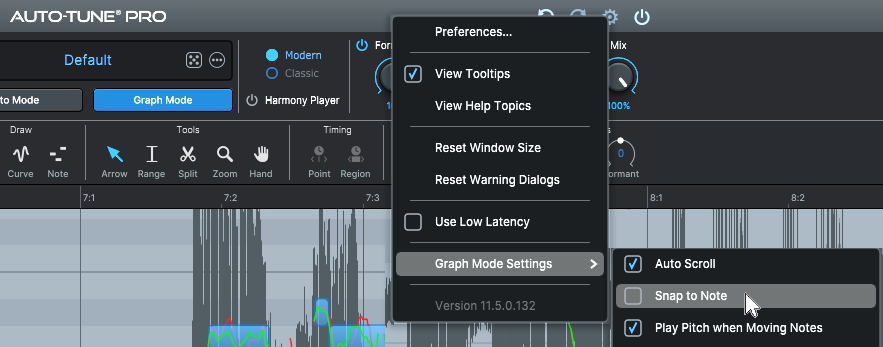
Most pitch-correction programs can turn off snap (figs. 3 and 4), so you can adjust pitch manually. It’s important to hear the note pitch as you move it. For example, in Auto-Tune Pro, check “Play Pitch when Moving Notes” under “Preferences.” With Melodyne, enable a track’s Input Monitor to hear the pitch changes. When the pitch soundscorrect, your edit is done.
Another tip for correction is not to apply pitch correction to vocals without the singer present. If the singer hears something “wrong,” then correct it. Otherwise, leave the vocal alone.
Use Pitch Correction to Create Harmonies
Because pitch correction can transpose notes, you can synthesize harmonies. Copy the original vocal track from which you want to create the harmony and edit the copy’s pitches to create the desired harmony. Although the sound quality won’t be as good as the original vocal, with a little processing (e.g., reverb or chorus), this may not matter for a background part. Of course, you can also “prototype” harmonies, learn them, and sing them. If a couple notes are out of your range, then slip in the synthesized notes.
Yes, Pitch Correction Can Give More Feel
It’s a cliché that pitch correction makes vocals sound less human, but pitch correction can make vocals sound more human. This is because you can be less inhibited when you sing. You’ll know that if there are a few wrong notes during an otherwise inspired take, no worries — pitch correction can fix them. So, swing for the fences! You may end up with a great performance.
(This excerpt is from the Sweetwater Publishing E-book Max Your Mix! and is reprinted with permission from the author.)